What are the most important metrics you tracking?

  • June 30, 2022
  • 13 replies
  • 285 views

Forum|alt.badge.img

While I’m familiar with how to literally use Google Analytics, I’m far from a data guru. I’m wondering how everyone in the community uses this tool/ to what end...

13 replies

Neil Patterson
Guide I
Forum|alt.badge.img+2

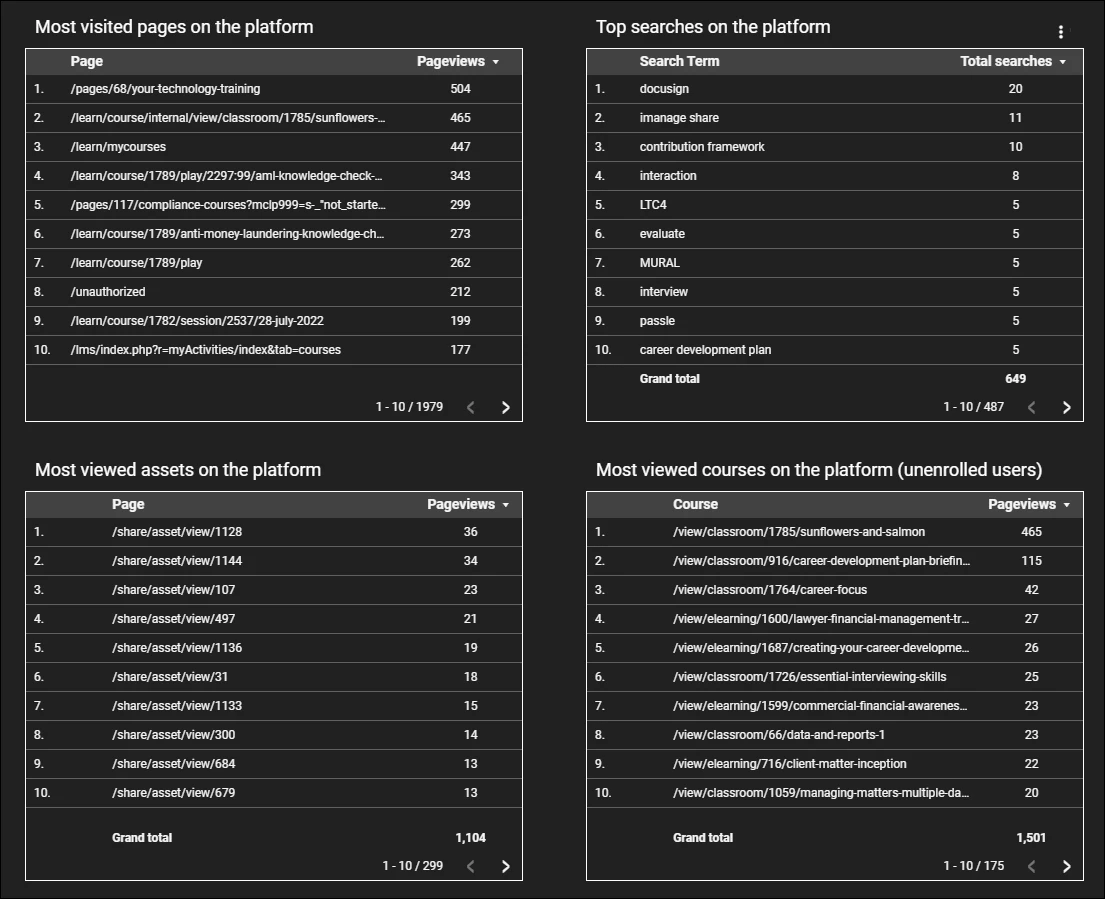
Hi @tommyVan. I think it all depends on what data your company is interested in.  For us we focus in on total page views to get a steer on how much the platform is being used; search terms to ensure that what people are looking for is on the platform; and what our top viewed pages are to see what is being interacted with.


Bfarkas
Hero III
Forum|alt.badge.img+6
  • Hero III
  • July 1, 2022

Curious about this thread, replying to follow along. :)


llo
Novice III
  • Novice III
  • July 4, 2022

We also look at search terms a lot and monitor overall traffic after newsletters, trade shows, SoMe campaigns, etc. (we train mostly external users, so promotion is key).


I used to share the Users by Country data with our regional offices during our monthly meetings. It ended up sparking a bit of friendly competition around who could attract more users. A win-win. :)


We also used the Users by Country to help us make translation decisions.

A few months ago we overhauled the look/feel/UI of our platform, and I’d love to use Google Analytics to discover if learners are using the platform the way we hoped they would. I haven’t quite cracked how to approach this yet, but I guess it will be based on page visits.


Forum|alt.badge.img
  • Novice III
  • July 18, 2022

Our main audience are external users, so we’re tracking with UTMs how many people enroll via different channels. For example, this helped us understand that blogs, newsletters and in-product links work really well whereas social media doesn’t except for LinkedIn. 

We’re also monitoring the seach terms people are using inside the platform- if you haven’t set-up this yet, there’s a helpful guide here.


omer.bitas
Influencer I
  • Influencer I
  • August 17, 2022

We use GA to mainly track general numbers of users, bounce rate and page views.

anyone using Avg. Session Duration? how are you relating this number to “real learning”?


Neil Patterson
Guide I
Forum|alt.badge.img+2

We use GA to mainly track general numbers of users, bounce rate and page views.

anyone using Avg. Session Duration? how are you relating this number to “real learning”?

We look at average session duration and also average time on page but just use it as more of a guide to overall usage.  The same with number of sessions.  We always use the caveat that GA measures website traffic and so it is not necessarily learning data (especially if a user is in ‘private mode’, or does not accept cookies), but we may say that on average last month, users spent xx minutes on the platform.  They may be looking at a document, watching a video, consuming an eLearning course or enrolling on ILT.


omer.bitas
Influencer I
  • Influencer I
  • August 17, 2022

Thanks Neil for sharing.

So you feel this data piece is relevant although a user can open a tab with your LMS, go to other tabs and then return and all of that time will be considered as session duration? 


lrodman
Guide II
Forum|alt.badge.img+6
  • Guide II
  • August 25, 2022

Who here tracks searches, pages and courses or course player?


Neil Patterson
Guide I
Forum|alt.badge.img+2

Thanks Neil for sharing.

So you feel this data piece is relevant although a user can open a tab with your LMS, go to other tabs and then return and all of that time will be considered as session duration? 

We only use it as a rough guide due to the issue you mention.  I guess it depends what you do with the data.  If you are looking at a definitive ‘learning time’ analytic, I wouldn’t use it (you’d probably have to pay the £12k for Docebo Learning Analytics for that!), but if you just want a ball park figure that shows people are using the site then it will do!  For us, it’s more about letting the partnership know that people are using the site 😀


omer.bitas
Influencer I
  • Influencer I
  • August 25, 2022

Thanks Neil for sharing.

So you feel this data piece is relevant although a user can open a tab with your LMS, go to other tabs and then return and all of that time will be considered as session duration? 

We only use it as a rough guide due to the issue you mention.  I guess it depends what you do with the data.  If you are looking at a definitive ‘learning time’ analytic, I wouldn’t use it (you’d probably have to pay the £12k for Docebo Learning Analytics for that!), but if you just want a ball park figure that shows people are using the site then it will do!  For us, it’s more about letting the partnership know that people are using the site 😀

Thanks Neil.

I’d be happy to pay for Learning Analytics if it was anywhere close to a product worth the money. (-:


Neil Patterson
Guide I
Forum|alt.badge.img+2

Who here tracks searches, pages and courses or course player?

@lrodman - We track searches, pages visited and kind of courses looked at (I can only figure out how to get it to show how many people end up on a specific page, so they may have gone ahead and enrolled, or maybe they just looked at the page).


Forum|alt.badge.img+3
  • Helper III
  • September 14, 2022

Who here tracks searches, pages and courses or course player?

@lrodman - We track searches, pages visited and kind of courses looked at (I can only figure out how to get it to show how many people end up on a specific page, so they may have gone ahead and enrolled, or maybe they just looked at the page).


Still not super comfortable in GA. How did you get the courses data?


Neil Patterson
Guide I
Forum|alt.badge.img+2

@lhubbard - it is just page views and not proper enrolment statistics.  I’ve just looked back at it, and it looks like I created a filter to show pages starting with ^/learn/course/internal/view/(.*)

Which then just reports on any pages that match that filter.  If I’m honest I must have got that from Google somewhere as I wouldn’t have known how to do that myself 😂

I did the same for the asset views:

If you go to the Resource tab at the top of the window, then Manage Filters, you can create them in there.  Once they’re created, create a data table in the usual way (dimension: PAGE, Metric: PAGEVIEWS) and then apply a Table filter for whatever filter you have created.


Hope this makes sense, I’ve not had coffee yet, so brain is not working properly 😴