

Hi,
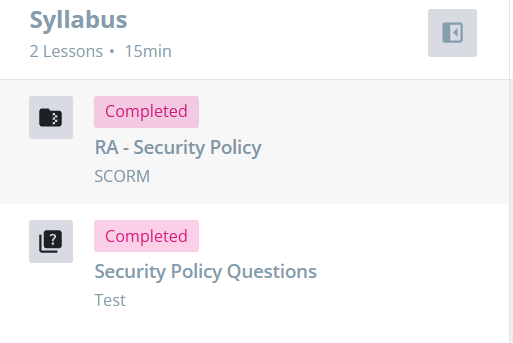
Does anyone know how I can change the colour of the course status within the new course player? Mainly the ‘Completed’ bit
I have attached a screenshot so you know what I am on about :)
Thanks!

Hi,
Does anyone know how I can change the colour of the course status within the new course player? Mainly the ‘Completed’ bit
I have attached a screenshot so you know what I am on about :)
Thanks!
Best answer by gstager
I was able to change the color of the completed box in my platform by changing the value for the confirmation messages
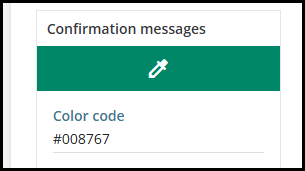
This may end up changing more than you wish.
I was also able to change the color of that box as follows with CSS.
/** Begin Change Color of 'Completed' Status Message **/
/** Set Color Value As Desired **/

dcb-ui-badge-status.dcb-ui-badge-status-theme-success {
    background-color: #AD122A;
}

/** End Change Color of 'Completed' Status Message **/
This may also have additional impact you do not desire.
Please verify with your own platform by testing/reviewing thoroughly.
Enter your email address or username and password below to log in to Docebo Community. No account yet? Create an account
Enter your E-mail address. We'll send you an e-mail with instructions to reset your password.


