



Hello Docebians.
I have found a few elements that have me stumped to hide when looking at External Training.
I have used CSS to hide table elements in other areas, but the logic does not seem to apply equitably here.
In External Training, we have setup a flow where “Rejected” entries are sent to a Waiting for Approval area.
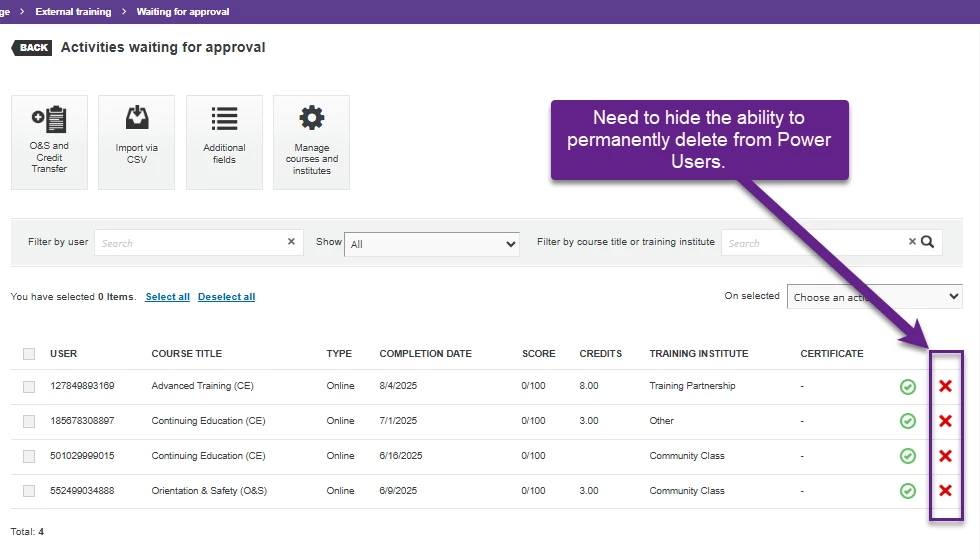
On this screen, they have the ability to review and Approve or Permanently Delete the record.
We do not want our users to Permanently delete records. I’d like to just hide the column or the entire class of delete-action. But I am hitting walls.
Can anyone help with CSS that will hide the Delete Action class?
I tried:
!--scriptorstartfragment-->
body.waiting-approval-page a.delete-action {
display: none;
}
and
#transcripts-waiting-approval-grid > div.gridItemsContainer > table > tbody > tr > td:nth-child(10) {
display: none;
}
!--scriptorendfragment-->
Neither approach seems to work.
Any thoughts?
Coincidentally, I was able to hide the same functionality on the User Personal Summary page with the code:
/** This will hide the Delete Action Header in User Personal Summary > External Training**/
#transcripts-management-grid_c10 {
display: none;
}
/** This will hide the cells under the Delete Action Header in User Personal Summary > External Training**/
#transcripts-management-grid > div.gridItemsContainer > table > tbody > tr > td:nth-child(11) {
display: none;
}
So, if there is a way to hide that function everywhere, I could use that approach, too, if it’s easier than coding for each page separately.
Note: Yes, I’m aware this is legacy pages, and the code is screwy, and “they’re going to change it soon.” I’ve been waiting for the changes for a couple years, though.
Thanks for any guidance or recommendations!