The Search for a Better Accordion

  • May 31, 2022
  • 73 replies
  • 2009 views

Show first post

73 replies

  • Novice I
  • May 30, 2024

Thank you, Greg! We’ll take a look.


Hi @gstager, this article is awesome, particularly for a CSS/HTML clueless person like me.
I love the look&feel :)
Might you have any idea/suggestion how to make this work in an HTML page training material?
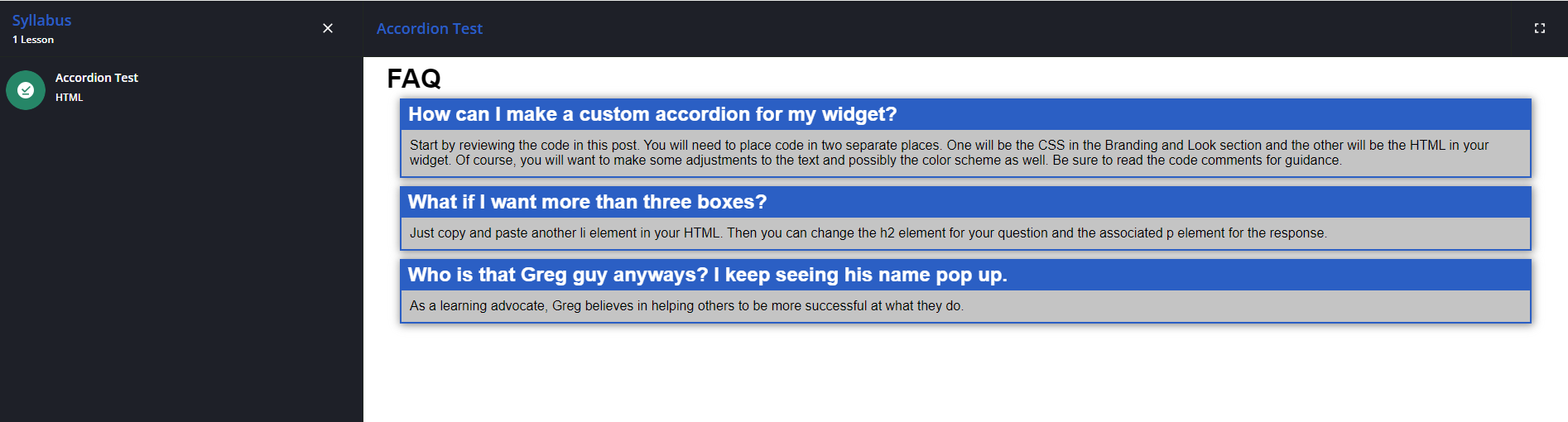
I tried saving your CSS code under Configure branding and look > Course Player > CSS for the HTML training materials, and it looks great except the accordion functionality doesn’t work :( everything is open:

Any thoughts how to solve this?
Thanks in advance!


gstager
Hero III
Forum|alt.badge.img+8
  • Author
  • Hero III
  • August 5, 2024

@Meira Osishkin 

Sorry for the delay in response - I have been away on holiday for the last three weeks.

It seems to me that this issue came up a while back and it was determined that some of the code - when used in the training space - was stripped out and it breaks the function. It should work OK in a page/widget context, though.

I do not have a workaround for it.


Thanks @gstager.
Even without the accordion functionality it looks great - thank you very very much!


Forum|alt.badge.img

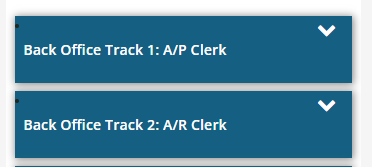
@gstager I’m LOVING this so much. But I’m running into an issue. The top left bullets are still showing and I can’t figure out how to have them not show. 


gstager
Hero III
Forum|alt.badge.img+8
  • Author
  • Hero III
  • September 5, 2024

@ariel.zimmerman -

I would expect that bullet to come from the default list style.

Check your CSS and make sure the list style is set to none as shown in my example below.

#accord ul {
list-style: none;
padding: 0px;
margin: 0px;
}

You may have changed some naming conventions - so consider that “accord”-ingly. LOL see what I did there?

I gave my accordion a set ID and everything associated with it in the CSS references that ID first.

Otherwise you could have other CSS downstream changing it back.


Forum|alt.badge.img

@ariel.zimmerman -

I would expect that bullet to come from the default list style.

Check your CSS and make sure the list style is set to none as shown in my example below.

#accord ul {
list-style: none;
padding: 0px;
margin: 0px;
}

You may have changed some naming conventions - so consider that “accord”-ingly. LOL see what I did there?

I gave my accordion a set ID and everything associated with it in the CSS references that ID first.

Otherwise you could have other CSS downstream changing it back.

Funny guy! 

Well, hmm. I’m stumped. I changed the accordian ID from accord to accordced so it shouldn’t be getting messed up from there. Here’s my CSS: 

/** Sticky accordcedion **/

/** Removes the little icon and positions your title for the box **/

#accordced ul {

 list-style: none;

 padding: 0px;

 margin: 0px;

}

/** Set background color as desired for the overall box and popout border **/

/** Set box-shadow as desired or remove **/

/** Width will be total amount of widget taken up **/

/** 95% for full and 2/3 and 90% for 1/3 looked good to me **/

#accordced ul li {

 position: relative;

 overflow: hidden;

 padding: 0px;

 margin: auto;

 width: 95%;

 background: #156082;

 box-shadow: 1px 1px 10px 1px #888888;

}

/** Set the spacing between each box **/

#accordced ul li + li {

 margin-top: 10px;

}

/** Set the spacing between your last box and the bottom of the widget **/

#accordced ul li:last-of-type {

 margin-bottom: 20px;

}

/** Positions the chevron at the far right of the box **/

/** Tweak the top and right values as desired **/

/** If you adjust the size of the chevron, you'll want to do top and right **/

#accordced ul li i {

 position: absolute;

 transform: translate(-6px, 0);

 margin-top: 10px;

 right: 20px;

 font-size: 24px;

 color:#ffffff;

 transform: rotate(180deg);

}

/** This will change the chevron when you open and close the boxes **/

#accordced ul li input[type=checkbox]:checked ~ i {

 transform: translate(0, -5px) rotate(0deg);

}

/** This removes the checkbox and makes the entire box clickable **/

/** This also sets the cursor to be a pointy hand on hover **/

#accordced ul li input[type=checkbox] {

 position: absolute;

 cursor: pointer;

 width: 100%;

 height: 100%;

 z-index: 1;

 opacity: 0;

}

/** Sets the border width of the dropdown - adjust as desired **/

/** Sets the background color of the dropdown area - adjust as desired **/

/** padding should be adjusted based on margin width as desired **/

#accordced ul li p {

 margin: 2px;

 background: #C1D2DD;

 padding: 10px;

}


/** Sets the title text color when the box is closed **/

/** Adjust this value as desired **/

#accordced ul li input[type=checkbox]:checked ~ h2 {

 color: #ffffff;

}

/** Sets the title text color when the box is open **/

/** Sets positioning of the text in the box **/

/** Adjust values as desired **/

#accordced h2 {

 margin: 5px 10px;

 color: #ffffff;

}

/** Hides the dropdown text when box is closed **/

/** Transition gives a little time for the fade out - adjust as desired **/

#accordced ul li input[type=checkbox]:checked ~ p {

 max-height: 0px;

 transition: .5s;

 opacity: 0;

}

/** This gives a little time for the fade in - adjust as desired **/

#accordced ul li input[type=checkbox] ~ p {

 transition: .5s;

}

/** This styles the main title of the accordcedion - FAQ in this example **/

/** Adjust as desired **/

#accordced h1 {

 margin: 5px 20px;

 color: #000000;

}

/** End of Sticky accordcedion **/


gstager
Hero III
Forum|alt.badge.img+8
  • Author
  • Hero III
  • September 5, 2024

That chunk of CSS seems fine.

If this were my issue - I would also double check the HTML and make sure there isn’t a small typo affecting that selector like a random missing bracket.

I would also toy with moving my CSS to the bottom of the list of other modifications.

I might even give the old !important trick a try.

Do you have more than one place where you put an accordion? If so, are you changing the ID for each one?

#accordced1

#accordced2

etc.

As a last resort, I may even go back to the original CSS and HTML before making modifications and see if that works. If it does - I would make one mod at a time and check. That way if you see the issue appear, you know which step caused it. If it still doesn’t work - I suspect conflicts with other code.


Forum|alt.badge.img

That chunk of CSS seems fine.

If this were my issue - I would also double check the HTML and make sure there isn’t a small typo affecting that selector like a random missing bracket.

I would also toy with moving my CSS to the bottom of the list of other modifications.

I might even give the old !important trick a try.

Do you have more than one place where you put an accordion? If so, are you changing the ID for each one?

#accordced1

#accordced2

etc.

As a last resort, I may even go back to the original CSS and HTML before making modifications and see if that works. If it does - I would make one mod at a time and check. That way if you see the issue appear, you know which step caused it. If it still doesn’t work - I suspect conflicts with other code.

I went to look at the updated PDF you had posted and it looks like it expired again. Can you share it again? I promise I’ll save it this time :)


gstager
Hero III
Forum|alt.badge.img+8
  • Author
  • Hero III
  • September 20, 2024

Sure!


Forum|alt.badge.img

Sure!


I’m sure I’m doing something wrong, but I still can’t open it. :( This is what I see when I try.


gstager
Hero III
Forum|alt.badge.img+8
  • Author
  • Hero III
  • September 25, 2024

Strange…

Downloads fine for me.


gstager
Hero III
Forum|alt.badge.img+8
  • Author
  • Hero III
  • September 25, 2024

@ariel.zimmerman 

So is that message a result of attempting the download from the post or when trying to open it on your PC?

If this is happening on the PC - check to make sure that the program you have associated with the file extension is correct.

Perhaps try a right click and “Open WIth...” then choose Acrobat Reader or whatever you have to open PDFs with.


Forum|alt.badge.img

Well, NOW it works. Heh. Thanks!


Forum|alt.badge.img

Hi, another follow up question. This works when I initially do it. But if the html widget is edited at all, the <i class="fa fa-chevron-down"></i> in my html is getting stripped out. Is there a way to put it in the CSS, or another way to do this?

Thanks!


gstager
Hero III
Forum|alt.badge.img+8
  • Author
  • Hero III
  • October 1, 2024

Hmm…

Well, the first version of this accordion did this a little different. You can compare the code from the PDF to the original post.

That said - both ways utilize the <i></i> tag.

If that is getting stripped - ugh.

The accordion still works though - right? Just the icon goes missing?

You’re sure that the editing is not breaking it?


Forum|alt.badge.img

Correct, I’m using <i class="fa fa-chevron-down"></i> in the HTML widget. Is there somewhere it should also be in the CSS?

And yes, if I even click in the widget and then save again, it strips the icons out.


gstager
Hero III
Forum|alt.badge.img+8
  • Author
  • Hero III
  • October 2, 2024

I made a small edit to my FAQ and my <i> tags were not stripped out.

I wonder if you have some sort of small typo that breaks it and causes their removal.


The CSS only addresses how it should look but there are references to the element.

Make sure there are not any typos there either.


At this point - I am thinking that if it is a typo - it is not necessarily a typo related to that element. Perhaps something adjacent.


  • Novice III
  • October 8, 2024

Love this! Thanks so much Greg. Small issue I am getting is that if a question is very long the text goes right overtop the chevron. I am by no means a CSS expert. Any help appreciated. Thanks.

Jason


gstager
Hero III
Forum|alt.badge.img+8
  • Author
  • Hero III
  • October 8, 2024

@RJQ 

Find this section in the CSS

#accord h2 {

margin: 5px 10px;

color: #ffffff;

}

Adjust the margins as follows.

#accord h2 {

margin: 5px 50px 5px 10px;

color: #ffffff;

}


Forum|alt.badge.img

@gstager do you know if it is possible to have bullets within an accordian? For example, the accordian list items are learning plan names and we want to have the courses bulleted in the text within each list item. 

I found a suggestion online to create an additional ul class, so I did that and inserted it within one of the li but docebo is stripping it out.

Any ideas?


gstager
Hero III
Forum|alt.badge.img+8
  • Author
  • Hero III
  • April 15, 2025

@gstager do you know if it is possible to have bullets within an accordian? For example, the accordian list items are learning plan names and we want to have the courses bulleted in the text within each list item. 

I found a suggestion online to create an additional ul class, so I did that and inserted it within one of the li but docebo is stripping it out.

Any ideas?

The accordion relies heavily on lists in the CSS so it makes it tougher to use them in a normal fashion.

A suggestion here might be to use an icon with some inline styling since icons are used in the CSS as well.

Here is a little snippet you could add to your HTML in front of each line of text you want to be bulleted.

<i style="color:#000000; font-size:16px; position: relative; left: 0px; margin-right: 5px;" class="fa fa-circle"></i>

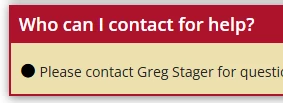
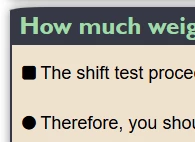
Should come out looking similar to these examples…

I even played with some other options - if you want a square bullet just change circle to square in the code above.


Hopefully that helps.


Forum|alt.badge.img

Oh good point and good idea. I'll give that a try.

Thank you!