I need to update my database via API. The problem I've encountered is that during this process, I update and create users.
For new users, I need to provide the password, but not for existing users.
The database has over 190,000 active users, and checking whether they already exist on the platform is not a solution. The vast majority do not have registered email addresses, so password recovery is also not a solution.
Has anyone else experienced this problem? Any ideas?
Best answer by KMallette
Hi,
I need to update my database via API. The problem I've encountered is that during this process, I update and create users.
For new users, I need to provide the password, but not for existing users.
The database has over 190,000 active users, and checking whether they already exist on the platform is not a solution. The vast majority do not have registered email addresses, so password recovery is also not a solution.
Has anyone else experienced this problem? Any ideas?
@msantos I think you have a basic problem with your database, namely that it seems you don’t have a individual field that you can consider (programmatically) your unique Identifier. Username is commonly that field, but if you don’t have any standardization of the field (i.e., using the email address, or a form like Firstname.Lastname) then you end up in your current situation. (Not to mention the additional support load for resetting passwords via administrator) To me, it sounds like you need to address this issue first.
Then, after that, when updating the database via API, you’ll need to either 1. do a search to see if the account exists or 2. have a provision for the script to do something if it errors trying to create a new account with the same username (which, again won’t work perfectly until you have a standardization of your usernames). In your script you could set a default password and then enable the “Force password update on first login”. Then communicate (because now you have email addresses that you can use) to your users what that standard password is. They’ll have to change it first time the come to the site.
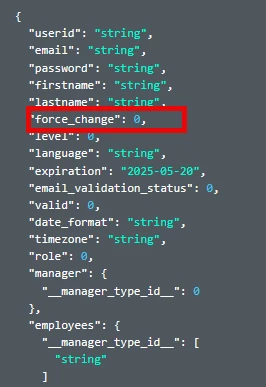
Looks like /manage/v1/user (to create) and /manage/v1/user{id} (to update) both have a ‘force_change” option for the password … and I think I saw a place to set a notification as well.
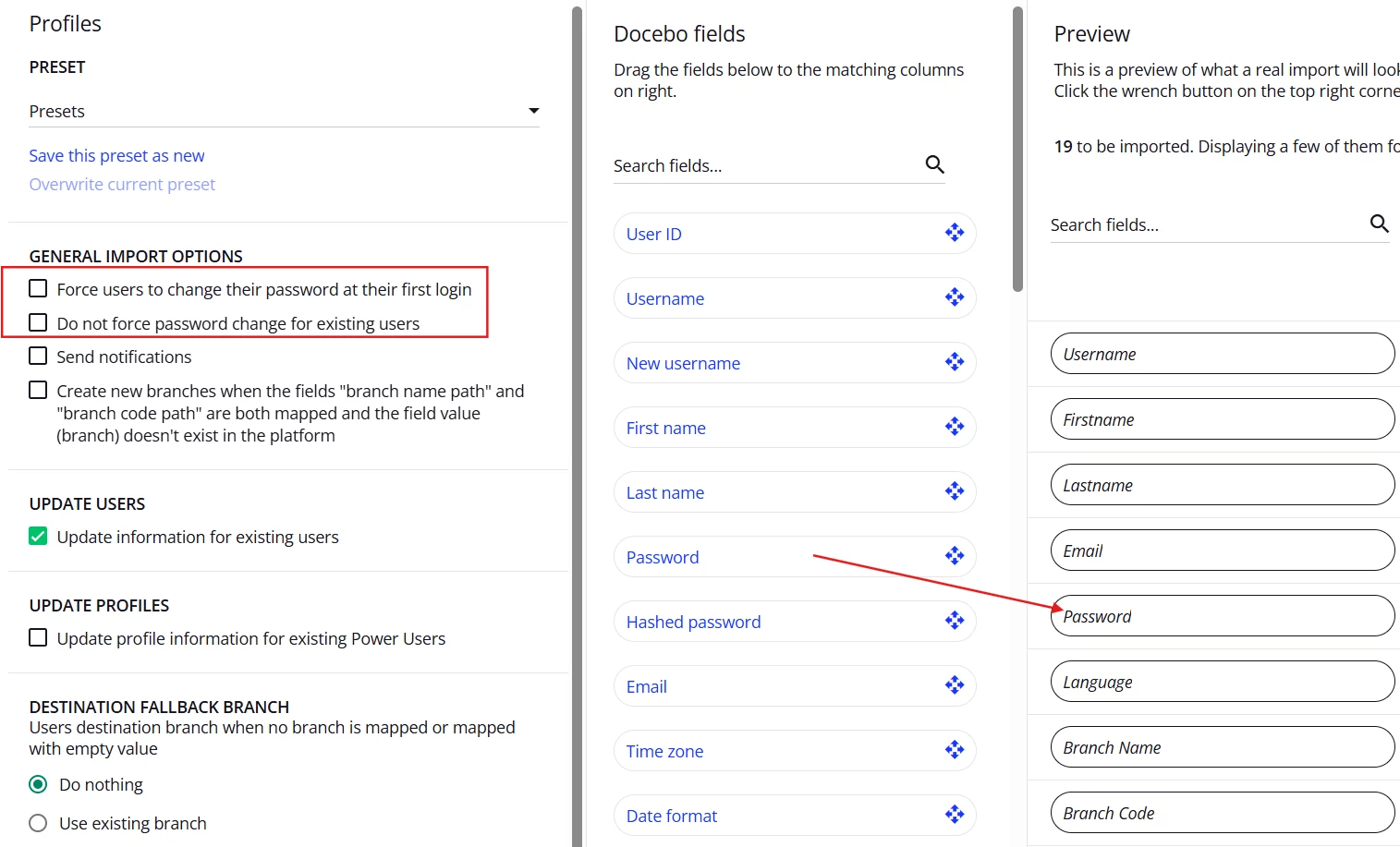
Have you considered using the CSV option to update or create users? There’s an option box for update information for existing users. You can also map to passwords you created in the CSV and also force users to change password at next login. Not sure if any of this helps. Always test in sandbox.
@msantos - I am not completely sure what all your needs are (regarding passwords). I tried to put “” or null with no success. In my example I put a fake email address, but you can put FirstName.LastName or whatever.
If you did that you could use FirstName.LastName as their password, or give them all similar passwords.
Without email I am not sure how any of this will be communicated to them.
I need to update my database via API. The problem I've encountered is that during this process, I update and create users.
For new users, I need to provide the password, but not for existing users.
The database has over 190,000 active users, and checking whether they already exist on the platform is not a solution. The vast majority do not have registered email addresses, so password recovery is also not a solution.
Has anyone else experienced this problem? Any ideas?
@msantos I think you have a basic problem with your database, namely that it seems you don’t have a individual field that you can consider (programmatically) your unique Identifier. Username is commonly that field, but if you don’t have any standardization of the field (i.e., using the email address, or a form like Firstname.Lastname) then you end up in your current situation. (Not to mention the additional support load for resetting passwords via administrator) To me, it sounds like you need to address this issue first.
Then, after that, when updating the database via API, you’ll need to either 1. do a search to see if the account exists or 2. have a provision for the script to do something if it errors trying to create a new account with the same username (which, again won’t work perfectly until you have a standardization of your usernames). In your script you could set a default password and then enable the “Force password update on first login”. Then communicate (because now you have email addresses that you can use) to your users what that standard password is. They’ll have to change it first time the come to the site.
Looks like /manage/v1/user (to create) and /manage/v1/user{id} (to update) both have a ‘force_change” option for the password … and I think I saw a place to set a notification as well.