
Question

Help: Updating Automated Groups using the API

  • May 6, 2025
  • 3 replies
  • 98 views

wardy-alcumus
Novice I

Hello,

I am hoping that someone from the community may have encountered this issue, and may have some insight to help me achieve what i need to (or provide alternative ideas to question my thinking).

I wanted to provide as much information as possible, so thanks in advance for reading to see if you could possibly help out!


Reason for our structure:

  • Our customers can have unlimited access to relevant packages for their employees, based on factors external to the Docebo platform (D365 sales processes).
  • These packages are not 1 per customer, they
  • They are not enrolled in the content, instead the options are displayed visually within pages.
  • Branches separate our customers, with employees created via SSO to land in the correct branch.
  • Groups with automated rules (based on branches); ensure each member has the correct content access.
  • These packages are not 1 per customer, they can have a variety of packages assigned (we manually add and remove customers to automated groups).


Current API Issue

Name: Update an Audience

Endpoint: /audiences/v1/audience/{uuid}

Use case: To update an automated group, with an updated list of branch_id’s to include within the automated rules.


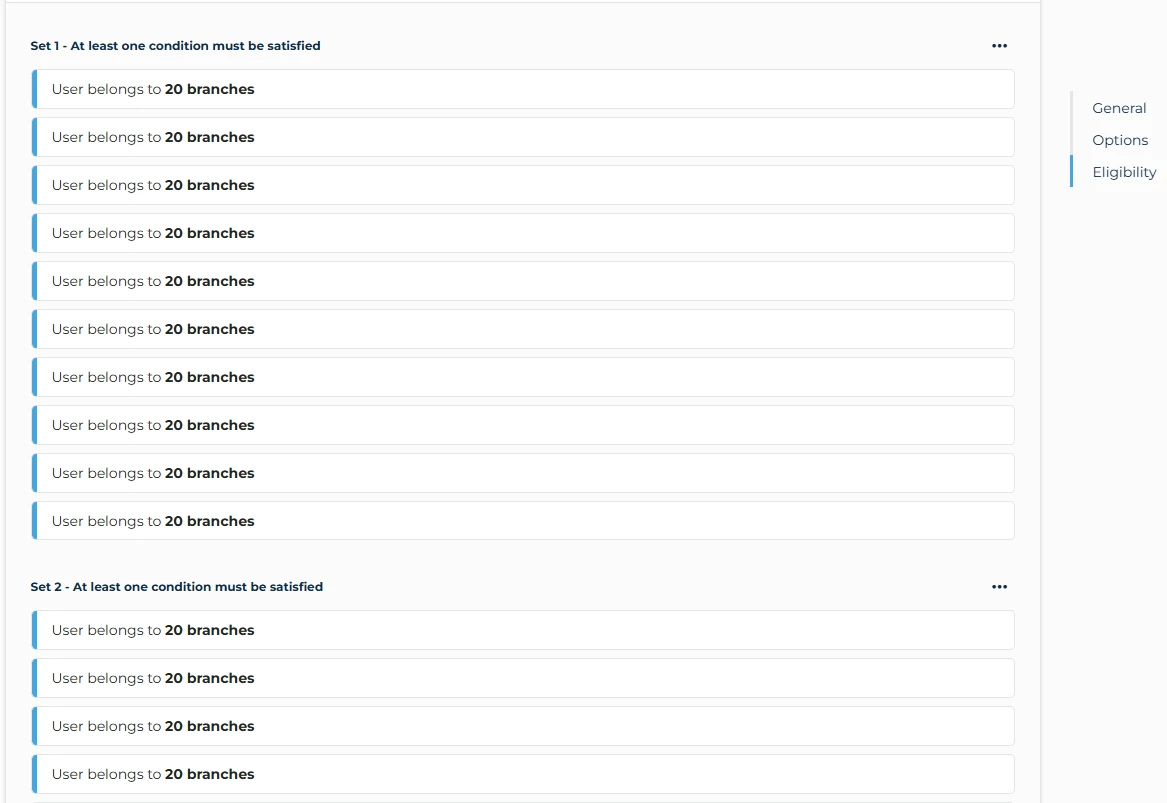
Initial Test: The body sample included in the documentation, seems to imply that we would be able to send the list of branches within the payload. When tested, it returns a successful 200 code – however it seems to require a more complex nested JSON structure (to match the “sets” and “conditions” used in automated groups). Despite seeming to add the branches to the rules, I received an error when loading the group within the platform GUI.


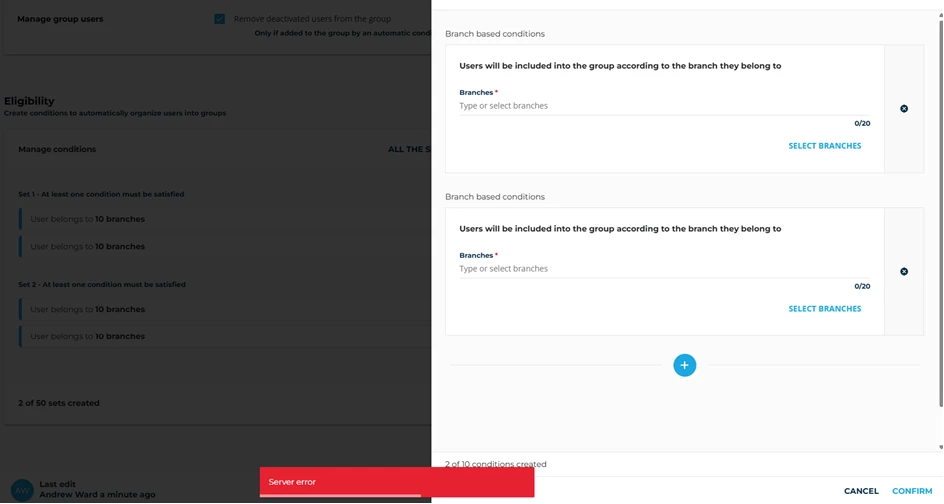
Amended test: As I thought this may be due to the lack of structure (i.e. having 30 branches within a condition which cannot exceed 20), I then copied the complex JSON structure within an existing group (used “get an audience” to retrieve the groups existing rules). When I sent this back to the platform to update the audience, I similarly received a successful 200 code – however despite it appearing to show the correctly formatted structure on the group landing page (my test was 2 sets, including 2 conditions each, with 10 branches in each) – this seemed to still provide the same error whenever I try to navigate or validate within the Docebo platform.


Error example: You can see that it appears on the landing (left side) that it worked correctly. But you can see when opening the rules, that it cannot retrieve or show these branches within the GUI. The bottom of the page demonstrates this server error whenever you try to perform any action on the page.


Thanks,
Andrew

3 replies

dwilburn
Guide III
Forum|alt.badge.img+4
  • Guide III
  • May 6, 2025

Hello ​@wardy-alcumus, I automated the settings for building groups, it is a different scenario, but this may help you. Check out my community post at the link below. It has an example of how I setup the JSON info and then fed the values with a CSV file.


wardy-alcumus
Novice I
  • Author
  • Novice I
  • May 21, 2025

Hi ​@dwilburn - thanks for your prompt response!

I realize that i never replied to you (poor form) - as your post helped to send me on a mental tangent and challenge my thinking on our approach 😊

Due to our use cases, i really had to stick to “update an audience” end point in the end (to spare unnecessary lookup tables and overhauling our user provisioning method).

I ended up getting the API to work consistently, and wanted to drop the information below in case anyone else wanted to use that end point successfully!


Warning: Requires a reasonable understanding of creating complex nested JSON structures


Solution

The best way to describe it, is to take a look at our automatic group rulesets, and then pull the output from the “Get an audience” endpoint.


You can see the structure which is required to be sent back to the platform. Thankfully our rules are always “if a user belongs to a branch”, and the “condition” statement is always “OR”.


Custom Connector

I would normally try and build an API in to a custom connector, because then dev and upkeep within automation tools is much easier. However for this i had to re-add the end point, so I was sending back a pure JSON body to the platform.


The Structure (at least for our use case)

Unfortunately Docebo was not able to easily interpret the payload of a list (array) of branches, and know what to do with that information. As such we need to provide the information within the structure provided within the {rulesets} part of the “get an audience” call.


You can see that we have:

Sets (can go up to 50, we will never touch this limit)

Conditions (can go up to 10 conditions within a set)

Branches (can go up to 20 within a condition)

Not visible in the screenshot, but we also then need to say whether the branch is including descendants in the rule.


The Composed JSON

The top of the code could be quite simple, just to update mandatory fields:

“name”: STRING

“description”: STRING

"exclude_deactivated_users": BOOLEAN

“ruleset”: "operator": "OR",
                “sets”: [ here is where our array of sets are input ]


The Complicated Bit (rulesets)

The nested JSON structure within the sets ends up looking something the like the below.

Remember however, this is just one example of a “set”, within an array of sets 🙂:

{
"rules_operator": "OR",
"rules": [
{
"type": "BranchMembership",
"payload": {
"branch_ids": [
87,
824,
825,
826,
827,
673,
893
],
"branch_ids_descendants": [
{
"branch_id": 87,
"descendants": "false"
},
{
"branch_id": 824,
"descendants": "false"
},
{
"branch_id": 825,
"descendants": "false"
},
{
"branch_id": 826,
"descendants": "false"
},
{
"branch_id": 827,
"descendants": "false"
},
{
"branch_id": 673,
"descendants": "false"
},
{
"branch_id": 893,
"descendants": "false"
}
]
}
}
]
}


How I achieved it

I’ve created a child flow, which can be triggered by creating basic information to update an audience (group). The very simplified logic of the flow is:

  • GET an audience api call
  • Store all existing branch_id’s within an array (this took a few nested apply to each loops).
  • Add the branch_id of the new branch to the same array, if it doesn’t already exist.
  • Cleanse to remove duplicates
  • Set a load of custom variables, including “counters”
  • Chunk the array in to 20’s
  • Run apply to each loop on every entry within the array:
    • Compose each chunk in to correct format of 20 branches
    • Compose and add the descendants nest based on that 20 branches
    • Compose the above in to a condition block
    • Add that condition block to a ruleset array
    • Increase counter by 10
    • When counter hits 10: Append the ruleset array to the final ruleset array, and clear the counter back to 0.
  • We then needed a cleanup step “for if there way any data leftover, which didn’t make it in to the “counter has hit 10” part of the loop (basically composing our final set).

Once all the above has completed, and with some teething - the “update an audience” api accepted what we had created - and formatted it really cleanly!


I know the above is quite complex, but wanted to update in the hope this helps someone - as I have taken LOADS of value from the posts the community have built up here.


dwilburn
Guide III
Forum|alt.badge.img+4
  • Guide III
  • May 21, 2025

@wardy-alcumus - that is very cool. A lot going on. I appreciate the share, I have been tinkering with some “audience” calls. One of the biggest elements I wanted (at that time) was a user count for each group. That was in the group call output but not with audiences.

Now the new interface (July 25 release) will have that in the front end.

Not to mention the deprecation of the “group” end points.

I am at a new company and trying to learn Docebo Connect now. We have a bunch of recipes that need to be updated. But there is so much stuff that is in there from previous admin that I am having a hard time sorting out the pieces.