
Question

LRS xAPI Integration I Docebo LRS vs LMS

  • October 11, 2024
  • 6 replies
  • 487 views

PathanSana
Novice III

Hello All, 

We have recently started looking for LRS Possibilities in Docebo and have the below questions.

Can anyone help answer these? 

  1. Does Docebo has their own LRS (learning record store) functionality, or is it required to use an external vendor ?
  2. Can we keep TinCan courses in Docebo with connection to external LRS, or do we have to upload courses to LRS and connect them with Docebo?
  3. Are there any business cases where such functionality was implemented ?

6 replies

francesca.vaccarino
Novice II
Forum|alt.badge.img+1

Hey, I think you might find this knowledge base article useful, but to sum it up:

  1. Docebo does not have its own LRS functionality
  2. You can upload xAPI (formerly TinCan) training materials in Docebo, users will access them and get redirected to where the course is actually hosted


  • Docebian
  • May 16, 2025

Docebo has implemented an internal LRS to which any xAPI package loaded to a course as a Learning Content Object will launch, authenticate and send statements via the following endpoint:

yourplatform.docebosaas.com/tcapi/


This is a standard REST endpoint like any of Docebo’s other exposed API endpoints that can accept requests along with a valid access_token.


When an xAPI package is launched inside of Docebo, the launch parameters inside of the package make a request to Docebo’s OAuth 2.0 server for this access_token to which to which the package itself can make authorized API request to Docebo /tcapi endpoint on behalf of the package and store the statements about a user’s interactions.


dklinger
Hero III
Forum|alt.badge.img+11
  • Hero III
  • May 19, 2025

Docebo has implemented an internal LRS to which any xAPI package loaded to a course as a Learning Content Object will launch, authenticate and send statements via the following endpoint:

yourplatform.docebosaas.com/tcapi/


@jean.le - hi - so I find it interesting that you are calling the LRS an internal one. I popup every now and then trying to understand more about the LRS established in Docebo.

When I do a browser search, I can find articles explaining internal vs external LRS. In some ways I feel like we have been dropped off without too much more information about how to leverage the LRS. Can you elaborate just one step more on a few questions:

  • I would love to be able to establish an external endpoint where people authenticate and then take the learning and that the Docebo LRS can record xAPI statements about the activity - is that possible?
  • I believe in the xAPI Docebo documentation, it mentions that an xAPI training material (and  course) must exist in the CLOR for this to even begin to work.
  • Anyway someone can come to the table and show this in action?

I wish I was more technically savvy but overall I can follow a decent example and in loose attempts at this - it just didnt stick well.


Forum|alt.badge.img+1
  • May 20, 2025

Hello,

Docebo does have its own LRS built into the platform however there isn’t an accessible interface where you can report on xAPI statements sent to it. There are API endpoints that can be used to extract this out of the platform however in my experience, these are not user friendly and require more advanced recipe actions and queries to attempt to make sense of the data.

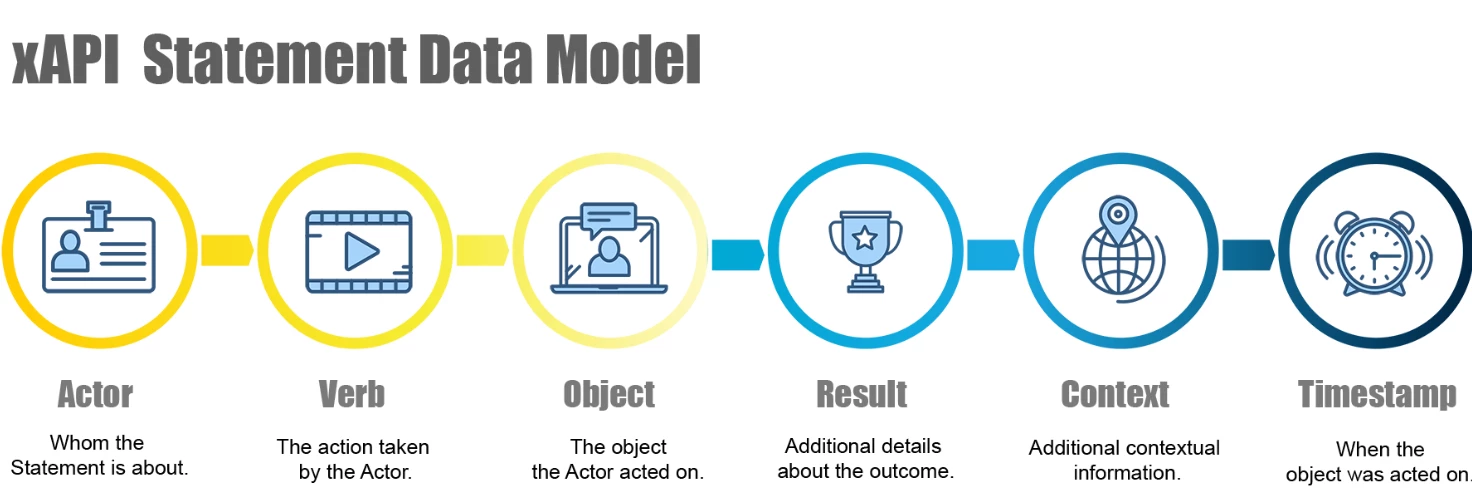
There is benefit to using xAPI versus scorm in Docebo at the course level though, IMO. I have found the tracking to be helpful for troubleshooting at times as there are typically more statements recorded than what scorm can provide. xAPI statements are for user interactions within the content and can vary depending on the authoring tool used. IE: Storyline provides more xAPI statements than Rise.


Those xAPI statements are then sent to a LRS. The LRS in turn stores this in its data warehouse. That data can then be extracted for reporting. The effectiveness of this reporting varies greatly depending on the LRS and somewhat to the authoring tool used that generates the xAPI statements.


Back to the LRS itself. When you publish a course from an authoring tool, the settings default to sending statements to the LMS/LRS its published in. If you want to send those to an external LRS IE scormcloud, watershed etc - you would need to change the publish/reporting settings in the authoring tool, entering in the URL and other credentials as applicable, so it knows where to send it and with the proper access. That’s so not anyone could just send statements to your LRS. Those credentials and URL are provided by the external LRS. How usable those statements are depends on the external LRS and as mentioned before, the authoring tool used.

In my opinion, unless you want to track and report out on how many times a user interacted with that button in your course, or how many people got questions 2, 4, and 10 wrong, an LRS isn’t the best solution to use. You can get at the most common analytics needed within Docebo using reports, Insights, APIs, Docebo Learn Data.

Resources to learn more:

xAPI data with an LRS

Checkout this course on Docebo U regarding interacting with Docebo LRS.

Articulate SL360-publishing to LMS/LRS


Forum|alt.badge.img
  • Contributor III
  • June 3, 2025

Hello,

Docebo does have its own LRS built into the platform however there isn’t an accessible interface where you can report on xAPI statements sent to it. There are API endpoints that can be used to extract this out of the platform however in my experience, these are not user friendly and require more advanced recipe actions and queries to attempt to make sense of the data.

There is benefit to using xAPI versus scorm in Docebo at the course level though, IMO. I have found the tracking to be helpful for troubleshooting at times as there are typically more statements recorded than what scorm can provide. xAPI statements are for user interactions within the content and can vary depending on the authoring tool used. IE: Storyline provides more xAPI statements than Rise.


Those xAPI statements are then sent to a LRS. The LRS in turn stores this in its data warehouse. That data can then be extracted for reporting. The effectiveness of this reporting varies greatly depending on the LRS and somewhat to the authoring tool used that generates the xAPI statements.


Back to the LRS itself. When you publish a course from an authoring tool, the settings default to sending statements to the LMS/LRS its published in. If you want to send those to an external LRS IE scormcloud, watershed etc - you would need to change the publish/reporting settings in the authoring tool, entering in the URL and other credentials as applicable, so it knows where to send it and with the proper access. That’s so not anyone could just send statements to your LRS. Those credentials and URL are provided by the external LRS. How usable those statements are depends on the external LRS and as mentioned before, the authoring tool used.

In my opinion, unless you want to track and report out on how many times a user interacted with that button in your course, or how many people got questions 2, 4, and 10 wrong, an LRS isn’t the best solution to use. You can get at the most common analytics needed within Docebo using reports, Insights, APIs, Docebo Learn Data.

Resources to learn more:

xAPI data with an LRS

Checkout this course on Docebo U regarding interacting with Docebo LRS.

Articulate SL360-publishing to LMS/LRS


Hi,

This is incredibly helpful information, and my use case aligns exactly with the example you gave for leveraging xAPI, I’m trying to track how many users interact with a specific resource within a course.

Would you be willing to share more details about the API endpoint you're using and any additional configuration steps required to retrieve and interpret that data? I’ve been testing the endpoint mentioned in the Docebo U course, but I keep receiving a 401 Unauthorized error.

ChatGPT insists that xAPI statements from Docebo’s internal LRS aren’t accessible via public API. That it’s not an exposed endpoint. Of course, we all know to take that with a grain of salt, but so far I haven’t been successful in getting it to work.

Any insights you could provide would be greatly appreciated!


Forum|alt.badge.img+1
  • June 3, 2025

Hi ​@dorseyrn, the 401 error means the call was made with invalid credentials. All the API endpoints require an authentication token to make a call. Not sure the tools you are using but for this endpoint you’ll need to make the call using an Authorization Bearer {token} header. You can generate a token in the Docebo API browser then input that into your header.

I’m using the info noted in the Docebo U course. 
 

Retrieving Statements

You can query these statements by calling the endpoint below, with a valid bearer token for a superadmin user (see the API Authentication Guide for instructions on obtaining an access token):

GET     https://{yoursubdomain}.docebosaas.com/tcapi/statements

Headers:

Authorization: Bearer {token}

The endpoint will return all xAPI statements recorded from your Docebo Instance, however, these statements will be paginated. To request a specific page, add a query parameter to the request URL. As an example, to return the second page of statements, the URL would be:

GET    https://{yoursubdomain}.docebosaas.com/tcapi/statements?page=2

This endpoint also supports some other filter parameters that can be useful, described here:

http://developer.pearson.com/blog/retrieving-xapi-statements-lrs


The response schema returned when making a call is below. As mentioned this is by no means user friendly. While we were able to create some sense of things and had a recipe extracting some data, we abandoned using this endpoint altogether and did not pursue this any further.

So, yes Docebo has an LRS that helps with native reports within the course admin area (and other real benefits to using xAPI). And yes Docebo has an API endpoint (1) to retrieve those statements, but unless you design and customize each xAPI endpoint when authoring the course into meaningful statements that you can then find in the statements returned in the endpoint, the data is almost unusable. Just look at the response schema. 😒Sorry I don’t have much else to share. Good luck.

[
{
"name": "statements",
"type": "array",
"of": "object",
"label": "Statements",
"properties": [
{
"control_type": "text",
"label": "Timestamp",
"type": "string",
"name": "timestamp"
},
{
"properties": [
{
"name": "account",
"type": "array",
"of": "object",
"label": "Account",
"properties": [
{
"control_type": "text",
"label": "Account service home page",
"type": "string",
"name": "accountServiceHomePage"
},
{
"control_type": "text",
"label": "Account name",
"type": "string",
"name": "accountName"
}
]
},
{
"control_type": "text",
"label": "Object type",
"type": "string",
"name": "objectType"
}
],
"label": "Actor",
"type": "object",
"name": "actor"
},
{
"properties": [
{
"control_type": "text",
"label": "ID",
"type": "string",
"name": "id"
},
{
"properties": [
{
"control_type": "text",
"label": "En- US",
"type": "string",
"name": "en-US"
}
],
"label": "Display",
"type": "object",
"name": "display"
}
],
"label": "Verb",
"type": "object",
"name": "verb"
},
{
"properties": [
{
"properties": [
{
"control_type": "number",
"label": "ID",
"parse_output": "float_conversion",
"type": "number",
"name": "id"
}
],
"label": "Test",
"type": "object",
"name": "test"
}
],
"label": "Context",
"type": "object",
"name": "context"
},
{
"properties": [
{
"control_type": "text",
"label": "Response",
"type": "string",
"name": "response"
},
{
"control_type": "text",
"label": "Success",
"type": "string",
"name": "success"
}
],
"label": "Result",
"type": "object",
"name": "result"
},
{
"properties": [
{
"control_type": "text",
"label": "ID",
"type": "string",
"name": "id"
},
{
"control_type": "text",
"label": "Object type",
"type": "string",
"name": "objectType"
},
{
"properties": [
{
"control_type": "text",
"label": "Type",
"type": "string",
"name": "type"
},
{
"properties": [
{
"control_type": "text",
"label": "En- US",
"type": "string",
"name": "en-US"
}
],
"label": "Description",
"type": "object",
"name": "description"
}
],
"label": "Definition",
"type": "object",
"name": "definition"
}
],
"label": "Object",
"type": "object",
"name": "object"
},
{
"properties": [
{
"name": "mbox",
"type": "array",
"of": "string",
"control_type": "text",
"label": "Mbox"
},
{
"name": "name",
"type": "array",
"of": "string",
"control_type": "text",
"label": "Name"
},
{
"name": "account",
"type": "array",
"of": "object",
"label": "Account",
"properties": [
{
"control_type": "text",
"label": "Account service home page",
"type": "string",
"name": "accountServiceHomePage"
},
{
"control_type": "text",
"label": "Account name",
"type": "string",
"name": "accountName"
}
]
}
],
"label": "Authority",
"type": "object",
"name": "authority"
},
{
"control_type": "text",
"label": "Object type",
"type": "string",
"name": "objectType"
},
{
"control_type": "text",
"label": "Version",
"type": "string",
"name": "version"
},
{
"control_type": "text",
"label": "Stored",
"render_input": "date_time_conversion",
"parse_output": "date_time_conversion",
"type": "date_time",
"name": "stored"
},
{
"control_type": "text",
"label": "Xapi version code",
"type": "string",
"name": "xapi_version_code"
},
{
"control_type": "text",
"label": "Original JSON",
"type": "string",
"name": "originalJSON"
},
{
"control_type": "text",
"label": "ID",
"type": "string",
"name": "id"
}
]
},
{
"control_type": "text",
"label": "More",
"type": "string",
"name": "more"
}
]