Question

Making API calls from Power Automate - how to handle authentication??

  • April 8, 2025
  • 5 replies
  • 719 views

sjennings78
Guide III
Forum|alt.badge.img+7

Anyone using Power Automate to make API calls?  How do you handle the authentication for the call?  I was able to set up an HTTP action in my Flow and it works as intended, but I was using a token that I created via Postman and every time it expires (which appears to be every hour), I have to update the Flow with the new token.  Is there a better way to set up the authentication to be able to run a daily API call?

5 replies

Forum|alt.badge.img+1
  • Influencer I
  • April 8, 2025

I have had some success here, so I can share what I have learned and take you a step further, though I’m still not where I want to be yet. 
 

I had to spend some time in Docebo’s documentation around authentication to understand them outside of tools like Postman.  What I settled on was using a JWT token to authenticate my power automate flows. There is a good explanation in Docebo’s documentation and I also watched some explainer videos about it to understand. There is a tool referenced in the documentation that will generate the tokens for you (JWT.is).  You can set them to last up to two weeks before reauthenticating. Times need to be in Unix time so you’ll need a converter. You’ll also need a text tool like notepad++ to save and keep your keys. Upload the key to as a txt file to Docebo, store your public key in power automate as a variable and you’re good to go for two weeks. 
 

Issues and limitations with this method:

I can’t seem to find a way to reauthenticate without manual intervention. If anybody can comment on that, I would be forever grateful. Some of our developers say they can code it manually but I have no idea how that would interact with Power Automate. So basically I have to remember to go in and generate a new token every two weeks.
 

Another thing to consider is security. I’m not sure if you’re just using this for your own personal flows or for a group, but API calls are logged in the system as actions that you take as a Superadmin. I’m working on rolling out a group app that will simplify logging ILT training and one of the ways we found to do it to stay compliant was to set up a special API superadmin user that would make the calls. When an action is logged in the system, we make sure that the instructor’s details are stored so that when auditing it we can show that the API account did the action meaning that the instructor tied to the course was the one who carried out the action. That info is pulled from Microsoft so we ensure the quality of the data. 
 

Let me know if that helps or raises more questions. I can try to clarify more, maybe a step by step if needed. 


sjennings78
Guide III
Forum|alt.badge.img+7
  • Author
  • Guide III
  • April 9, 2025

Thanks, ​@ChrisBurton.  That gives me another road to go down. 

I had started attempting to add login in my Power Automate flow to get an access token first and then use it (thanks to chatGPT’s suggestion) but I haven’t been able to get it to authorize correctly yet, so I’m not sure if that will work or not (I certainly don’t know enough about access tokens to know if it will work that way with Docebo or not).


Forum|alt.badge.img+1
  • Influencer I
  • April 9, 2025

Thanks, ​@ChrisBurton.  That gives me another road to go down. 

I had started attempting to add login in my Power Automate flow to get an access token first and then use it (thanks to chatGPT’s suggestion) but I haven’t been able to get it to authorize correctly yet, so I’m not sure if that will work or not (I certainly don’t know enough about access tokens to know if it will work that way with Docebo or not).

If you can figure out how to automate the access token part, I would love to hear how you manage it! Yeah, look into the JWT route and see if it gets you a bit further.

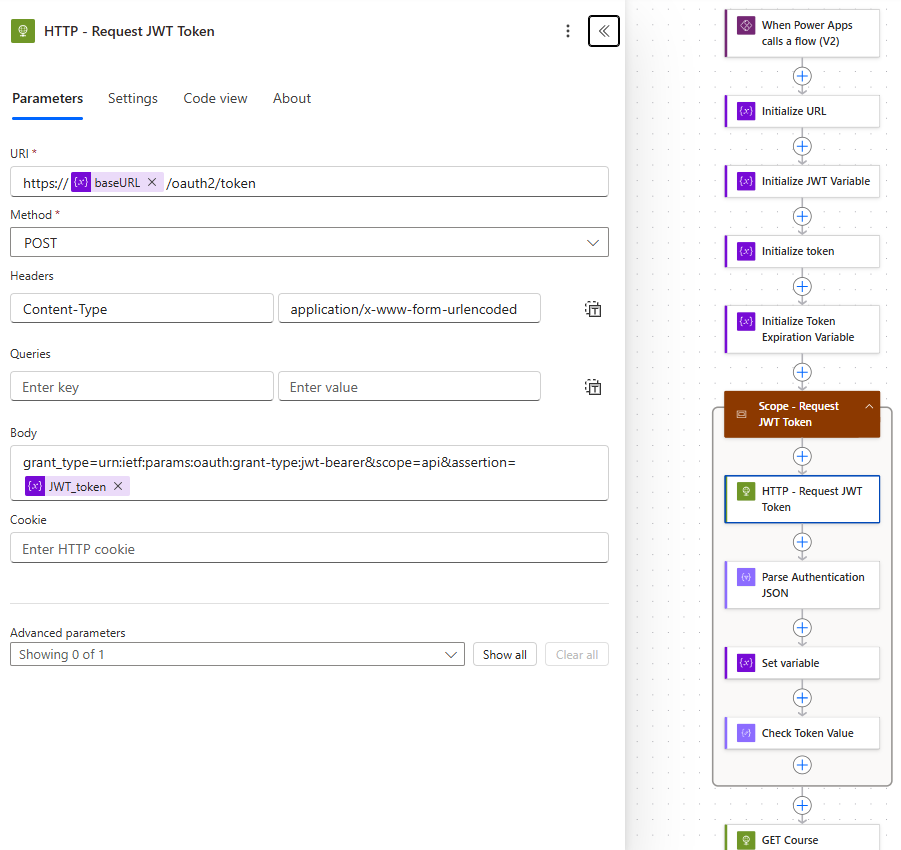
Below is my authentication workflow. There are a few extra variables that aren’t needed, but you can see that I am using a variable to house the JWT token so that I don’t have to update every API call in the flow.


The authorization call is made, I parse the JSON and set the returned token as a variable for use in later API calls (that’s the Set variable action in the JWT scope).

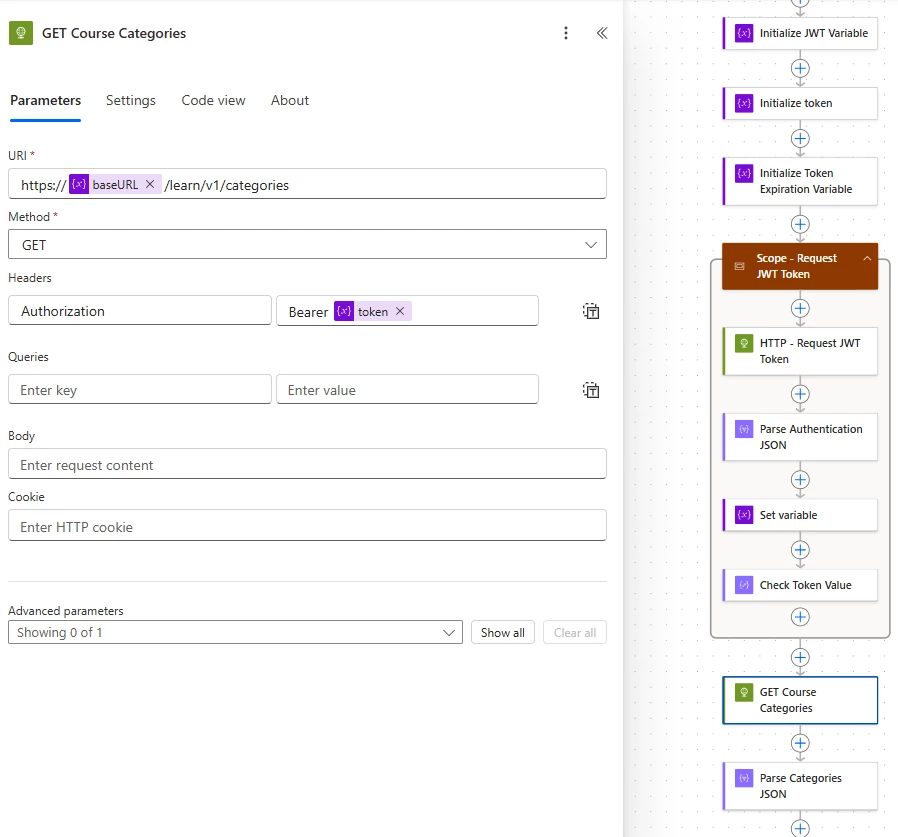
In an actual API call, here is how I use the token variable:


brandonbillings
Helper II
Forum|alt.badge.img+1

Hello,

I have dozens of power automate flows using the docebo APIs. I make a HTTP POST to docebo_url/oauth2/token

the body of the post is: client_id=YOURCLIENTID&client_secret=YOURCLIENTSECRET&grant_type=password&scope=api&username=SUPERADMIN&password=PASSWORD

Parse the JSON response and store the access_token string in a variable


Rather than put these steps in every flow, I built a Docebo “solution” in power automate. With solutions, you can call child flows from other flows. I built a simple “get token” flow in my solution, and I can call that at the start of my other docebo flows. The child flow runs and passes back the new bearer token.

As an alternative, I started building a Docebo custom connector in power automate, but I haven’t had much time to devote to fully fleshing out this approach. I am not a developer by any means, but what I have above is working for me. Hopefully that helps, but let me know if you have any questions!


Forum|alt.badge.img+1
  • Influencer I
  • April 9, 2025

That is another way!

My company restricts Custom Connectors so I cannot use them. I had spent weeks trying to get the custom connectors to work before realizing they were being blocked. I totally forgot I had even gone through these steps! 😅