



Answer

Tracking Course Access for Users

  • August 28, 2025
  • 2 replies
  • 75 views

jungerer
Contributor II
Forum|alt.badge.img

Hello All,

We are facing a potential data loss issue with course access and I’m wondering if anyone else has had and solved this.

What we’re trying to record:

We are looking to see how many unique users access certain courses per month.  So if User A accesses any of the courses in a given month, they are counted.  If they access any of the courses in another month, they are counted again.  Our PowerBI graph looks like this:
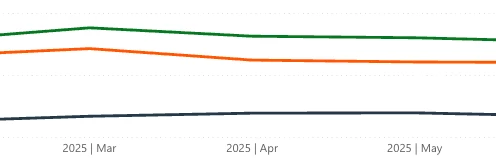
 

We’re using the First Access Date and Last Access Date to build this data.  The issue is when we have this situation:

  1. User A accesses Course B in June.  This is recorded in the course First and Last Access date fields.
  2. User A accesses Course B in July.  This is recorded in the course Last Access date field.
  3. User A accesses Course B in August.  This is recorded in the course Last Access date field.

Now we have a date the user accessed that course that is no longer present as either First or Last.  Thus our data for the “middle” month would change.  This isn’t a big issue with our current program dataset (those courses are typically one and done) but we have other programs where the entire point is to have people access the course every month. 

We’re examining the use of snapshots in our database to preserve the counts monthly but are there any other ways in the Docebo data to see every time someone has accessed a given course?  I have looked at training material attempt dates and those might fit the bill, but I wanted to ask the experts.

Thanks!

Best answer by John

You’re right that using only First Access and Last Access will always overwrite the “middle” months.

The cleanest way around this is to take regular snapshots of course access data (daily or monthly) and store those in your PowerBI model. That way you preserve history and can track unique users by course each month. Some folks also layer in training material attempt dates for extra detail, but snapshots are the reliable baseline.

For cadence:

  • Monthly snapshots work if you only need month-over-month trends.

  • Daily snapshots give more flexibility (you can always roll them up by month later) and protect against late updates.

In PowerBI, once you’ve got snapshots staged, you can use a measure like:

(DAX)

MonthlyActiveUsers =
DISTINCTCOUNT(CourseAccess_Snapshots[UserID])

Then slice by Course and Month to see your trend over time.

2 replies

John
Docebian
Forum|alt.badge.img+3
  • Docebian
  • Answer
  • August 28, 2025

You’re right that using only First Access and Last Access will always overwrite the “middle” months.

The cleanest way around this is to take regular snapshots of course access data (daily or monthly) and store those in your PowerBI model. That way you preserve history and can track unique users by course each month. Some folks also layer in training material attempt dates for extra detail, but snapshots are the reliable baseline.

For cadence:

  • Monthly snapshots work if you only need month-over-month trends.

  • Daily snapshots give more flexibility (you can always roll them up by month later) and protect against late updates.

In PowerBI, once you’ve got snapshots staged, you can use a measure like:

(DAX)

MonthlyActiveUsers =
DISTINCTCOUNT(CourseAccess_Snapshots[UserID])

Then slice by Course and Month to see your trend over time.


jungerer
Contributor II
Forum|alt.badge.img
  • Author
  • Contributor II
  • August 29, 2025

Thanks ​@John that makes me feel better about the plan going forward.

