Question

QUESTION:Don't want to see old courses come up for my new users

  • April 14, 2025
  • 4 replies
  • 45 views

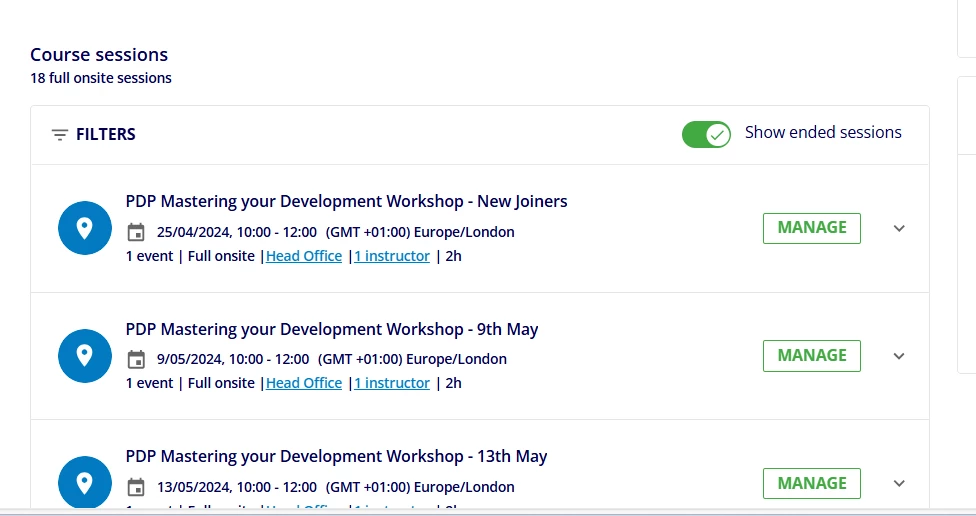
How do I make it so that when users are looking at courses on the front end they don't see all the old/ past course dates. I know there is the manual button that you can untick "see pervious courses" but how so I make that that the rule. People at my organisation don't seem to "see" the button and I get lots of messages about it. There's no reason for them to see past courses as I just want them to sign up to the new ones. Please help! Save my inbox

4 replies

lrnlab
Hero III
Forum|alt.badge.img+10
  • Hero III
  • April 14, 2025

Can you explain what you mean by “old/past” courses? Not sure I follow your question. Thx


  • Author
  • Newcomer
  • April 14, 2025

When you are looking at a course - for instance, we have our personal development plan course - we have about 80 events that have been held last year so are now past events. I have created this year’s courses but when you search PDP it comes up with all of 2024s courses first until you tick the button that says “show ended sessions” and then it shows the up-coming 2025 dates. I’ve had lots of people tell me they can only see old dates and not the new sessions as they haven’t scrolled or unticked the box. To me it seems silly that it shows past events. I want to know if there is a way to make it so it just shows up-coming events without people having to either scroll down or untick the box. I have added a picture. Thank you.


lrnlab
Hero III
Forum|alt.badge.img+10
  • Hero III
  • April 14, 2025

OK I got...so you are taking about sessions not courses….

I agree it would be better to have that toggled OFF by default. The only way I can think to attempt to change this would be to use CSS. Never tried it so not sure that would work. 

I would suggest you open a ticket with support to ask about this and whether they have an viable option to turn this OFF by default.


lrnlab
Hero III
Forum|alt.badge.img+10
  • Hero III
  • April 14, 2025

I don't have this same view at all...I only see future and/or sessions that are not full (no waitlist enabled)...As I look at your screenshot, I see “Manage” - is this an admin view? or perhaps an Instructor view? Doesn't seem like a user view as they would not be able to manage a session; unless you changed something in the localization app…??