Question

Annual Compliance Training renewals

  • October 7, 2025
  • 5 replies
  • 48 views

Denise.Koehnlein

I’m trying trying to implement annual compliance training for staff that will renew on the same calendar date for all staff each year.  The problem I'm having is that when the Learning Plan is assigned, we’re giving staff 90 days to complete it.  I was going to use certifications so it will auto-renew next year, but I can’t figure out how to give all staff the same due date for renewal since they have such a large range for completion this year.  If I set the renewal for 365 days, I understand that will be from the date each person completes it this year, which is not what we want.  Any suggestions?

5 replies

  • Newcomer
  • October 7, 2025

Hi Denise, it sounds like there may be too many variables at play here to reliably automate the assignment and due date each year as you’d like.

It’s a little manual, but once a year I archive all the previous years’ enrolments in our compliance training, then use Groups to easily mass-enrol everyone back into the relevant compliance courses/ learning plans.

I do this once a year for approx 800 learners, with varying regional requirements. It usually only takes me a couple of hours, which doesn’t feel too onerous, and it gives me the ability to ensure everyone has the same due date.

If there’s a better way to do it, someone in here will know how. I’ll be keeping a close eye on the other responses you get just in case!


  • Newcomer
  • October 17, 2025

Hi Denise, it sounds like there may be too many variables at play here to reliably automate the assignment and due date each year as you’d like.

It’s a little manual, but once a year I archive all the previous years’ enrolments in our compliance training, then use Groups to easily mass-enrol everyone back into the relevant compliance courses/ learning plans.

I do this once a year for approx 800 learners, with varying regional requirements. It usually only takes me a couple of hours, which doesn’t feel too onerous, and it gives me the ability to ensure everyone has the same due date.

If there’s a better way to do it, someone in here will know how. I’ll be keeping a close eye on the other responses you get just in case!

@vGold87 I’m trying to do something similar now and can’t quite figure it out. After you archive the enrollments for the previous year, do you still have accurate reporting to show they all completed it in that year? So far what I’ve seen is that if I archive enrollment, it wipes all of the previous completion data. 


  • Newcomer
  • October 17, 2025

Hi Denise, it sounds like there may be too many variables at play here to reliably automate the assignment and due date each year as you’d like.

It’s a little manual, but once a year I archive all the previous years’ enrolments in our compliance training, then use Groups to easily mass-enrol everyone back into the relevant compliance courses/ learning plans.

I do this once a year for approx 800 learners, with varying regional requirements. It usually only takes me a couple of hours, which doesn’t feel too onerous, and it gives me the ability to ensure everyone has the same due date.

If there’s a better way to do it, someone in here will know how. I’ll be keeping a close eye on the other responses you get just in case!

@vGold87 I’m trying to do something similar now and can’t quite figure it out. After you archive the enrollments for the previous year, do you still have accurate reporting to show they all completed it in that year? So far what I’ve seen is that if I archive enrollment, it wipes all of the previous completion data. 

@emcvan Yes! When setting up reports you can choose whether or not to include archived enrollments.I toggle this depending on whether I’m reporting on progress for the current year or providing a multi-year record to regulators/ auditors. The attached screenshot is from the Filters tab for the Users - Courses report type.


I strongly recommend testing it with dummy data first though, to make sure it behaves like you expect it to!


  • Newcomer
  • October 20, 2025

Hi Denise, it sounds like there may be too many variables at play here to reliably automate the assignment and due date each year as you’d like.

It’s a little manual, but once a year I archive all the previous years’ enrolments in our compliance training, then use Groups to easily mass-enrol everyone back into the relevant compliance courses/ learning plans.

I do this once a year for approx 800 learners, with varying regional requirements. It usually only takes me a couple of hours, which doesn’t feel too onerous, and it gives me the ability to ensure everyone has the same due date.

If there’s a better way to do it, someone in here will know how. I’ll be keeping a close eye on the other responses you get just in case!

@vGold87 I’m trying to do something similar now and can’t quite figure it out. After you archive the enrollments for the previous year, do you still have accurate reporting to show they all completed it in that year? So far what I’ve seen is that if I archive enrollment, it wipes all of the previous completion data. 

@emcvan Yes! When setting up reports you can choose whether or not to include archived enrollments.I toggle this depending on whether I’m reporting on progress for the current year or providing a multi-year record to regulators/ auditors. The attached screenshot is from the Filters tab for the Users - Courses report type.


I strongly recommend testing it with dummy data first though, to make sure it behaves like you expect it to!


Oh this is so helpful! Thank you!!!


dklinger
Hero III
Forum|alt.badge.img+11
  • Hero III
  • October 20, 2025

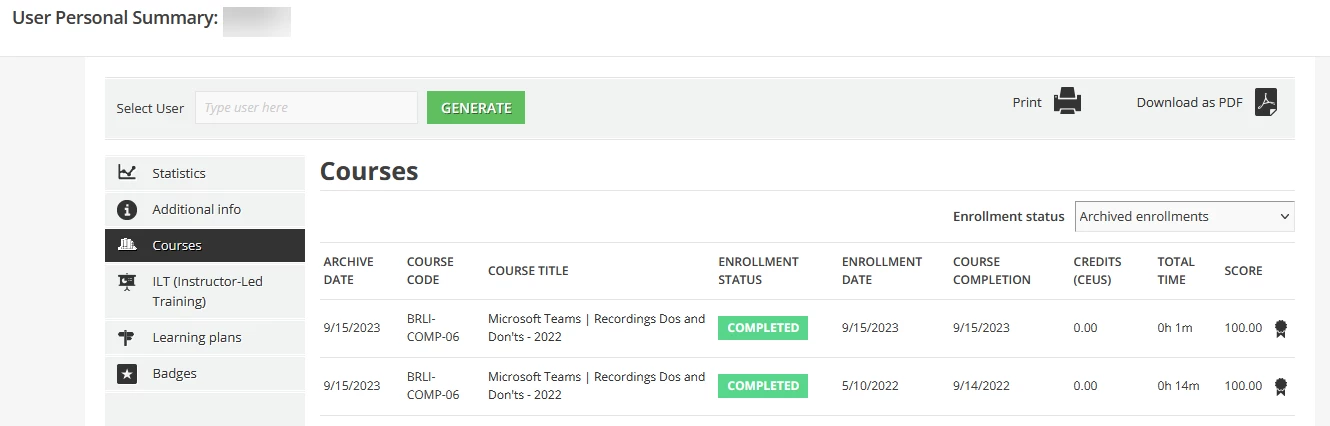
Hi folks - just to continue the thought - these folks have been working at a few of these concepts more  and more. You can pull a certificate for an archived enrollment pretty straight forwardly as well - so that will be good. See below.


Can you teach me something though? Because we only do them few and far in between (like we have only rolled it out with one course) - when you pull it into an enrollment report - how do you know what type of enrollment it is?

An archive vs and active? I ask - because outside of your shop - you may have people pass over the archive drop-down as they look for their record/certificate from their user profiles. It may feel like a captain obvious thing - but I can see it being skipped over from a report perspective if a column that calls out if it is indeed an archive or is not available in the report.