API Call to check the names/emails/usernames of users enrolled in Courses

  • March 20, 2024
  • 11 replies
  • 212 views

Forum|alt.badge.img+1

Can someone provide the API Call to extract the names/emails/usernames of users enrolled in particular Courses?

We need to this to set up a database for a ID card company to extract these details from Docebo to provide the users access via ID cards..


11 replies

KMallette
Hero II
Forum|alt.badge.img+9
  • Hero II
  • March 20, 2024

You’ll want Manage > User … this particular endpoint has a “minimal” option that you should explore.


Bfarkas
Hero III
Forum|alt.badge.img+6
  • Hero III
  • March 20, 2024

Hmm, I think in this case I would go one of two routes:

  1. Try this endpoint, /course/v1/courses/{id}/enrollments,
    course > Courses > Returns enrollments associated to the given course
    This one lets you plug in one course Docebo ID and get list of enrollments and their details back.
  2. Use Reports: You could instead build out a report if you had multiple courses or wanted more restrictions built into it, i.e. all users except certain branches. You could then use the API to call the report details.

Forum|alt.badge.img+1

@Bfarkas- Can you please explain the second step in details, extracting the report is fine but how can I then use API?


Forum|alt.badge.img+3
  • Helper III
  • March 22, 2024

@arnab.duttagupta2022  If you are asking how to find the course ID to be able to use it in the API, this KB article tells you how to find it in the url. Don’t let the title of the article fool you,scroll down to the section labeled “Retrieving the course ID and the session ID"

https://help.docebo.com/hc/en-us/articles/9298423851794-Enrolling-users-in-courses-and-sessions-using-CSV-files


Bfarkas
Hero III
Forum|alt.badge.img+6
  • Hero III
  • March 22, 2024

@Bfarkas- Can you please explain the second step in details, extracting the report is fine but how can I then use API?

First, important to note that these were not two steps, but two unique and seperate approaches. The first one lets you use only the API, but is one call per course. The second one you configure a new report with the settings you want for it, then you don’t have to export it, you simply use the API to tell it to refresh and to call the current data within the report directly. Theres a bunch of writeups about this, you can start with the ones below:

https://community.docebo.com/integrations%2Dapis%2D45/report%2Dlisting%2Dapi%2D2308 


Forum|alt.badge.img+1

@Bfarkas - I hope you in the first option you meant this call right-

GET/learn/v1/enrollments/{id_course}/{id_user


Bfarkas
Hero III
Forum|alt.badge.img+6
  • Hero III
  • March 28, 2024

@Bfarkas - I hope you in the first option you meant this call right-

GET/learn/v1/enrollments/{id_course}/{id_user

No, as you need to know the user already to use that one, look and follow the path of what I said above, you only need the course ID on that one and then it returns an array of the users enrolled in the course which I think is what you were asking for. Make sure to switch in the services menu to “course”  this one is not on the default learn service area


Forum|alt.badge.img+1

Yes I get your logic, completely makes sense however the call you are mentioning- I am not getting that call in sandbox or I am not understanding! For ILT sessions we have a similar call under ILT sessions?


Forum|alt.badge.img+1

I found it https://tuvr3.docebosaas.com/api-browser/#!/course/Courses/Courses_course_v1_courses_id_enrollments


Also I found the steps to your second suggestion by providing the Report ID which I created I can only extract by CSV however I want it in JSON file to help our vendor to get access to our Docebo enrollments for creating ID cards or is there any other way?


Bfarkas
Hero III
Forum|alt.badge.img+6
  • Hero III
  • March 28, 2024

I found it https://tuvr3.docebosaas.com/api-browser/#!/course/Courses/Courses_course_v1_courses_id_enrollments


Also I found the steps to your second suggestion by providing the Report ID which I created I can only extract by CSV however I want it in JSON file to help our vendor to get access to our Docebo enrollments for creating ID cards or is there any other way?

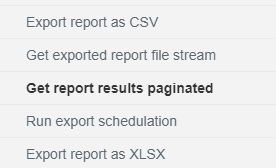
For the report piece, there are multiple endpoints to get the output, sound slike you are using the ‘Export results as CSV’, you want ‘Get report results paginated’ which will be JSON:


dwilburn
Guide III
Forum|alt.badge.img+4
  • Guide III
  • March 28, 2024

If you want a dump of info to get started, then pull a report to make sure you get the correct info. You can include the course codes in the report. 

Then if you want to use the API you have the basic elements to call the enrollment status from the API call.