Answer

Automatic Group Enrollment

  • July 21, 2025
  • 5 replies
  • 52 views

Forum|alt.badge.img

I’m trying to set up an automatic group based on 2 conditions:

  • email contains 1 of 50 different address options 

AND

  • a specific additional field selection

I think I’m getting stumped on the conditions and sets being required to be satisfied. 

Best answer by Josh.Lunsford

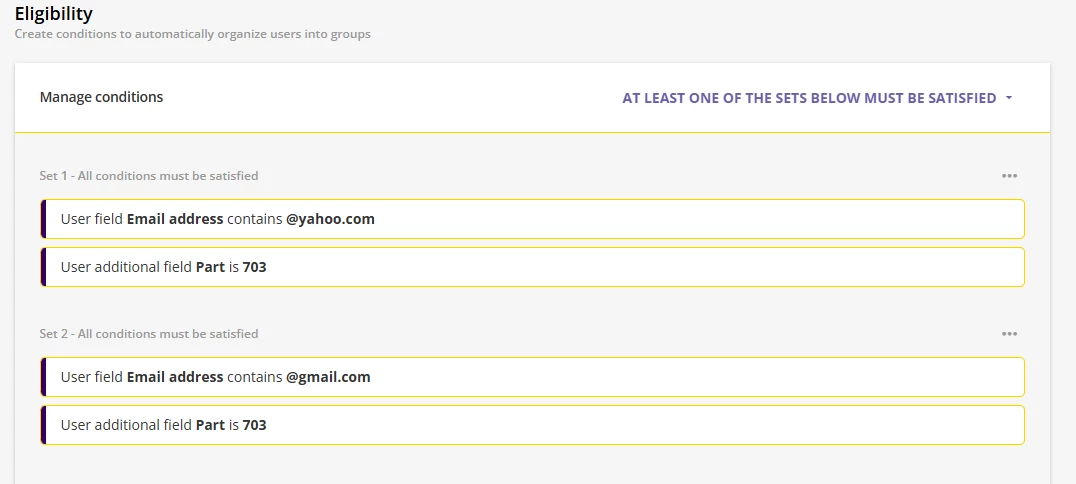
That just gave me the idea for a work around. since you can have 50 sets. if in each set you have all conditions must be satisfied and have 1 of the 50 email addresses in each set and the additional field in the sets and then on the overall manage conditions setting would be at least one of the sets must be satisfied. but if you want more than 50 emails then you would not be able to have all in one group.

5 replies

Good afternoon,

With the sets being limited to 10 conditions this is not something that can be done. It would be a good option for an idea post that they increase the condition allowed in a set or to even allow you to use automatic group conditions like you can use manual groups as a condition. 

As of right now with the way it is set up you will not be able to have one group with all 1-50 email addresses because, you can have all the e-mail conditions filled in a total of 5 sets but then you would not be able to set the overall conditions to all must be met due to having 5 sets of email addresses. 

You could do 5 different groups with sets of 10 email addresses and the additional field selection 


lrnlab
Hero III
Forum|alt.badge.img+10
  • Hero III
  • July 22, 2025

You will also need to make sure you set the proper “relationship” between the data points; e.g. “all conditions must be satisfied” or “at least one condition must be satisfied” both inside the set and outside the set.

If the conditions are 1 email + 1 additional field = 1 user, you might not be able to fit everything into a single group.


  • Novice III
  • Answer
  • July 22, 2025

That just gave me the idea for a work around. since you can have 50 sets. if in each set you have all conditions must be satisfied and have 1 of the 50 email addresses in each set and the additional field in the sets and then on the overall manage conditions setting would be at least one of the sets must be satisfied. but if you want more than 50 emails then you would not be able to have all in one group.


Forum|alt.badge.img
  • Author
  • Contributor I
  • July 22, 2025

Is there a way to set a condition that must be met first before other conditions in a different set?


I have not seen a feature that would allow that.

But, if you set up the conditions like below would get you up to 50 emails: