Question

Best practices on user addition field "Country" a drop-down list (Separator)

  • May 16, 2025
  • 3 replies
  • 40 views

Forum|alt.badge.img+3

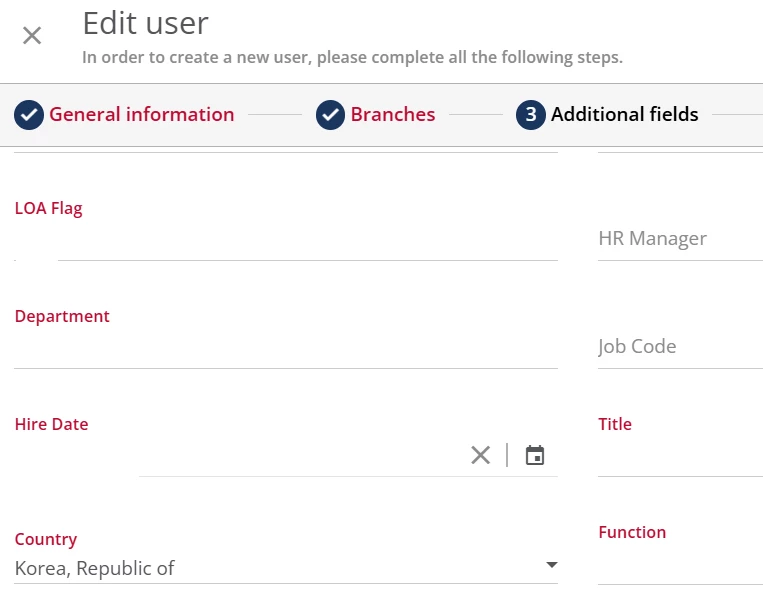
We need to schedule a report to push it to our SFTP location for our internal function to build automate process. The issue is with the field "Country" containing commas, which causes data splits and adds extra columns in the report when validated. (Ex: Column “C” values updated in D, and D values updated in E, due to data splits).

We used Docebo “Country” drop-down field as a user additional field.

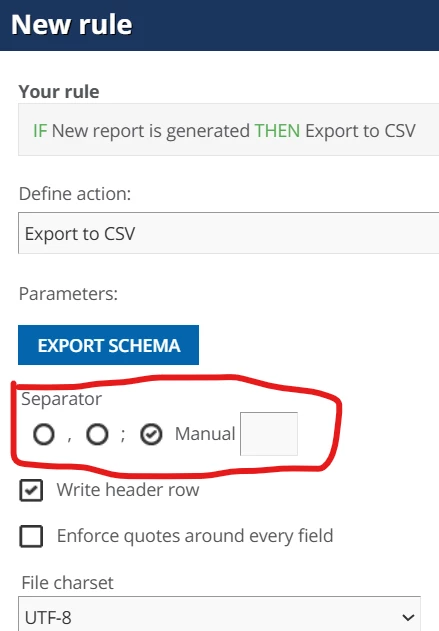
I tried with semicolon, comma, and colon values but it doesn’t help. What’s the best practices to deal with separator?  


3 replies

lrnlab
Hero III
Forum|alt.badge.img+10
  • Hero III
  • May 16, 2025

Not sure I follow as to where you see commas in the Country drop down list...do you have an example?

Also, if you also enable the option to “enforce quotes”, that should help to keep your text together; just not sure you can the exported report to do that automatically.


Forum|alt.badge.img+3

Not sure I follow as to where you see commas in the Country drop down list...do you have an example?

Also, if you also enable the option to “enforce quotes”, that should help to keep your text together; just not sure you can the exported report to do that automatically.

@lrnlab Sorry for the delayed response. I fixed this issue.

I scheduled a user report to automate the process in our organization. We used "country" in the user's additional field and found that commas (,) in some of the country names (such as Korea, Iran, Taiwan, etc.) affected the data split when using the delimiter in the Excel report. I fixed this issue by using GET DATA > CSV file format instead of opening the report directly and using “Text to Column” delimiter to avoid the data split problem. 


lrnlab
Hero III
Forum|alt.badge.img+10
  • Hero III
  • May 26, 2025

Oh! I see what you mean. Never realized they were written this way. definitely something to watch for in the future. Thanks for bringing this up and happy to hear you found a solution.