

Question

Certification and Retraining - Record did not Update

  • April 22, 2025
  • 3 replies
  • 66 views

trose23
Helper III
Forum|alt.badge.img+3

We recently started using the Certification and Retraining area more extensively.  We have several Certs set up for Anti-Harassment Training (different certs for employee vs manager and state specific options), which were set up in February.  I manually uploaded certification records for those who had prior valid completions in early March, so that they would get notifications of their upcoming expirations starting in April and beyond.  I created a brief procedural training explaining how certifications work, and what to do to renew them.


Since then some of the records have updated without issue as our team members go in to renew them, but I’ve found a handful of other individuals who have enrolled in and completed the most current training option and their records have not updated.  I can find no discernable difference on the system between those who are updating correctly and those who are not.


In these instances there was a “retired” training that is now under maintenance and cannot be accessed for record keeping, and the new training that is current and active.  These users have all completed the new training, and all of them enrolled in and completed the training after the certification was set up.  Even with the audit trail, I have no real way of knowing if they followed the “appropriate steps” to go through My Activities to seek out the course or if they searched it globally and enrolled in it that way, but since they wouldn’t have taken this course version before I’m honestly not sure if that would matter or not.  One of the users who did not update was enrolled in the new version by me as an admin and her record did not update.


Any ideas on why some of these records aren’t updating/overriding the old record when the new completions occur?


3 replies

JZenker
Guide II
Forum|alt.badge.img+2
  • Guide II
  • April 22, 2025

When you say their records aren’t updating, are you not seeing them as Active in Certifications after they complete the course associated to the Certification?


trose23
Helper III
Forum|alt.badge.img+3
  • Author
  • Helper III
  • April 22, 2025

When you say their records aren’t updating, are you not seeing them as Active in Certifications after they complete the course associated to the Certification?

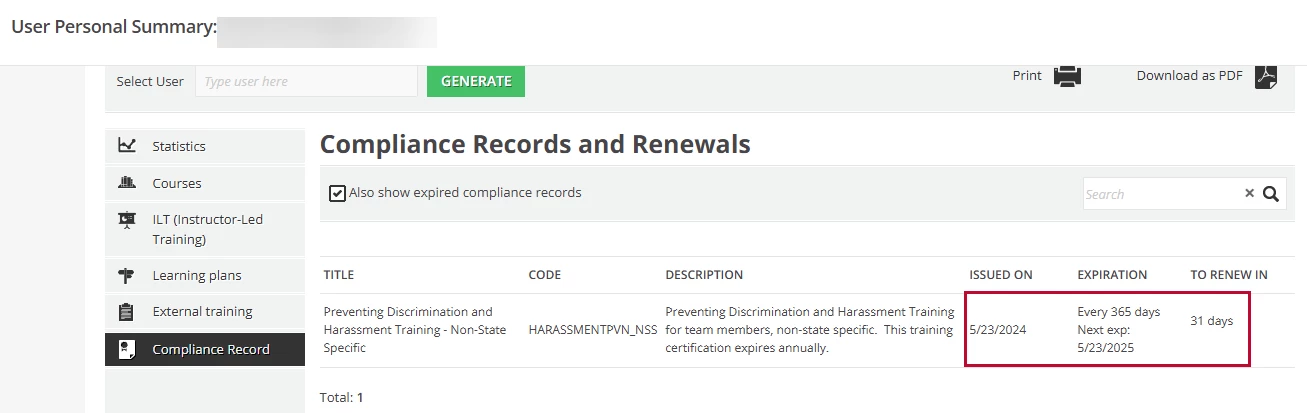
Their old certification is still showing as though it is the most current information, so when I look them up, it says they are expiring in “X Days” with an expiration date, but it is still the old information from the previous time they took a valid training for the cert.  This would have been the first/only time so far the user in the example pictures took the new training option.

Showing where this user says they will expire in 31 days, with the old expiration date.  This was from my Admin view.  The user view has the “Renew Now” option on this area.
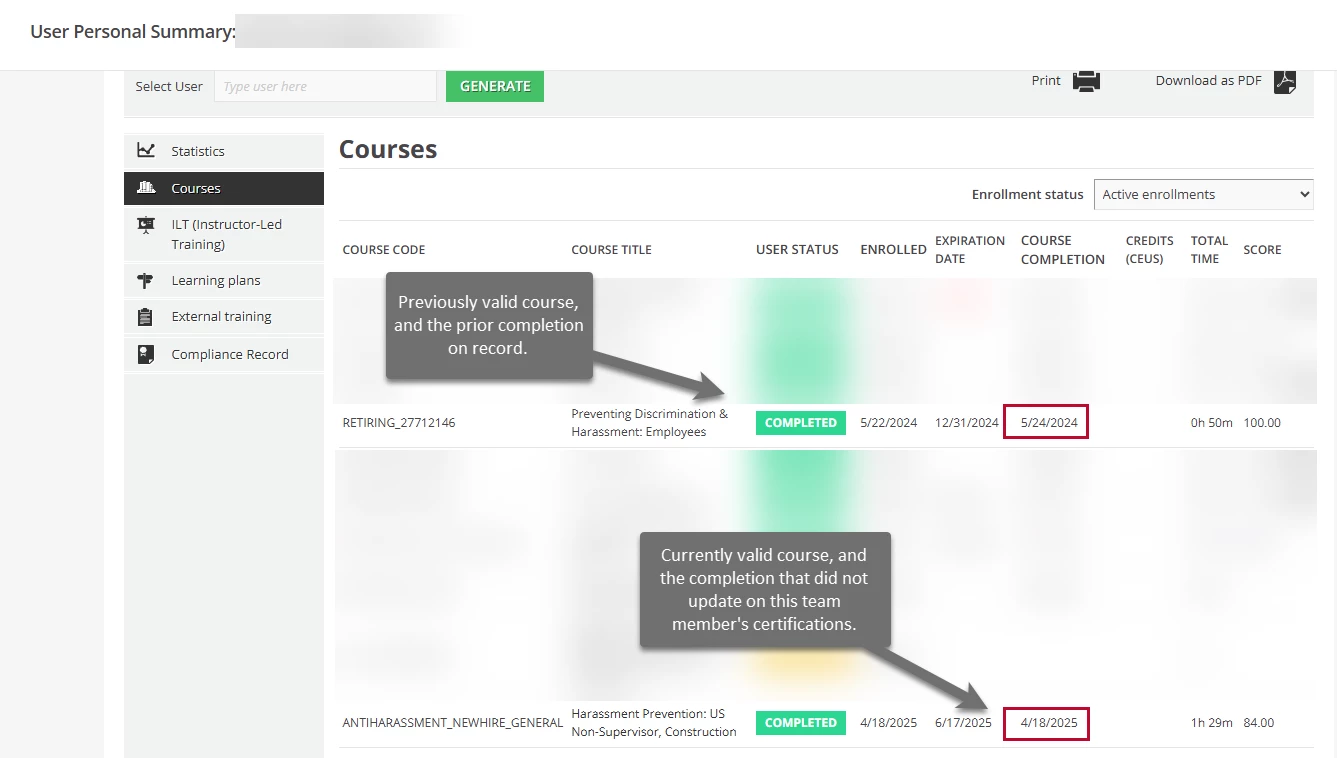
The old and new courses, both completed.  The retired course completion date reflects the current expiration shown in the first image. The more recent completion date from this week has not been captured in certifications.
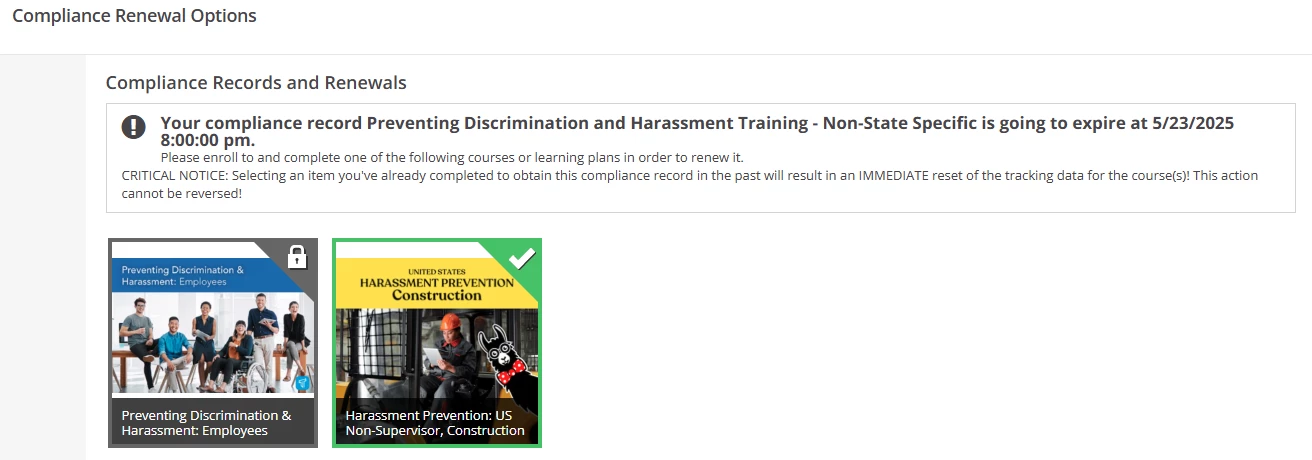
Showing the renewal options shown together.  The new course was the one this person completed, but the record is still showing that the expiration date is next month.


JZenker
Guide II
Forum|alt.badge.img+2
  • Guide II
  • April 22, 2025

When you say their records aren’t updating, are you not seeing them as Active in Certifications after they complete the course associated to the Certification?

Their old certification is still showing as though it is the most current information, so when I look them up, it says they are expiring in “X Days” with an expiration date, but it is still the old information from the previous time they took a valid training for the cert.  This would have been the first/only time so far the user in the example pictures took the new training option.

Showing where this user says they will expire in 31 days, with the old expiration date.  This was from my Admin view.  The user view has the “Renew Now” option on this area.
The old and new courses, both completed.  The retired course completion date reflects the current expiration shown in the first image. The more recent completion date from this week has not been captured in certifications.
Showing the renewal options shown together.  The new course was the one this person completed, but the record is still showing that the expiration date is next month.


It looks like the user was enrolled into the new (second) course recently. I would imagine they completed the course by locating it rather than clicking the Renew button. If they complete the course outside of the actual renewal process (renewal links or Renew button) it will not count as a recertify. 

May need to manually award the certification in this instance.