Hi all,
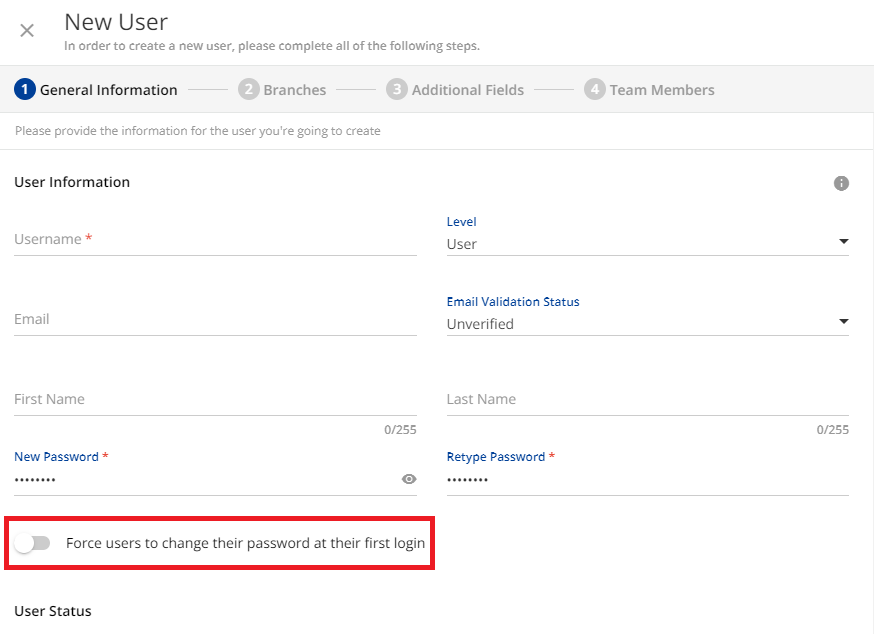
I would like to hide the option shown in the following screenshot. Does anyone know how to hide this with CSS? I’d like to hide it because we never use it and it is easy to turn it on by mistake.



 +4
+4Hi all,
I would like to hide the option shown in the following screenshot. Does anyone know how to hide this with CSS? I’d like to hide it because we never use it and it is easy to turn it on by mistake.
Best answer by gstager
Hmm, so if that’s the case, an alternative approach to the css change might be better, that sounds like an over all container for the interaction, which could then be adjusted back to just the toggle size and leave in as an option for folks if ever needed. Just throwing it out there.
You’re a pretty smart cookie
The switch and the label were pretty strongly tied together so I ended up reducing the size of that hit box (which hid the label text) - and put the text back in on the line above
Not the best fix but perhaps acceptable…? At least now the hit box is limited to the switch.
At least on my platform it was.
/** Reduces the size of the hit box **/
/** This also hides the label text **/

#doc-layout-page-content > ng-component > div.users-rightpanel > rightpanel-component > div > div.mdl-rightpanel.hyd-shadow-md.bg-white.ng-trigger.ng-trigger-isVisible.ng-tns-c379-7.has-description.has-breadcrumbs.ng-star-inserted > div.ng-tns-c379-7.mdl-rightpanel__body.text-grey-dark.border-grey-light > dcl-wrapper > div.ng-star-inserted > div > div.wizard-content > div > div:nth-child(1) > form > dcl-wrapper > ng-component > div > div:nth-child(2) > div:nth-child(3) {
    width:45;
}

/** Re-inserts label text above the switch **/

#doc-layout-page-content > ng-component > div.users-rightpanel > rightpanel-component > div > div.mdl-rightpanel.hyd-shadow-md.bg-white.ng-trigger.ng-trigger-isVisible.ng-tns-c379-7.has-description.has-breadcrumbs.ng-star-inserted > div.ng-tns-c379-7.mdl-rightpanel__body.text-grey-dark.border-grey-light > dcl-wrapper > div.ng-star-inserted > div > div.wizard-content > div > div:nth-child(1) > form > dcl-wrapper > ng-component > div > div:nth-child(2) > div:nth-child(2)::after {
    content: "Force users to change their password at their first login"
}
Enter your email address or username and password below to log in to Docebo Community. No account yet? Create an account
Enter your E-mail address. We'll send you an e-mail with instructions to reset your password.





