

Question

Document Storage for Learners

  • January 15, 2025
  • 8 replies
  • 125 views

SarahV2008
Contributor II
Forum|alt.badge.img

Hi,

I’m hoping someone will know the answer to this question. My company is in manufacturing and needs to keep records of training with leaners signatures on the learner's transcripts for when we are audited. Is there a way in Docebo to save documents on a learner’s profile? We were told that the Repository may be an answer but that won’t attach the documents to the learner, and we’d have to have multiple folders for all of our locations.

thanks,

Sarah

8 replies

lrnlab
Hero III
Forum|alt.badge.img+10
  • Hero III
  • January 15, 2025

Yes there is a way to do that...You might need to restrictive as to how many documents you want to save though.

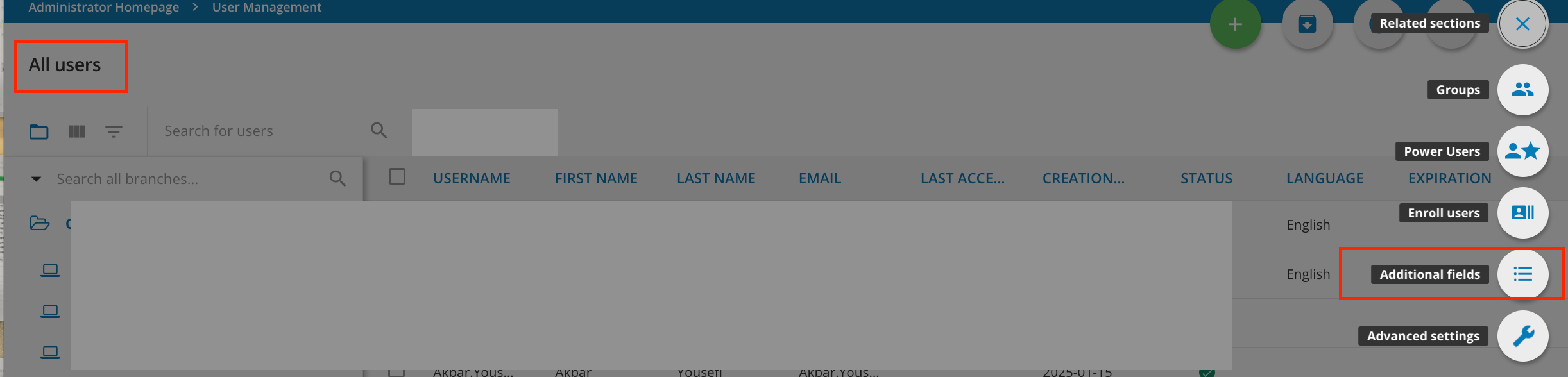
  • On the user management menu, goto to “Additional Fields”
  • You can then create a field with type: File Field
  • Choose your settings, then select Confirm

Once the field is enabled you can upload docs and as a super admin, you can also download them from the user’s profile summary screen > additional fields tab

Hope this work for your use case.


SarahV2008
Contributor II
Forum|alt.badge.img
  • Author
  • Contributor II
  • January 15, 2025

Hi! 


Thanks for the speedy reply. Sorry but I don’t know where the User management menu is…. Or is this on my personal page? (Under the hamburger menu, I don’t have an Additional field option under it either). If I would need to do this as an Instructor. If not, please let me know where this would be. 


lrnlab
Hero III
Forum|alt.badge.img+10
  • Hero III
  • January 15, 2025

Do you have admin access to create Additional Fields in the LMS? You will need that. If you do not, please see one of your super admins who can create this field for you. You will not be able to do this with only power user permissions.


SarahV2008
Contributor II
Forum|alt.badge.img
  • Author
  • Contributor II
  • January 15, 2025

Thanks! I do have access. Sorry for another question - I see it but there seems to be no actions I can take. I’ve attached a screen shot of what I’m seeing. 


lrnlab
Hero III
Forum|alt.badge.img+10
  • Hero III
  • January 15, 2025

Sorry...you need to CREATE the new field first. Then you can upload the file(s) on the user profile. 

You need to go to Additional Fields hen click the green + sign at the top right to create the new field.

https://help.docebo.com/hc/en-us/articles/360020125379-Creating-and-managing-user-additional-fields

You can follow these instructions


SarahV2008
Contributor II
Forum|alt.badge.img
  • Author
  • Contributor II
  • January 15, 2025

Thanks! I’ll check it out. I appreciate your time!


DrKRR
Novice I
  • Novice I
  • June 4, 2025

Yes there is a way to do that...You might need to restrictive as to how many documents you want to save though.

  • On the user management menu, goto to “Additional Fields”
  • You can then create a field with type: File Field
  • Choose your settings, then select Confirm

Once the field is enabled you can upload docs and as a super admin, you can also download them from the user’s profile summary screen > additional fields tab

Hope this work for your use case.


This was helpful for a discussion we were having this morning about options for college transcripts. Thanks for the info! 


dklinger
Hero III
Forum|alt.badge.img+11
  • Hero III
  • June 7, 2025

So even though ​@lrnlabs solution is plausible - and actually technically works? I would highly suggest to consider the impact of the approach - as it can create a reporting out snag. Storage is great. But being able to mine said storage is usually the very next ask that comes along.

By storing learning records in a user profile? You create a type of paradox that shouldn’t be compromised IMHO. You should user custom user fields to collect attributes about the person. 

But a users learning activity or records or certifications should be stored as learning objects to get the most report-ability out of the system. This treads carefully the Jurassic Park quote….and to paraphrase - we get so consumed with could the system do something? That you lose sight on should we be doing it in the first place.

My recommendation - slow down - consider the impact of said storage….

To quote some best practices:
 

Best practices

Choose your fields carefully Remember that user additional fields are primarily used to obtain additional information for reports, creating dynamic groups, and enrolling groups of users automatically to courses.

Keep them updated Make sure that the information for these additional fields are updated and easily retrievable in order to avoid messy platform and user management. For example, if you use a system integration such as ADFS, be sure that all of the additional fields that you want to pass to your learning platform are present. This also applies to CSV updates. Keep your databases consistent.

Visibility By allowing your users to change some user additional fields that visible to them, you can allow them to automatically move from an automatic group to another, and even change which catalogs are visible to them. For example, you could create catalogs divided by different lines of products, roles, or even user seniority (Rookie, Normal, Advanced, Expert), and so on.

Branch additional fields By applying the additional fields to branches based on a domain of the Extended Enterprise, users can see the additional fields that are relevant to their branch only. As the Superadmin, you have the assurance that only the fields necessary for that particular branch are shown and completed by the user.

Stay organized When viewing user additional fields in the User Management area of the platform, you can use filters and various views in order to hide or filter the info you see. This may help you narrow down the info that you're viewing

Watch out for manual entry by learners In some cases, some user information may be difficult to track down in your platform. In this case, set the field as mandatory and grant visibility to the user. At the first login, he or she will be forced to fill in the information to proceed. In order to reduce entry typos, avoid text fields, and use a field where users don’t have to type in responses manually.

Notes about File field additional user field type This additional field is accessible to the user from the My Profile section for editing. A new file can be uploaded only here. To download the existing file, the user can access it from the My Activities widget and then the Additional Info section. Clicking on the file link will download it locally.

As a Superadmin, you can access the file by selecting the user from the Users page in the E-Learning section of the Admin Menu and choosing to edit a user profile. In the Additional Fields step, you will see the fields and you can click on the file link to upload a new file, overwriting the existing one. As an option, you can download the file by accessing the User Personal Summary from the All Users page, by clicking on the ellipsis menu at the end of the user row, and selecting the related option, then moving to the Additional Info tab.