

Question

Has their been a change to how iCal attachments function in the outlook desktop application?

  • August 13, 2025
  • 2 replies
  • 28 views

Jtischler
Helper II
Forum|alt.badge.img+1

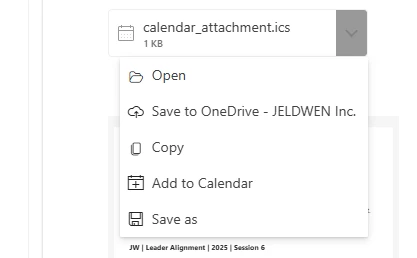
We are noticing that when an iCal is received as an attachment in the Outlook desktop application that it is not able to be saved to the calendar.  When you open it, it routes you to the O365 Web Outlook where you have to open it again and then add to calendar there. Even the icon looks different:

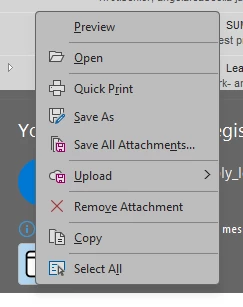
no add to calendar option
When opened it opens up webmail, and I have to open the attachment again
Only then once I open the attachment in webmail do I have the option to add to calendar

Has anyone else noticed this change?  How are users able to add and stay in the desktop application?

2 replies

lrnlab
Hero III
Forum|alt.badge.img+10
  • Hero III
  • August 13, 2025

This is likely a change in outlook not Docebo.


Jtischler
Helper II
Forum|alt.badge.img+1
  • Author
  • Helper II
  • August 13, 2025

@lrnlab very possibly, thats why the post to see if anyone else is experiencing the same.  I do have a ticket in with support as well to see what they have on this.  I will update if anything noteworthy is provided in the feedback.  The fact you didn’t know what this was makes me feel better that I have not missed something in the change to the new notification platform lol.  Much appreciated sir!