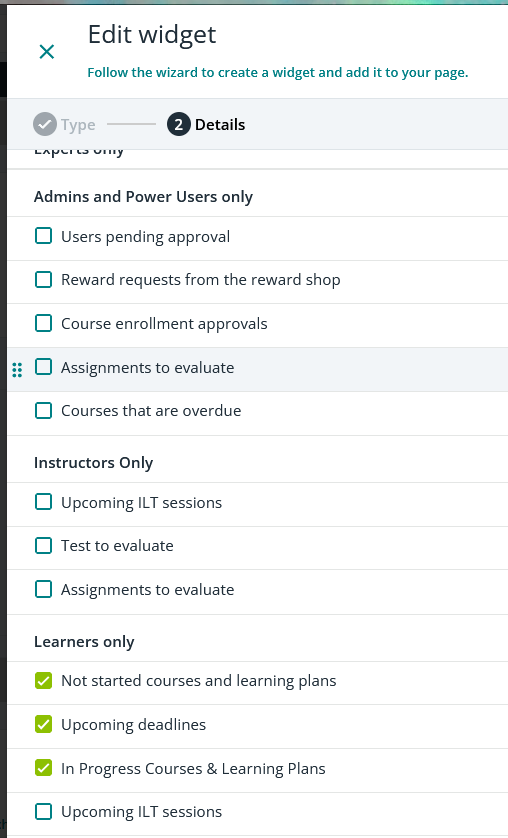
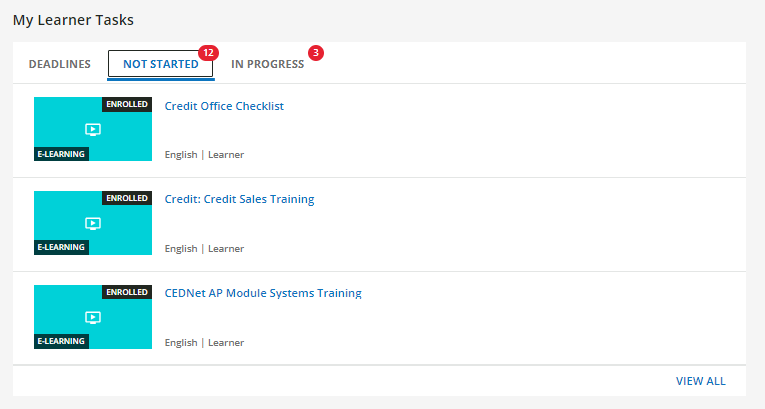
We want to use the Task List widget, but dislike the page layout of the page seen when you click “View All”.
I’d love to be able to change the target of the View All, but I’m not sure that’s possible. Our next option would be to hide the “View All”.
I’ve been playing with CSS trying to figure out how to do so, but haven’t had any luck. Any CSS wizards have any ideas?
Best answer by gstager
@ariel.zimmerman
Try this - with some notes...
/** Begin Hide View All on Task List Widget **/

#panel-1 > div > dcl-wrapper > ng-component > div > div > a {
    display: none;
}

/** End Hide View All on Task List Widget **/
“Panels” are the tabs across the top.
“Panels” are zero indexed so in your screenshot above - the Deadlines tab is panel-0 and Not Started is panel-1 so the code above should hide the view all link on that panel.
You can repeat the above CSS and change the panel number for each panel you wish to hide.
If you change the panels shown in the widget - it will change the panel numbers depending on where the new panel is inserted.
Test other areas to make sure the CSS modification does not change something else you don’t want it to.
@ariel.zimmerman Hi, Ariel … Could you give us a couple of screen shots? I don’t find anything in the Task List widget that is “view all”. This is how we use the Task List widget, and it works really well for us.
Sure! It’s on the widget itself. It shows just a few items and if there are more than fit in the widget, there is a “View All” button at the bottom. It links to the Docebo My Courses and Learning Plans, which we don’t like because there’s no way to hide the courses that are inside learning plans, so it’s overwhelming for the learners. We would prefer to either a- redirect the target link to a custom page with the view we want them to see or b-hide it altogether and we can add another widget with a button to a custom page.
#panel-1 > div > dcl-wrapper > ng-component > div > div > a { display: none; }
/** End Hide View All on Task List Widget **/
“Panels” are the tabs across the top.
“Panels” are zero indexed so in your screenshot above - the Deadlines tab is panel-0 and Not Started is panel-1 so the code above should hide the view all link on that panel.
You can repeat the above CSS and change the panel number for each panel you wish to hide.
If you change the panels shown in the widget - it will change the panel numbers depending on where the new panel is inserted.
Test other areas to make sure the CSS modification does not change something else you don’t want it to.
Okay, follow up question: if we don’t want all task widgets to do this, is there a way to indicate it happens just on this page?
Sure - it is a bit more complicated, though.
#doc-page-33 > div > widget-render-old > div > div:nth-child(2) > div:nth-child(2) > #doc-widget-277 > task-list-widget > div > tabs > div > div > div > div > #panel-4 > div > dcl-wrapper > ng-component > div > div > a {
  display: none;
}
Try this
Look at the dark maroon items in the code above that have the hashtags.
#doc-page-33
#doc-widget-277
#panel-4
Each of the number values here will need to change based on your environment.
You’ll have to determine the page number and the specific widget number and then panel number as previously discussed.
#panel-1 > div > dcl-wrapper > ng-component > div > div > a { display: none; }
/** End Hide View All on Task List Widget **/
“Panels” are the tabs across the top.
“Panels” are zero indexed so in your screenshot above - the Deadlines tab is panel-0 and Not Started is panel-1 so the code above should hide the view all link on that panel.
You can repeat the above CSS and change the panel number for each panel you wish to hide.
If you change the panels shown in the widget - it will change the panel numbers depending on where the new panel is inserted.
Test other areas to make sure the CSS modification does not change something else you don’t want it to.
Hopefully this is helpful.
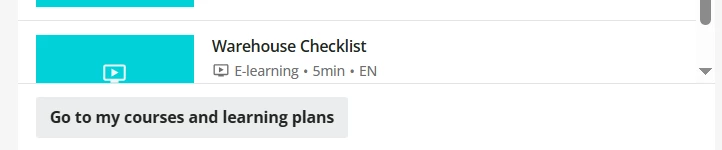
@gstager With the update that went out this week, this no longer works. There is now instead a “Go to my courses and learning plans” button, which we don’t want.