Answer

How do I use the "filters" input on the GET /manage/v1/user endpoint?

  • February 15, 2024
  • 4 replies
  • 318 views

I am successfully connected to and pulling users from the GET /manage/v1/user endpoint, however, I want to make use of the optional "filters" input to limit the results to only Power Users or Super Admins. This means I have to filter on the "level" attribute of the user. Can anyone explain the syntax for this sort of filter? The API explorer gives the following description on the field: serialize object containing list of filters and their options. I have tried a few options, the only one I have gotten results for (no Internal Server Error), but still the filter does not seem to be applied is this:

[{"level" : {"criteria" : "not_equal", "value" : "user" }}]

I cannot get the syntax correct and keep getting Internal Server Errors otherwise. Any help or examples would be great!


Best answer by t3d4

You were super close above, try this:

[{"level":{"option":"not_equal","value":"user"}}]


This worked for us, too - thank you!

4 replies

Bfarkas
Hero III
Forum|alt.badge.img+6
  • Hero III
  • February 21, 2024

You were super close above, try this:

[{"level":{"option":"not_equal","value":"user"}}]


  • Newcomer
  • Answer
  • February 21, 2024

You were super close above, try this:

[{"level":{"option":"not_equal","value":"user"}}]


This worked for us, too - thank you!


  • Author
  • Novice I
  • February 21, 2024

Thank you!


  • Newcomer
  • November 7, 2025


You were super close above, try this:

[{"level":{"option":"not_equal","value":"user"}}]


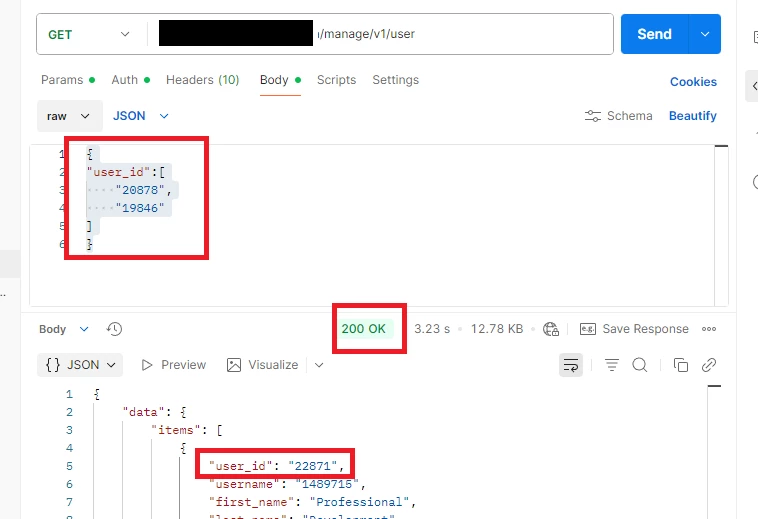
I want to bring a block of users based on a list of usernames. How to do it? 

[{"username":{"option":"equal","value":"ABC"}}] or …

Also, I’m trying this way :
 

{

"user_id":[

    "20878",

    "19846"

]

}

but the results does not filter. it brings all data

This is from Postman : 


The main idea is to bring a list of users based on username or user_id at once.

Could you help me ?