

Answer

Instructor Resources

  • August 1, 2023
  • 2 replies
  • 118 views

Forum|alt.badge.img

Hi Everyone

Is it possible to have the instructor’s slide deck in the training materials so that the instructor can access and present the slides without the attendees being able to access/view the slides for themselves?

We tried hiding the slides but then couldn’t figure out if the instructor could access and present them.

Many thanks

Best answer by lrnlab

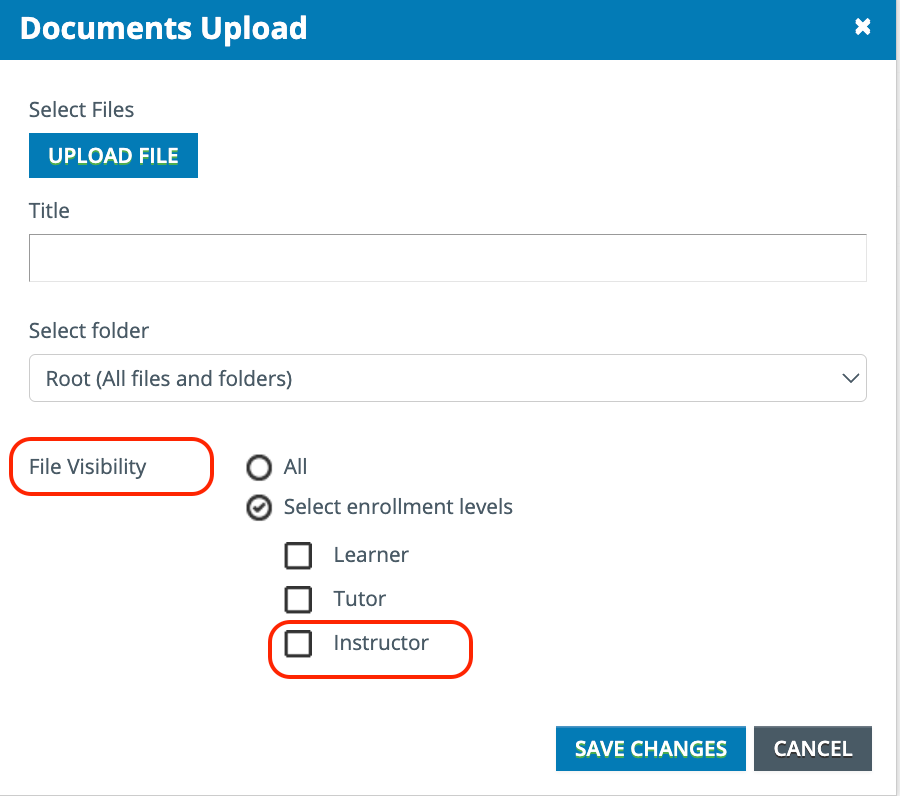
yes for sure...you can add the “File repository” widget and when you add the instructor deck to that widget, you specify who can see it.

 

2 replies

lrnlab
Hero III
Forum|alt.badge.img+10
  • Hero III
  • Answer
  • August 1, 2023

yes for sure...you can add the “File repository” widget and when you add the instructor deck to that widget, you specify who can see it.



KMallette
Hero II
Forum|alt.badge.img+9
  • Hero II
  • August 1, 2023

@SarahBee This is a bit more complex than just marking Instructor.  Because Docebo doesn’t have a global list of instructors, this setting works only for the instructor assigned to an ILT session/event. If an instructor doesn’t have an assigned session/event, or you don’t want the large administrative overhead of managing ILT courses, the content doesn’t get displayed.

For my instructor’s I’ve ended up building a catalog specifically for their presentations. These might just be another copy of the learner’s SCORM, or it may be PDF, PPTs, etc. The point is that it’s separate from the learner’s content. Further, I put the catalog on it’s own instructor’s dashboard/page so that they can get to it whenever the need arises.



