

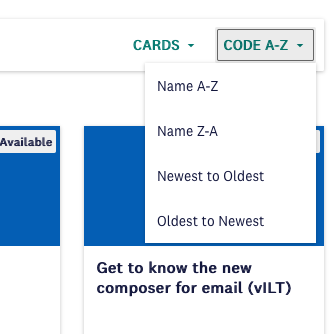
I’d like for users to only be able to sort courses by Newest-Oldest, Oldest-Newest, Name A-Z, Name Z-A. Is that possible? That would mean removing or hiding the option to sort by Code A-Z and Code Z-A in the course catalog.

Best Answer
Is it possible to remove the option to filter courses by Code A-Z and Code Z-A?
Best answer by alekwo
One caveat is that this code may be not unique to the catalog page, and may be hiding something else on other pages that would fit the same CSS selector, so you will need to test it and may need to work no a more specific selector.
Also, it assumes that sorting by codes will always be the 3rd and 4th option in the drop-down, so it will require changes should Docebo ever change the order of options in the menu.
doc-widget-course-catalog > ui-data-browser > div> div > div > div > ui-button-dropdown > div > div > ui-button-dropdown-option:nth-child(3),
doc-widget-course-catalog > ui-data-browser > div> div > div > div > ui-button-dropdown > div > div > ui-button-dropdown-option:nth-child(4)
{
  display: none !important;
}
before:
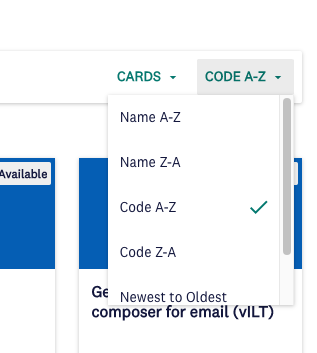
after:



Log in to Docebo Community
Enter your email address or username and password below to log in to Docebo Community. No account yet? Create an account
Docebo Employee Login
or
Enter your E-mail address. We'll send you an e-mail with instructions to reset your password.