Best Answer

Issue with Sequential Navigation in Multilanguage Course

  • October 22, 2025
  • 4 replies
  • 104 views

siyang
Novice III

We’re encountering an issue when enabling a course with Multilanguage settings and using Sequential Navigation.

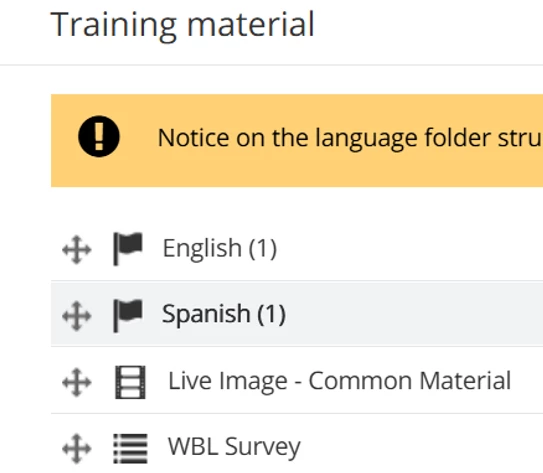
In the course, we have an English folder, a Spanish folder, and some common materials outside the language folders (as shown in the screenshot).

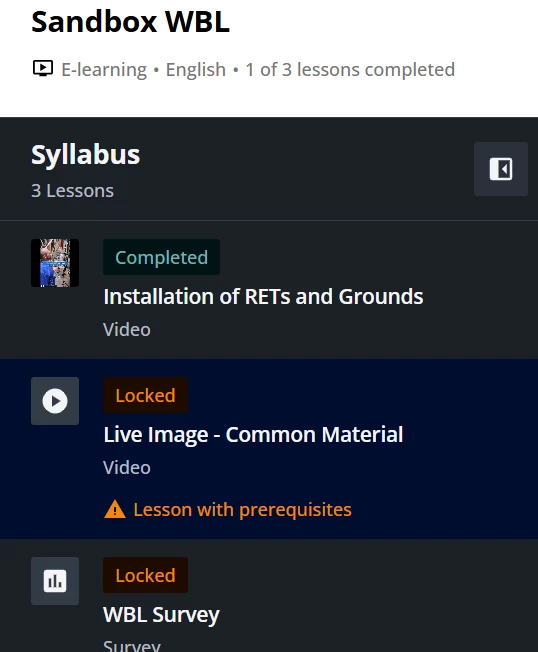
When I follow the English path, I’m able to complete all the content in the English folder, but I can’t access the next common material — it appears as Locked with a message that the prerequisite was not met.

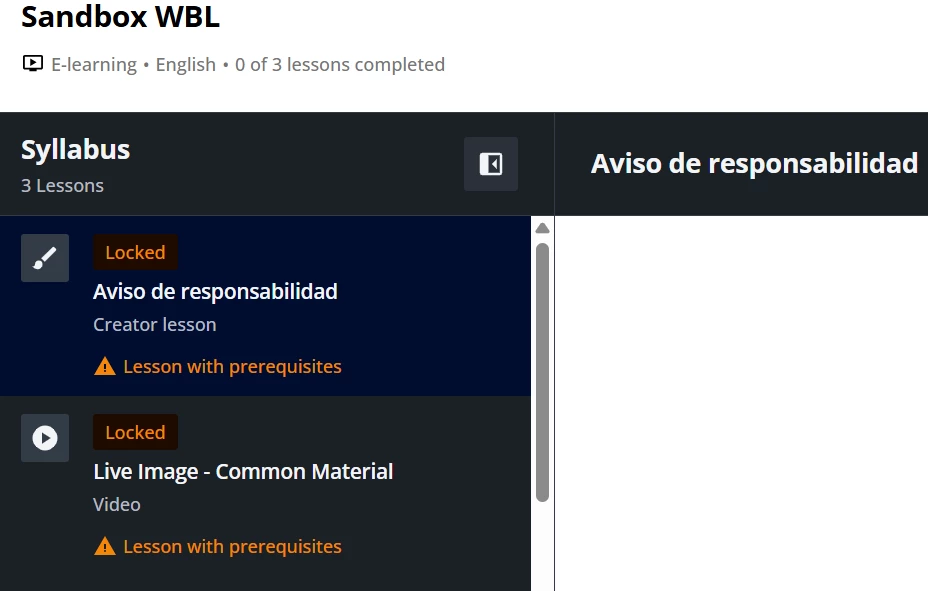
When I switch to the Spanish, I’m unable to start the course at all. The first Spanish learning material remains locked until I complete the English materials.


Did I do something wrong or the Sequential Navigation shouldn’t be applied when Multilanguage is enabled?

Best answer by siyang

Shout-out to Docebo’s Senior Customer Manager, Citlyn! She explained everything in detail and provided guidance from the product team to help us.

After investigation, the issue isn’t a platform bug but a limitation in how progress and completion are tracked in multilanguage courses:

  • Progress is calculated across all materials.

  • Completion is based only on the selected language folder.

Because our course uses Sequential Navigation, the platform requires learners to complete content in the order listed in the syllabus (English → Spanish → Common materials). This causes “Locked” items when switching languages or trying to access shared content.

GUIDANCE:

It depends on the structure you want, but when a single course contains parallel language folders (EN, ES, etc.), using Free navigation plus lesson‑level prerequisites within each language folder is the safer default to avoid cross‑language locking. 

  • If your single course has parallel language folders and a shared “common” section, prefer Free navigation and enforce order only inside each language via prerequisites; this prevents one language path from blocking the other while still keeping an intentional path within the chosen language. Lessons with prerequisites will still lock until their own requirements are met. 
  • If you truly need a strict linear path, keep Sequential navigation but restructure so learners don’t encounter the other language folder first (for example, duplicate “common” items inside each language folder, or split languages into separate courses). The lock behavior you observed is expected with sequential courses when items appear earlier in the syllabus. 
  • If you split by language, mark the language courses as equivalent so completing one counts for the other(s) where needed (e.g., in a learning plan). 
  • Be aware that in multi‑language courses, switching the course content language after starting can affect/reset tracking because progress is managed per language, which can amplify the perception of “locks.” 

Bottom line: choose Free navigation as your default for multi‑language courses with parallel language folders, unless you have a strong reason to keep a single linear path across languages.


4 replies

dklinger
Hero III
Forum|alt.badge.img+11
  • Hero III
  • October 22, 2025

Ew. No bueno. Following to learn a little more from this one…..


  • Newcomer
  • October 22, 2025

We encountered the same issue when using the “Sequential Navigation” and “Final Training Material Locked” settings. The same behavior occurs - learners are required to complete all materials in every available language before any content outside the language folders becomes accessible. We currently have a support ticket open for this.


siyang
Novice III
  • Author
  • Novice III
  • Answer
  • October 22, 2025

Shout-out to Docebo’s Senior Customer Manager, Citlyn! She explained everything in detail and provided guidance from the product team to help us.

After investigation, the issue isn’t a platform bug but a limitation in how progress and completion are tracked in multilanguage courses:

  • Progress is calculated across all materials.

  • Completion is based only on the selected language folder.

Because our course uses Sequential Navigation, the platform requires learners to complete content in the order listed in the syllabus (English → Spanish → Common materials). This causes “Locked” items when switching languages or trying to access shared content.

GUIDANCE:

It depends on the structure you want, but when a single course contains parallel language folders (EN, ES, etc.), using Free navigation plus lesson‑level prerequisites within each language folder is the safer default to avoid cross‑language locking. 

  • If your single course has parallel language folders and a shared “common” section, prefer Free navigation and enforce order only inside each language via prerequisites; this prevents one language path from blocking the other while still keeping an intentional path within the chosen language. Lessons with prerequisites will still lock until their own requirements are met. 
  • If you truly need a strict linear path, keep Sequential navigation but restructure so learners don’t encounter the other language folder first (for example, duplicate “common” items inside each language folder, or split languages into separate courses). The lock behavior you observed is expected with sequential courses when items appear earlier in the syllabus. 
  • If you split by language, mark the language courses as equivalent so completing one counts for the other(s) where needed (e.g., in a learning plan). 
  • Be aware that in multi‑language courses, switching the course content language after starting can affect/reset tracking because progress is managed per language, which can amplify the perception of “locks.” 

Bottom line: choose Free navigation as your default for multi‑language courses with parallel language folders, unless you have a strong reason to keep a single linear path across languages.



siyang
Novice III
  • Author
  • Novice III
  • October 22, 2025

I hope the Multilanguage feature can be improved, otherwise it’s just another “Folder” function.