



Question

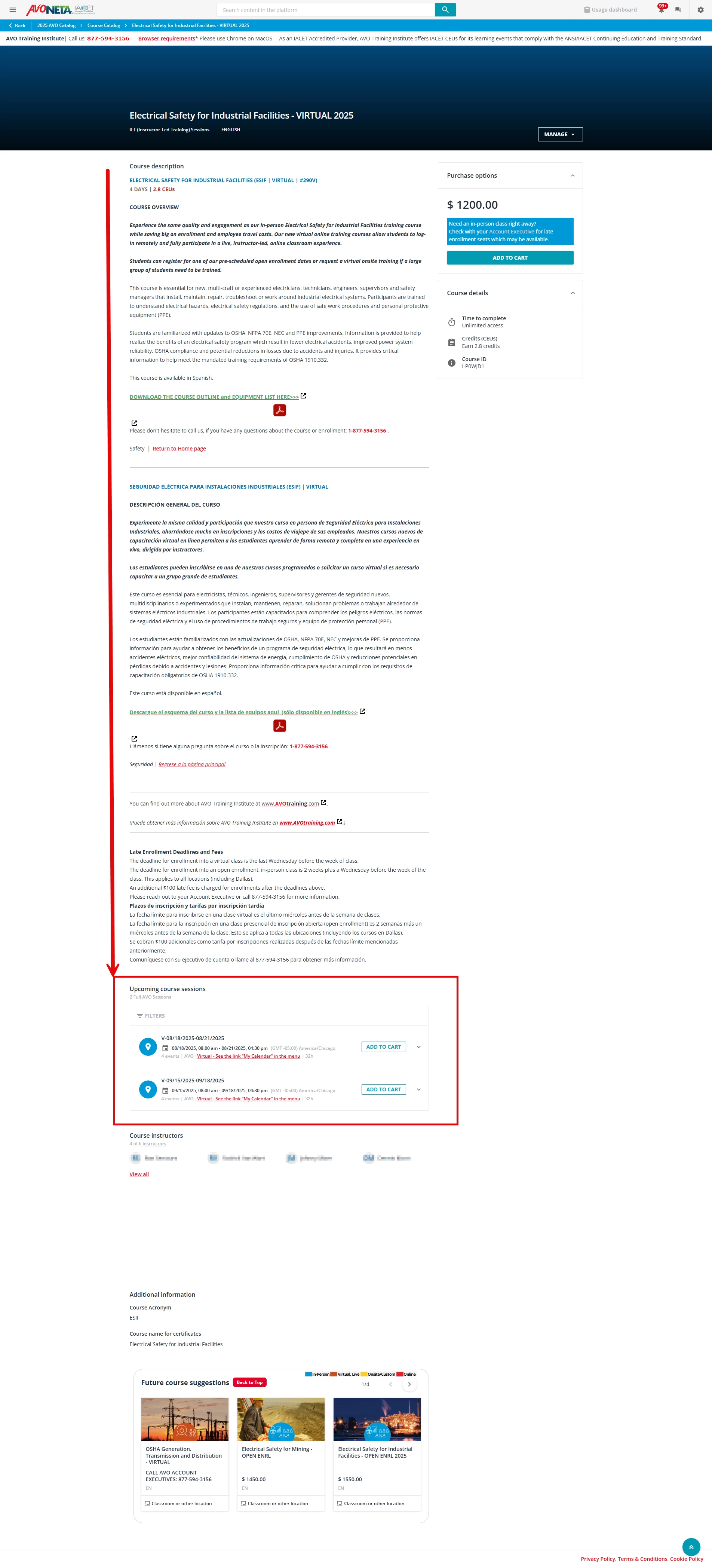
Showing Upcoming Course Sessions above the Course Description?

  • August 11, 2025
  • 4 replies
  • 38 views

elamast
Hero I
Forum|alt.badge.img+7

Does anyone know of a way to show the Upcoming Course Sessions above the Course Description box?  I can’t seem to find this in any of the settings.  In our world where we sell training we want the sessions list as close to the top as possible!

Example of how it looks now:
 

4 replies

lrnlab
Hero III
Forum|alt.badge.img+10
  • Hero III
  • August 11, 2025

I had some success with the Content Partner section that I was able to move to the bottom of the page using the z-axis. You might be able to do the same with the Sessions block and move it above the description..??


Forum|alt.badge.img+1

@elamast I think you could also hide that description with CSS to have only 3 rows visible and then have “Show More” button only for that box which would then have more visibility to the “Upcoming Sessions”.


elamast
Hero I
Forum|alt.badge.img+7
  • Author
  • Hero I
  • August 12, 2025

@elamast I think you could also hide that description with CSS to have only 3 rows visible and then have “Show More” button only for that box which would then have more visibility to the “Upcoming Sessions”.

Thanks.  That’s certainly a possibility if I can’t reverse the positions.


elamast
Hero I
Forum|alt.badge.img+7
  • Author
  • Hero I
  • August 13, 2025

Here was the solution to swap the positions of the Upcoming Sessions with the Course Description:


/* Make the parent a flex container with column direction - minimal change */
.ui-col-24.ui-col-md-16 {
    display: flex;
    flex-direction: column;
}

/* Use order to rearrange only the two specific widgets */
lrn-widget-content-description.lrn-content-overview-slot {
    order: 2;
}

lrn-widget-course-sessions.lrn-content-overview-slot {
    order: 1;
}

/* Ensure other widgets maintain their natural order */
lrn-widget-course-syllabus.lrn-content-overview-slot,
lrn-widget-course-suggested-for-you.lrn-content-overview-slot,
lrn-widget-content-instructors.lrn-content-overview-slot,
lrn-widget-course-additional-info.lrn-content-overview-slot {
    order: 3;
}



