Question

User additional fields - Visible but Not Editable

  • October 14, 2021
  • 12 replies
  • 278 views

Forum|alt.badge.img

We want to users to be able to see the type of purchase they have made but we don’t want to let them edit the field. Is there a way to make a user field visible but not editable? I am sure someone out there has gotten clever!

12 replies

lrnlab
Hero III
Forum|alt.badge.img+10
  • Hero III
  • October 14, 2021

@tonya.clark don/’t think we have that level of control...if you have a look at:

Advanced Settings > Users > Options (at the top), we only have the option to display the entire section or not; nothing to allow/not allow editing of the visible fields. We turned them all off except for the basics because of this…

Docebo should add the option to make these fields read only, or read/write...there are a few Ideas on this already posted so I just voted on them (found 4-5)


Forum|alt.badge.img
  • Author
  • Novice III
  • October 14, 2021

I will get out there and vote too! Thanks for the reply.


alekwo
Guide III
Forum|alt.badge.img+1
  • Guide III
  • October 14, 2021

@tonya.clarkthis option is not available in Docebo (there are already a few ideas registered on this topic e.g. LMS-I-1833, DL-I-1852, LMS-I-4236).

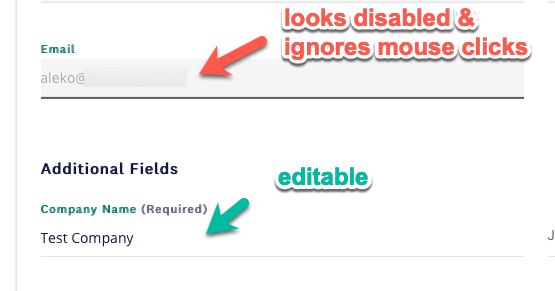
Still, using CSS you can make fields look like being disabled and make them not accepting mouse clicks (it will still be possible to navigate to them using the keyboard, but it’s rather unlikely that someone will know and be willing to make it - but I’d not base any group rules on them, as technically people will be able to edit them).


In our case, we are getting person’s email as well as their first and last name from the SAML identity provider, so we don’t want users to edit them in Docebo.

You may need to play with the right selector to get to the correct filed, but once you figure it out you can add something like:

{
pointer-events: none;
color: #AAA;
background: #F5F5F5;
}

To get something like this


Forum|alt.badge.img
  • Author
  • Novice III
  • October 15, 2021

Thank you Alek! This might work. I think we are going to have a new field that would display that we could use this code on. Our original field that is used to automate group enrollment will get hidden so it doesn’t impact the automation.


lrodman
Guide II
Forum|alt.badge.img+6
  • Guide II
  • August 2, 2022

I’m having trouble finding mine @alekwo haha


I don’t suppose anyone has a workaround like this for mobile?


I want users to be able to opt out of email via Boolean UAF but not edit their library card number. 


lrodman
Guide II
Forum|alt.badge.img+6
  • Guide II
  • August 2, 2022

.dcb-ui-input-text-input-element #ui-input-text-5{

   pointer-events: none;

   color: #AAA;

   background: #F5F5F5;

}

Not working @alekwo or anyone able to help


lrodman
Guide II
Forum|alt.badge.img+6
  • Guide II
  • August 2, 2022

Edit: fixed!

/*user additional field 1 (library card) uneditable */

#ui-input-text-5.ui-typography-body.dcb-ui-input-text-input-element {

   pointer-events: none;

   color: #AAA;

   background: #F5F5F5;

}


Is it possible to make it so tab skips it? keyboard-events?


kfortenb
Influencer I
  • Influencer I
  • January 29, 2024

I know this thread is a couple years old but we need this capability as well.

Using Extended Enterprise across multiple domains, we have SAML connected to different domains, each one syncing over several of our user additional fields. We need these fields for reporting at both the super admin level, and power user level.

Some of the fields contain sensitive data that is not appropriate for power user access, so we would like just some of the fields visible for reporting purposes. The problem with making the fields “visible” to our power users for reporting, is that as mentioned earlier in the thread, the users can then alter the fields themselves. This is a dealbreaker for us, as our automated groups rely on the fields being accurate. This is inviting manual data input problems that will be very difficult to track. The CSS patch might be somewhat effective but comes with risk, especially across multiple domains at the scale of large enterprise.


Daniel
Hero III
Forum|alt.badge.img+3
  • Hero III
  • January 30, 2024

I know this thread is a couple years old but we need this capability as well.

Using Extended Enterprise across multiple domains, we have SAML connected to different domains, each one syncing over several of our user additional fields. We need these fields for reporting at both the super admin level, and power user level.

Some of the fields contain sensitive data that is not appropriate for power user access, so we would like just some of the fields visible for reporting purposes. The problem with making the fields “visible” to our power users for reporting, is that as mentioned earlier in the thread, the users can then alter the fields themselves. This is a dealbreaker for us, as our automated groups rely on the fields being accurate. This is inviting manual data input problems that will be very difficult to track. The CSS patch might be somewhat effective but comes with risk, especially across multiple domains at the scale of large enterprise.

I very much agree. Our users can edit their username, first name, last name, and email address, all of which come from the SAML identity provider and should be read-only.


Daniel
Hero III
Forum|alt.badge.img+3
  • Hero III
  • January 30, 2024

Here's an idea to vote on to make the personal info read-only.


kfortenb
Influencer I
  • Influencer I
  • January 31, 2024

Thank you @Daniel ! I just gave it my vote. :)


  • Novice II
  • May 24, 2024


/*user additional field 1 (library card) uneditable */

#ui-input-text-5.ui-typography-body.dcb-ui-input-text-input-element {

   pointer-events: none;

   color: #AAA;

   background: #F5F5F5;

}


I want to urge users not to use this solution. It’s breakable by regular user navigation.

“My Profile” has 4 sections, defaulting to “Personal Info.” If users navigate to another section like “Change Password” or “Preferences,” when they navigate back to “Personal Info” your CSS won’t affect the desired fields. 

Docebo increments the ID number of these page elements as users navigate. So while this element may be ui-input-text-5 when you first load the page, it could be ui-input-text-12 if users clicked other sections then returned.

This increases the importance of Docebo giving admins direct control of which fields can be viewed or edited. I’m sure this is a common need, and CSS won’t hack it.