Question

Best Practices for Managing Archived Courses and Enrolments

  • May 9, 2025
  • 3 replies
  • 124 views

Forum|alt.badge.img

Hi everyone,

We're currently reviewing how we handle archived courses and their enrolments in our platform and would love to hear how others are managing this.

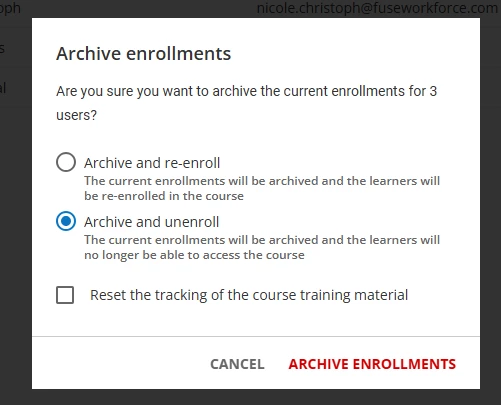
Right now, we've noticed that even when a course is archived using our internal process — which involves renaming the course (e.g. Z) Course Name ARCHIVED), changing the status to "Under Maintenance", and reassigning it to an Archive Folder — any associated enrolments still appear in users' learning plans (though they are locked). To streamline the learner experience, we're exploring the option of formally archiving these enrolments so they no longer clutter the plans.

We've tested the impact and noted the following:

  • Archiving an enrolment removes it from standard reports, as it's no longer active.

  • However, archived enrolment data is still accessible in custom reports, provided filters and columns like "Archived Enrolment [Yes/No]" and "Archive Date" are enabled.

  • Important limitation: Archiving is a one-way action — while learners can be re-enrolled, the original enrolment date can't be restored, only the completion date.

Before we proceed with this as a formal process, we’re really keen to hear from the community:

👉 How are you managing older or completed enrolments for archived courses?

  • Are you archiving them too?

  • Leaving them visible?

  • Using "under maintenance mode" or other custom workflows?

  • Or even unenrolling learners altogether?

We're particularly looking to reduce “learning build-up” in user plans while keeping records clean and reportable.

Thanks in advance for any insight you can share!

3 replies

monica.cheek
Helper I
Forum|alt.badge.img+3

We have been in the process of doing this as well.  What I’ve been doing is going into the enrollment status and unenrolling those who are just enrolled then filter on “in progress” and “completed” then go in and hit the “archive and enroll” radio button and uncheck “reset the tracking….” then archive enrollments.

Very interested to hear other users’ experience!  I did find out when I started this project, because it’s a background job AND I have thousands of users, I did bog down our system and caused some major issues.


  • Newcomer
  • May 9, 2025

Hi,

We are using archive enrollment only for courses that are no longer valid. The process is similar to yours:

Put course under maintenance and put it in the catalog obsolete where noone have access. 

Next step we only archive in progress and enrolled enrollments status. We leave completed out of it. So employee can see the on the first page and they are visible on the report.

We also do not use it for courses that are associated with Learning plans. LMS does not let us do it. We would have to remove the association with the learning plan and we really do  not want to do it.

Waiting for a moment when we will be able to archive course and learning plan with all its data. 


sarahbarber99
Novice II

Hi There,

We have developed a somewhat similar process.  A few notes we found out the hard way:

  • If you have Power Users that will need historical reporting for these archived courses, you will want to keep the course in a category that is visible to them.  We initially locked it down into an “archived” category that only superadmin had visibility to but Power Users dealing with compliance courses began reporting issues viewing reports on those archived courses.  As a work-around, we created a “DO NOT ENROLL - ARCHIVED” category that is still visible to all Power Users but is another way to denote that they should not be enrolling learners in this course. 
  • We decided to add “RETIRED MM/DD/YY” to the front of our course title - this is again helpful for our Power Users when enrolling learners in training so they can clearly see that it is retired, no matter the length of the title of the course.  
  • Any of our in-progress and enrolled learners when we need to archive the course get their enrollment status changed to “suspended”, then we update the enrollment validity to that day.