Answer

Customizing assignment submission notification to be sent to specific power users

  • November 3, 2025
  • 4 replies
  • 46 views

We have a power user profile set up as ‘Subject Matter Experts’ for a variety of courses that have assignment submissions. Even though a notification is set up for a specific course (intended to go to a specific SME power user), the assignment submission notification is sent to all SME power users, even the ones not assigned to that particular course. Is this because all SME power users have access to the same user groups? Does anyone know of a way to get notifications to go power users assigned specifically to a course?
 

Best answer by mstrom

Not sure if this helps but this is a different approach that works…

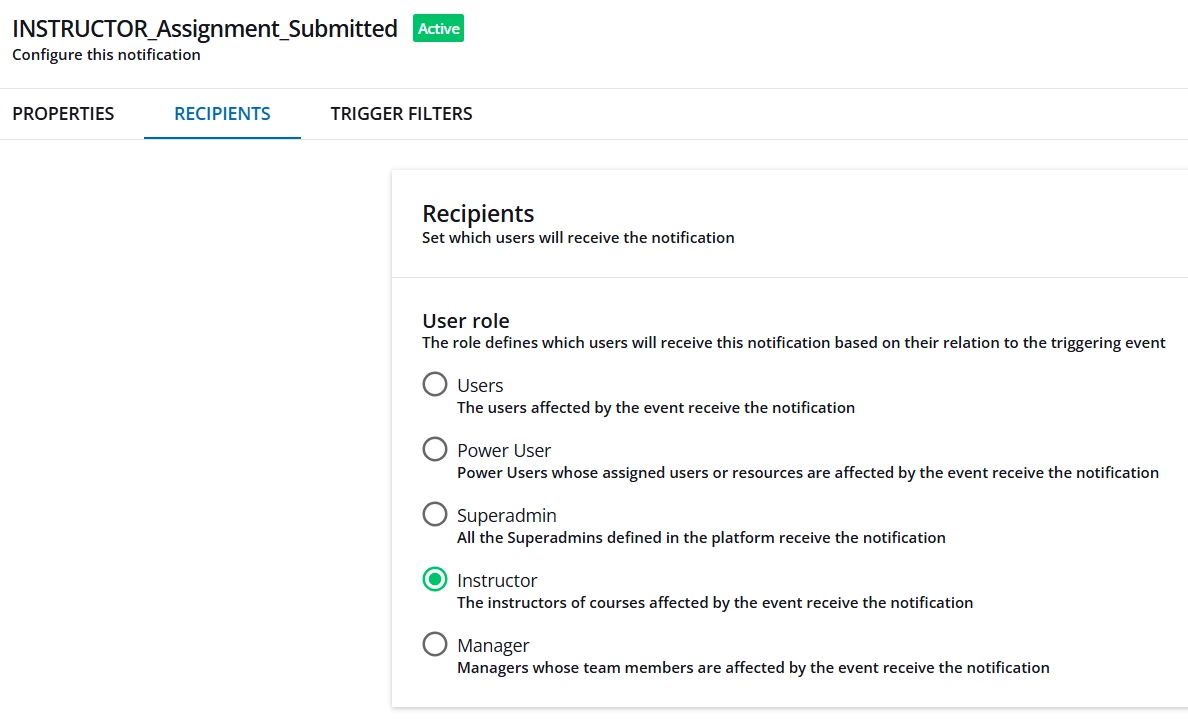
  1. Set your assignment notification type recipients to Instructor.


  1. Ensure the course you are targeting is added under trigger filters.
  2. Enroll the intended recipient into the course>select level to Instructor>Confirm.
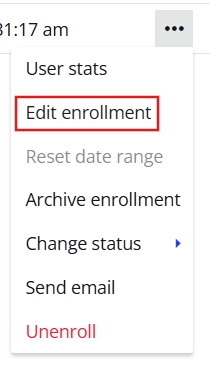
  3. If user is already enrolled>Under enrollments section of course, select ellipsis at far right of user and select Edit Enrollment.


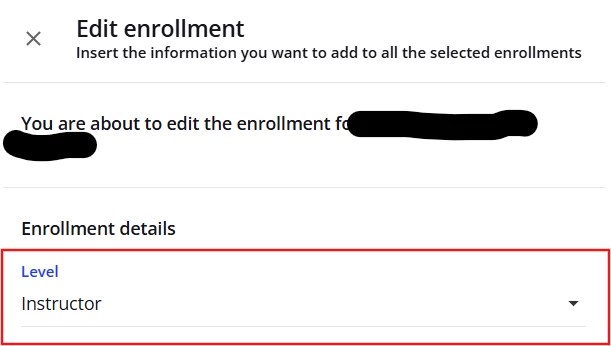
  1. Change level to instructor, then select save changes.


Now anytime an assignment is submitted only the user(s) set as Instructor will receive the notification for that course.

Rinse and repeat for additional courses/users.


4 replies

lrnlab
Hero III
Forum|alt.badge.img+10
  • Hero III
  • November 3, 2025

You should be able to control to whom it is sent using the “Trigger Filters” tab along with the Recipients tab. Did you set those? You may need to create a group of SMEs or define by Group(s) + Course(s), etc.


Forum|alt.badge.img+1
  • Answer
  • November 4, 2025

Not sure if this helps but this is a different approach that works…

  1. Set your assignment notification type recipients to Instructor.


  1. Ensure the course you are targeting is added under trigger filters.
  2. Enroll the intended recipient into the course>select level to Instructor>Confirm.
  3. If user is already enrolled>Under enrollments section of course, select ellipsis at far right of user and select Edit Enrollment.


  1. Change level to instructor, then select save changes.


Now anytime an assignment is submitted only the user(s) set as Instructor will receive the notification for that course.

Rinse and repeat for additional courses/users.


  • Author
  • Novice I
  • November 4, 2025

You should be able to control to whom it is sent using the “Trigger Filters” tab along with the Recipients tab. Did you set those? You may need to create a group of SMEs or define by Group(s) + Course(s), etc.

I had triggers set up for a specific course already. The system seemed to be treating the triggers as Users OR Course/Learning Plan rather than Users AND Course/Learning Plan. Following mstrom’s suggestion of enrolling the SME or Power User as an ‘Instructor’ in the eLearning seems to have solved the issue. This also allowed a specific Super Admin to receive an assignment submission notification. 


  • Author
  • Novice I
  • November 4, 2025

Not sure if this helps but this is a different approach that works…

  1. Set your assignment notification type recipients to Instructor.


  1. Ensure the course you are targeting is added under trigger filters.
  2. Enroll the intended recipient into the course>select level to Instructor>Confirm.
  3. If user is already enrolled>Under enrollments section of course, select ellipsis at far right of user and select Edit Enrollment.


  1. Change level to instructor, then select save changes.


Now anytime an assignment is submitted only the user(s) set as Instructor will receive the notification for that course.

Rinse and repeat for additional courses/users.


Thank you ​@mstrom!!! This seems to have worked. Enrolling a Power User or Super Admin as an Instructor for specific eLearning courses seems to have worked for assignment submission notifications.