Question

How have you handled a spring cleaning of users?

  • February 10, 2026
  • 5 replies
  • 24 views

LeslieKelley
Contributor I

Would anyone be willing to share their housekeeping best practice to clean out users? We provide mostly technical training for our dealers. Each dealer has a branch, and each branch has at least one power user who theoretically keeps up with the branch. Except that most of them don’t, so we have users who have moved on to other opportunities that are still in the platform. My manager has asked me to do a little spring cleaning with our instance of Docebo because he sees so many users who likely need to be deactivated. He is suggesting I create a course for Power Users as a means to facilitate this housekeeping where I ask them to evaluate their team and check a box to confirm that they have checked all their people. In that way, we would know who has completed a user review and who hasn’t. He also suggested we ask the community for ideas. Has anyone carried out some similar housekeeping and could offer a suggestion of how you handled user housekeeping? 

5 replies

sjennings78
Guide III
Forum|alt.badge.img+7
  • Guide III
  • February 10, 2026

I’d love to hear how others are doing this as well.  I am able to manage our internal users (employees) with a connection to our HRIS, but for our external users (clients) we have the same scenario - each site branch has at least one Power User that is supposed to keep their user list maintained but most do not.  Some sites are good about deactivating users but most are not. 

My first thought was to start with a list of user accounts that were created 2+ years ago but have never logged in and delete those.  For that I could use a combination of reports, Excel, and APIs (or possibly Docebo Connect, since we have that).

Then maybe get a list of accounts that have not logged in for at least a year (maybe 18 months to be safe, for those that only do annual courses) - but we’d only deactivate those accounts, not delete them, to maintain historical records.


willingworth
Influencer III
Forum|alt.badge.img+3
  • Influencer III
  • February 11, 2026

Question to folks who deactivate: why?

I struggle with this functionality altogether. The only impact we have on data retention are GDPR requirements. Beyond that, if we have 85,000 users with 40,000 not having logged in 5 years, it doesn’t necessarily have a negative effect on me or the platform. Unless it does, and I’m not aware?


I think your Course idea is a great way to distribute the task and monitor it. Checklists could be useful, but a simple course with a Yes/No exam would do the trick. Tack some notifications on it to remind folks, and I bet it’ll really help with governance.


dklinger
Hero III
Forum|alt.badge.img+11
  • Hero III
  • February 12, 2026

@willingworth - some folks have licensing / seat plans that they have to be sensitive to. Beyond that? Spring cleaning just makes administrating everything just a little easier

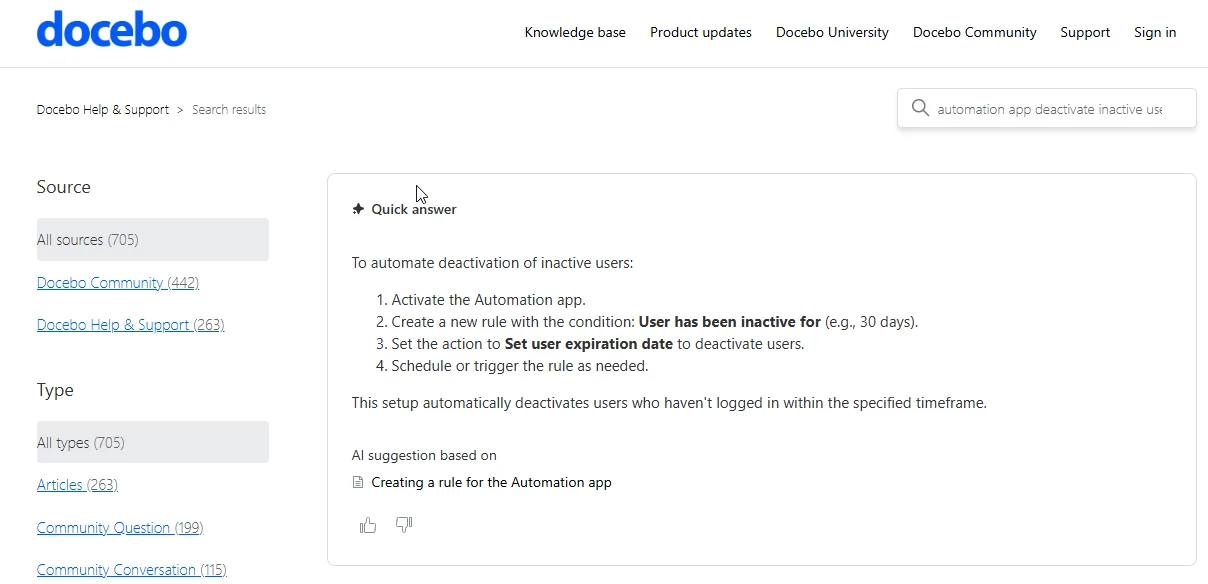
Hi - ​@LeslieKelley here is a thought. The automation app can help you deactivate users based on their activity and use. You set a threshold of a timeframe and the app will deactivate folks for you:

Maybe this can work for you?????

I can see a few scenarios where this may feel like a no go….and it could land up increasing login support - but if you can figure out a sweetspot - let automation drive it for you!!!!

https://help.docebo.com/hc/en-us/articles/360020082520-Creating-a-rule-for-the-Automation-app#h_01HFCAACJC6MVRDSBYG9B5VMZX


LeslieKelley
Contributor I
  • Author
  • Contributor I
  • February 12, 2026

Thanks, responders. I appreciate the input. I am a one person department and the community is a good place to hear from others who may handle their platform in different ways that I haven’t considered. ​

@willingworth  It doesn’t bother me if we have a million users, but it bothers my boss quite a bit to have people there that don’t belong and haven’t logged in. I got a good boss, so I want to keep him happy. We are starting a periodic housekeeping to move deactivated users from branches to an archive location because customers have complained of having to wade through long lists of deactivated users to find the current ones. 

At the same time this is rolling out, I have freshened our user and power user tutorials, and our user guide. I think our plan will be to:

  1. Send out a newsletter to tell dealers that an audit is coming
  2. Create a course to track which dealers have tackled the task
  3. Assign a course with a notification to power users with a link introducing new tutorials and asking them to take a few moments to check their roster and complete the course
  4. Follow up on those that don’t check, urging them to get it done
  5. Clean out deactivations
  6. Follow up on with note from that point forward anyone not logging in after ## days or months will be automatically deactivated, and set up automation to do that.  (thanks ​@dklinger)

Thanks to all for your input. Others just now reading can feel free to join the conversation and add any ideas!


willingworth
Influencer III
Forum|alt.badge.img+3
  • Influencer III
  • February 13, 2026

@dklinger & ​@LeslieKelley  --- oooooh, it sounds also like you have Power User setups where you have enabled other users to do user management or enrollment management. That makes a LOT of sense. We have two primary superadmins in our instance - the two of us aren’t bothered by all the excess, but I could see how a local PU may be less happy about wading through thousands of fluff.

Thanks for the insights!