


Question

HTML Drop Down Menu's Doing Funny Things

  • July 15, 2025
  • 3 replies
  • 31 views

Forum|alt.badge.img

Hi All, 

I’m a bit stumped so hoping someone might be able to give me an idea where to look. We have multiple pages that use essentially identical HTML and CSS to do a drop down menu bar. On some of these pages the menu bar appears above widgets further down on the page (such as the My Courses and Learning Plans Widget) on other pages it appears behind and is un-usable. I’ll attach two screen shots of the same HTML and My Courses and Learning Plan widgets displaying both of these things.

Any idea why that might be happening and any way people can think to ensure it appears above further down widgets? (note I have tried to change it from Card to List and it still goes behind one the one page)
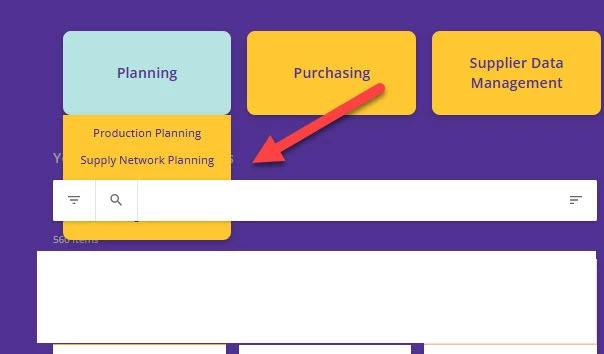

Thanks in advance if anyone can point me in the right direction!

3 replies

Forum|alt.badge.img

The only other thing I could think was the order with which they were added to the page… does that matter?


elamast
Hero I
Forum|alt.badge.img+7
  • Hero I
  • July 15, 2025

My gut feeling is that the z-index values are higher/lower related to the elements that they are covering or are being covered by.  You can check out the z-index values using a tool like this in Chrome:  https://github.com/gwwar/z-context

You can adjust the z-index values through css.


Forum|alt.badge.img

@elamast - Thanks for the guidance here. In further research it looks like the out of the box docebo widgets have a Z-Index of “auto” so I’ll have to play around with how to ensure my HTML objects appear above this.

