[UPDATED] My Team Dashboard – Release Dates Confirmed!

  • May 12, 2025
  • 24 replies
  • 1292 views

raisa.holmo
Docebian

[Updated Sep 11, 2025]

We’re excited to announce that the My Team Dashboard is almost here, however, a small delay has impacted the original Sandbox availability from August 11 to September 15 (GA remains October 6). This delay means you’ll get an even stronger, more reliable experience on day one.

Thanks for your patience—we can’t wait for you to explore this new feature!


Some of you - or many - have been eagerly waiting for the manager dashboard, and we’re thrilled to share that it now has a confirmed release date:

  • Sandbox Availability: August 11th September 15th
  • General Availability: October 6th

The My Team Dashboard will be added directly to the My Teams page, giving managers an overview of team activity, including overdue items, upcoming deadlines, and key learning metrics. It’s designed to help you stay on top of your team’s learning progress and take timely, targeted action to support their development.

🔍 Want to learn more?
Check out the My Team Dashboard card posted on the Docebo Feature Roadmap to learn more about what’s coming! Thanks for your continued feedback - it plays a huge role in shaping the future of Insights!

⚠️ Please note: If you are on the Engage package, the My Team Dashboard will not be available to you. 

24 replies

  • Contributor II
  • May 12, 2025

This is EXCELLENT news! Our leadership team has been asking for this for some time - great to see that it is coming soon!


jungerer
Contributor II
Forum|alt.badge.img
  • Contributor II
  • May 12, 2025

Love the card in that link.  Will the columns at the bottom of that card be customizable?  We have very low use for “time spent in learning” due to that metric being skewed when someone leaves the browser tab open.  We prefer using Course Completion % instead.

Also, will learning plans be included?  We have some of our internal education via learning plans so knowing the progress at the plan level gives leaders more context than the individual courses.

Great feature looking forward to it!


dklinger
Hero III
Forum|alt.badge.img+11
  • Hero III
  • May 12, 2025

Morning - a continuation of where ​@jungerer is going ​@raisa.holmo - how much of the dashboard is:

  • admin customizable (we help to configure an experience)
  • manager customizable

is going to play a very important role in how the tool will be perceived and seen.

Our folk have ALOT of information pushed at them all the time. So getting them to what they need as quick as we can for key learning programs has to be a primary driver.

My Team Reporting had many challenges with too much data being delivered - so it would be great if we can impact what we feel is relevant for our orgs.


jungerer
Contributor II
Forum|alt.badge.img
  • Contributor II
  • May 12, 2025

I’ll add to ​@dklinger’s comment.  When I was working with my PowerBI team to basically build this in that tool, one of the feedback we got was that leaders have too many dashboards to remember to look at.  They wanted a monthly summary that they could subscribe to and have sent to them so they remembered.  


jungerer
Contributor II
Forum|alt.badge.img
  • Contributor II
  • May 12, 2025

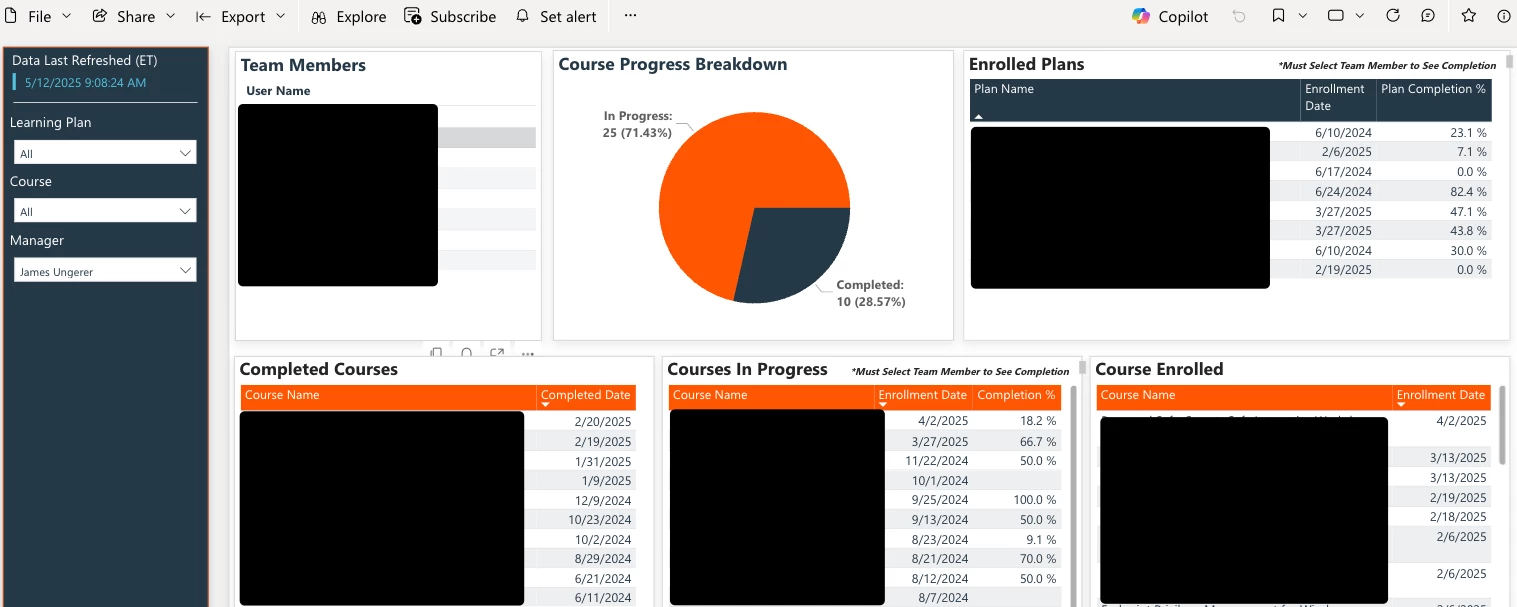
This is what we wound up building (blacked out data due to privacy issues at my company).

The page auto loads the manager’s team.  When you select a user it displays completion % for everything.

The tables along the bottom are auto sorted by most recent at the top so the priority stuff is always there.


raisa.holmo
Docebian
  • Author
  • Docebian
  • May 12, 2025

Love the card in that link.  Will the columns at the bottom of that card be customizable?  We have very low use for “time spent in learning” due to that metric being skewed when someone leaves the browser tab open.  We prefer using Course Completion % instead.

Also, will learning plans be included?  We have some of our internal education via learning plans so knowing the progress at the plan level gives leaders more context than the individual courses.

Great feature looking forward to it!


Thank you so much for sharing your feedback! We’ll be sharing more details about this feature in the coming months, but in the meantime, I highly recommend adding your input 💬 to the My Team Dashboard card. In the card, you can vote on how important this feature is to you, and after voting, you can also leave a comment. This ensures your feedback reaches our product team directly and helps shape future updates. 😊 


lrnlab
Hero III
Forum|alt.badge.img+10
  • Hero III
  • May 12, 2025

Excellent thank you


Forum|alt.badge.img+2
  • Helper II
  • May 14, 2025

Thank you! This is the most anticipated feature for our managers. Can’t wait to see this.

Would also love to see a status chart for learning plans. We assign mainly role-based learning plans to our internal employees and individual courses are generally the compliance courses. 


  • Contributor II
  • September 17, 2025

In addition to this - is there a way to connect from the individual “My Team Card” on the Manager page to the dashboard summary for each user, as well as a total team dashboard report?

Managers would like to be able to select one of their team members, and then see the summary dashboard for that user only (vs. applying filters on the summary page). 


Forum|alt.badge.img+2
  • Helper II
  • September 17, 2025

This is what we wound up building (blacked out data due to privacy issues at my company).

The page auto loads the manager’s team.  When you select a user it displays completion % for everything.

The tables along the bottom are auto sorted by most recent at the top so the priority stuff is always there.


Hello ​@jungerer -- Love what you posted above. What tool did you use to create that? Is that a page in Docebo or most likely outside of Docebo? 


Forum|alt.badge.img+4
  • Helper II
  • September 18, 2025

Has anyone been able to get this to work in the Sandbox?  On the Courses & Learning Plans tabs I just get a “data failed to load” error


lrnlab
Hero III
Forum|alt.badge.img+10
  • Hero III
  • September 18, 2025

@mzirnhelt having issues as well...opened a ticket. It seems to work for a power user (why, dunno) but as a super admin, I can only view the course tab if I first go the LP which loads but but no data is displayed and then back to the course tab; which again has no data. The PU can see data when they use it but you cannot impersonate. you must be logged in as the PU to get it working. Good thing this is just in our sandboxes now. Hopefully this can be fixed for stabilized before it hits production.


  • Novice II
  • September 26, 2025

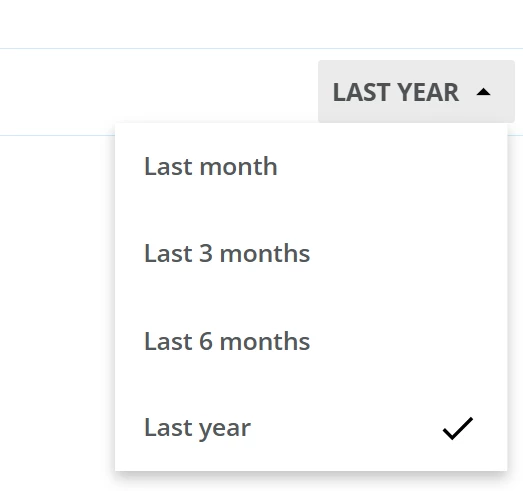
I’ve noticed the My Team Dashboard is quite limited in regards to the time frame of data it will show.  Has anyone found a hack to view team progress longer than within the last year?  Or within a defined time frame (ie September 1st - December 1st).


walteredavisjr
Contributor I

Agree with ​@nogloff comment on time frame and would add that the time frame would cause Overdue metrics to be inaccurate for anything outside that time frame. My expectation as a manger is that it would show metrics without a time constraint by default so I can see the full picture then I could choose to change the timeframe. I can already see our org sharing negative feedback about this. 

My other question is will we be able to adjust or at least “reorder” any of the filters or visuals for our organizations. Example Overdue is top of visuals which is great that its highlighted since that will be a primary action for many managers. However the filter so that only overdue is shown is a couple of filter options lower I had to scroll to see it. Any feedback would be appreciated.  


walteredavisjr
Contributor I

I would also like to propose having a list of team members or branch with team members in case its a manager of managers to quickly choose a team member rather than having to search and look up. 


lrnlab
Hero III
Forum|alt.badge.img+10
  • Hero III
  • October 2, 2025

These are all great suggestions ​@walteredavisjr will you be opening an. idea for this so we can vote it up? Thank you.


walteredavisjr
Contributor I

Hi ​@lrnlab thanks for recommending. I created an IDEA for each of the areas we thought could use some improvement. Would look forward to others support and VOTE on those relevant for your organization. 


lrnlab
Hero III
Forum|alt.badge.img+10
  • Hero III
  • October 3, 2025

thank you ​@walteredavisjr voted them all up


Forum|alt.badge.img+4
  • Helper II
  • October 7, 2025

Did this roll out as expected on the 6th?  My managers still aren’t seeing it.


jckemv
Helper I
Forum|alt.badge.img+2
  • Helper I
  • October 8, 2025

Did this roll out as expected on the 6th?  My managers still aren’t seeing it.

I cannot see it either here in Melbourne, Australia timezone and it is the 8th Oct.


lrnlab
Hero III
Forum|alt.badge.img+10
  • Hero III
  • October 8, 2025

same here still not seeing the updates in prod sites


  • Novice II
  • October 8, 2025

Hi ​@lrnlab thanks for recommending. I created an IDEA for each of the areas we thought could use some improvement. Would look forward to others support and VOTE on those relevant for your organization. 
 

Thanks for initiating all these ideas. I’ve upvoted them all.  The ‘Exclude Inactive Users from Manager Dashboard Data’ and ’Manager Dashboard Team Member List for Easy Filtering’ are the two biggest pieces of feedback / issues I’ve heard from my management team today.


Forum|alt.badge.img
  • Influencer I
  • October 23, 2025

I agree with ​@nogloff there should be a custom date filter.

Are there plans to add a Certification Dashboard for Managers?

Cc: ​@gerrodhudson 


ldlmcoitrg
Novice III
  • Novice III
  • November 6, 2025

Hello ​@gerrodhudson, sharing this idea submitted for adding the completion rate in the learning plan details table.