


Before I even start with my thesis, I will first point everyone to Bfarkas and his numerous resource on APIs. He’s produced so many useful guides and insights, so if you really need to get into the weeds, start with his work.
Lions, Tigers, APIs, AIs, Oh my!
How does one title something without AI anymore? You think of something else funny and cute, then you run the novelty into the ground with too many commas. I promise, I’ve written all of this post without the use of AI. Now, enjoy the meat:
My thesis:
For a long time, I hesitated diving into the Docebo API. Frankly, it’s intimidating. I’d never written an API in my life. I have worked with colleagues on APIs, but I had never done the work myself. Sometimes I would dip into the API browser and perform a single command in the browser, but a real automation processing LOTS of data?
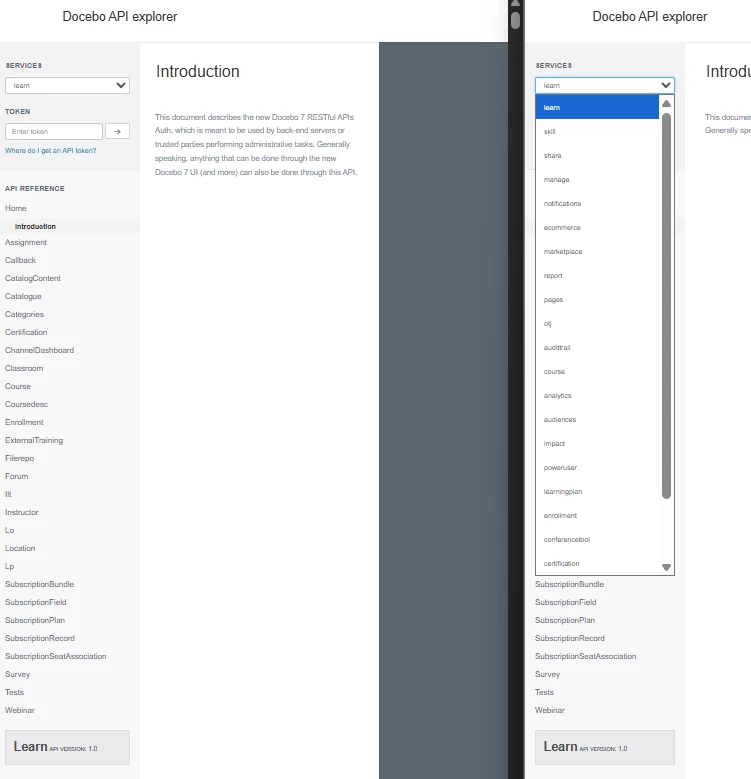
Nope. Scared away…
So back to copy/pasting my way through those laborious manual tasks:
- Needed 500 enrollments? I hoped the CSV imports were sufficient.
- Had to upload a bunch of folks to a bunch of courses? Block my calendar…
- Creating a ton of new courses, ILT session/events, or other materials in the platform? Prepare for the CTRL+C, CTRL+V hand cramp.
...all of this until I stumbled into what AI could do for me.
The Task at Hand
For reasons irrelevant to this post, we run a lot of ILT content outside of Docebo. Therefore, we do not have the benefit of the automations and attendance features available through Docebo. However, we want to keep Docebo as our single source of truth for all learning records. So, to date, we have been having our ILT instructors keep their attendance in spreadsheets and then importing that data into Docebo to be tracked in a series of courses.
As you can imagine, that ends up being a lot of enrollment data across a lot of courses. It’s a bit unbearable to manage manually. Not only is the manual effort laborious, but we have to do this on a weekly basis. So, when I joined my current team early in 2025, I was handed this task.
I immediately decided to “API or die” on this hill. The manual effort is too much.
The Solution
Our company subscribes to several AI platforms: I set out with Google’s Gemini to solve this problem.
My considerations:
- I was fairly confident in my prompt engineering: I gave the AI a role as an expert in Docebo and APIs.
- I tested the AI a few times, asking it to give me examples of Docebo endpoints.
- I reviewed the data I had in the spreadsheets and worked with the AI to determine that all of it could be imported via API.
Then I simply asked AI to write me an Apps Script in Google Sheets that would import to Docebo. While this took quite a bit of iteration, I might say one maybe even two full business days of testing, the work was “that simple.”
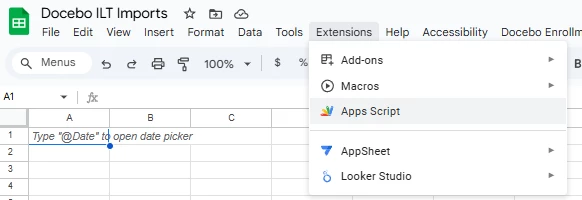
I did not write a single piece of code. I did not look up a single endpoint in the API browser. I did not need any external support (though my buddy who’d already done this once did provide me his authentication library which really helped).
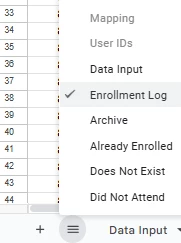
Now, AI had not only created the connections, helped me troubleshoot how the data imported, but it also created a full user menu for me inside of Google Sheets:
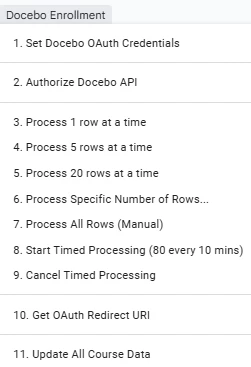
At the end of the day, here is all of the functionality the API provided me:
- Check a row of user data
- If the user does not exist in Docebo, put them on a sheet “Does Not Exist”
- If the user is already enrolled in the course, put them on “Already Enrolled”
- If the user did not attend the live training, put them on “Did Not Attend”
- If a user exists in Docebo AND attended the ILT, put them on “Archive” after completing these three tasks:
- Enroll the user in the course
- Update their enrollment from “Enrolled” to “Completed”
- Add notes to an Enrollment Additional Field
- Information I needed
- A “Mapping” sheet with all of the course names, their ID number (numerical ID number from the course URL, not the auto-generated Course Unique ID), and Course Code
- A “User IDs” sheet with all of my potential users so that it can check if the users exist or not
- Logging & Processing
- Create an “Enrollment Log” sheet so I can see exactly what happens with each row of data
- Provide me options for importing (as seen in the menu screenshot above)
- Process X row(s) at a time
- 1 row for testing
- 5 rows for a quick burst
- 20 to do a single course or so
- X rows to perform large operations (100s of rows)
- Time out imports
- To not spam the API and to not take forever, I asked the AI to build a time-based importer. This still needs some iteration, but is only relevant when dealing with 1000+ rows.
- Process X row(s) at a time
Conclusion
This sheet works. Each time I need to run updates, everything processes through and I can step away from my importer without any worry. No more hand cramps or fear of importing the wrong data to the wrong courses.
If you have any questions about how or suggestions for this post, let me know. Glad to share that you, too, can become an API user with AI support.
Good luck automating!