


I wanted to share our experience with updating the URL of our extended enterprise using Docebo built in pages to manage the redirect from the old URL to the new URL.
Issue:
Recently, we went through a re-brand with a new company name, which meant we had to updated the custom URLs we had for our extended enterprise domain. We knew that we could set up a re-direct with our URL provider, but we really wanted to have a message to display when the user accessed the incorrect URL letting them know to save the new URL in their favorites. We wanted an easy solution without having to rely extensively on our IT teams to assist us.
This is how we did it:
We figured out that we could use a Docebo page that comes up when someone attempts to access an extended enterprise that is not associated to their user branch (the multidomain selector page)!
- We happened to have an extra extended enterprise available. So we set up a duplicate of our current extended enterprise what we were using, but set it up with the new URL and pointed that new extended enterprise to a place holder branch that was empty.
- Turned off the setting to restrict extended enterprise login.

This way, when a user logs into the wrong extended enterprise, they are redirected to the multidomain selector page (url is <your domain>/learn/multidomain/selector).
- The image below is what our page normally looks like, so we had to make a couple of adjustments to have it work as a redirect page.
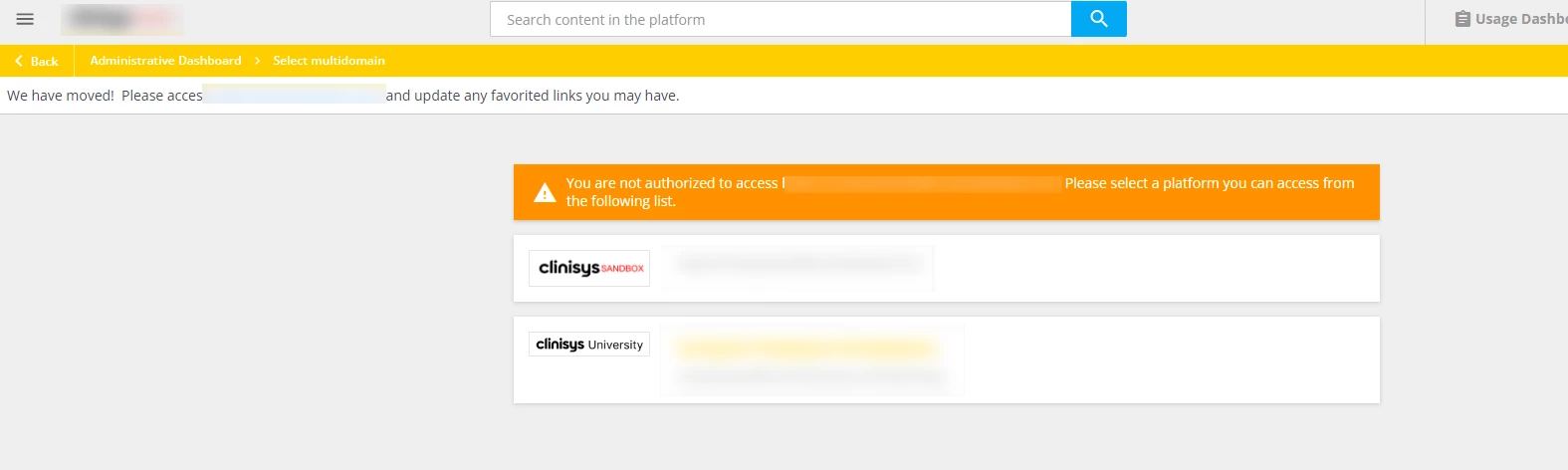
- In the localization tool, we updated the “You are not authorized” message to say “We have Moved! Please take a moment to update your favorited links. Click the button below to proceed”. (This message was updated from the localization tool, under the multidomain module of the localization tool.)
- There are two buttons appearing, one for the main docebosaas url, and the extended enterprise url. We only want the user to see the button that points to the extended enterprise they should be accessing. Using CSS, we were able to hide the first button (which is the one that lists the main docebosaas url).
Here is the CSS code we used for that:
/**hides button on multidomain selector page**/

.multidomain-button:first-of-type {

    display: none;

    }

/**END**/
That’s it with the set up!
In fact, with this method of using the multidomain selector page we were able to set up our extended enterprise well in advanced and inform our users what the new URL was going to be and when we were going to launch it.
If someone went to the new URL before the launch date, they were redirected to that multidomain selector page, and our message at the time said “Not yet! We will go live with the new URL on this date”.
Once we were ready to have users access the extended enterprise with the new URL, we swapped the branches on the extended enterprise domains, and instantly our redirect was working beautifully!
We were expecting to receive some help desk tickets related to this change, and we were happy to report, that with this method, there were no issues or tickets or questions that came up! We ended up using this method with a second extended enterprise because we needed to change that URL as well!
Some important to consider when you do this:
- If you are using custom pages with buttons or links that redirect to other pages within your platform, make sure you are using relative URLs! If not, your users will be stuck in an endless loop of trying to access the link and being redirected to the multidomain selector page.
- If you have a button or link that points to something that is in the legacy UI (like the My Activities page), the relative URL does not work, so you will need to make sure you update the entire URL once you go live.
- I haven’t tested it, but I am not sure if this will work as well if you are able to associate a user profile to multiple branches and each branch is associated to different extended enterprise domains. We currently do not run into this issue with our use case, so this was not a problem for us.
I hope this helps or sparks ideas for folks who are in the same situation as we were! If you have any questions please feel free to message me!

