Best Answer

HELP - Docebo Domain Management

  • November 30, 2023
  • 6 replies
  • 305 views

Is anyone having issues uploading new SSL Certificates via the new Domain Management for the extended enterprise? 

In the past, I would request a new certificate>download CSR>upload CSR file to Godaddy SSL>download certificate and upload to the extended enterprise. 

Now I am not sure where to create a CSR file for this. Does anyone have any tips or solutions?

Thank you in advance for your help!! 

Best answer by Sébastien Arbour

Hi @ltproberto ,

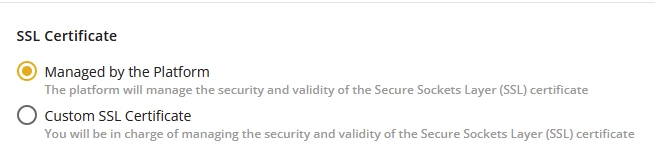
This change took us a little bit by surprise too. However, you can now use a SSL certificate provided by the platform (using Let’s Encrypt.) You don’t need any CSR for doing so (see screenshot below)
If you still want a certificate from Go Daddy, you might want to check if this would apply to your specific case: https://www.godaddy.com/help/request-my-ssl-certificate-for-a-secondary-domain-hosted-with-a-godaddy-hosting-account-or-a-site-hosted-with-another-company-without-a-certificate-signing-request-csr-40440. Please note that you will need the certificates and the private key in PEM format.

If you are a little technical or are not afraid of testing things, you might want to have a look at openSSL. Here are some useful commands for managing SSL certificates: https://www.digicert.com/kb/ssl-support/openssl-quick-reference-guide.htm.

Wishing you good luck!
Sébastien

6 replies

KMallette
Hero II
Forum|alt.badge.img+9
  • Hero II
  • November 30, 2023

@ltprobertoYikes!  I hadn’t seen this yet, so thanks for posting.

I see what you mean … did you find anything here: https://help.docebo.com/hc/en-us/articles/14650952792338-Domain-Management


Here’s something that might be more specific: https://help.docebo.com/hc/en-us/articles/14657806837010


Forum|alt.badge.img

Hi @ltproberto ,

This change took us a little bit by surprise too. However, you can now use a SSL certificate provided by the platform (using Let’s Encrypt.) You don’t need any CSR for doing so (see screenshot below)

If you still want a certificate from Go Daddy, you might want to check if this would apply to your specific case: https://www.godaddy.com/help/request-my-ssl-certificate-for-a-secondary-domain-hosted-with-a-godaddy-hosting-account-or-a-site-hosted-with-another-company-without-a-certificate-signing-request-csr-40440. Please note that you will need the certificates and the private key in PEM format.

If you are a little technical or are not afraid of testing things, you might want to have a look at openSSL. Here are some useful commands for managing SSL certificates: https://www.digicert.com/kb/ssl-support/openssl-quick-reference-guide.htm.

Wishing you good luck!
Sébastien


Annarose.Peterson
Hero III
Forum|alt.badge.img+7

umm this has been a NIGHTMARE for us…. Have you had any resolution?  Any tips for on how you resolved this?

Our files from Go Daddy do not come in .pem format. :-(

Anyone else have problems with moving to the new domain management?  


martiniwinski
Influencer II
Forum|alt.badge.img
  • Influencer II
  • October 7, 2024

I’ve had MANY problems with the new domain management area.

1) I had to contact my IT department to for a PEM format, which the SSL cert and the Intermediate cert was in, but not the key file

2) The key file now needs to be unencrypted, which my IT department usually never gives out. I had to contact a director in IT to ask for permission for an unencrypted key file.

3) I had to use a text editor (notepad or notepad++) to copy the SSL cert info and save as individual PEM files, same for the key file.

4) I was able to upload everything and have the new custom SSL certs added to the subdomains.

5) This morning my platform went haywire and we couldn’t use New Reports (500 error) and our users that completed eLearning were not tracked at all - zero completions. I had to revert back to the “Managed by the Platform” certificates.

In summary. This new admin area is great, but the SSL certificate update process is now a complete nightmare like @Annarose.Peterson said. It’s not easy, requires so much manual work, and at the end it accepted my certs, but broke the platform. Unreal.


Annarose.Peterson
Hero III
Forum|alt.badge.img+7


In summary. This new admin area is great, but the SSL certificate update process is now a complete nightmare like @Annarose.Peterson said. It’s not easy, requires so much manual work, and at the end it accepted my certs, but broke the platform. Unreal.

Yeah, we ultimately gave up and now let the platform manage our certificates. Which saves us money in the end, but honestly, either simplify the SSL cert process, or remove the option all together. 


martiniwinski
Influencer II
Forum|alt.badge.img
  • Influencer II
  • October 7, 2024

The old process was tedious, but at least it worked. We used to be able to upload standard .crt and .key files, including encrypted .key’s, which were easy to get from my IT department. The .pem format and unencrypted keys are a pain. Then when we had everything (and the system said everything was ok), we had so many system issues. Turns out it wasn’t ok. Very frustrating and seems like a one step forward, two steps back implementation of this feature.