If this helps....a conversation on extended enterprise and its order of operations to consider with tis setup

  • March 8, 2022
  • 7 replies
  • 266 views

dklinger
Hero III
Forum|alt.badge.img+11

Morning so I did some outreach to my CXM before that format was changed on us (a different conversation) on what are best practices for turning on Extended Enterprise once you are up and already going. This was the general response and order of operations to consider:

  1. Create the Pages & Menus you would like the users to see (if already created then skip this step)
  2. Set up EE domain and don't tie the branch to it until all settings and branding look & feel is complete to eliminate user impact
  3. In the setup process you will need to determine if you are going to use a custom domain or not. If yes, then you will need to get the SSL certificate set up. If not using a custom domain then just write in the new URL that will be used with the .docebosaas.com at the end.
  4. Once all is set up and users are ready to be tied to the new domain, it would be recommended to send out a communication to these users letting them know they will need to use X URL to sign in. ( newsletter feature can be used for this)
  5. If you still plan to use the main domain for one of the companies then you wouldn't be able to set up a redirect because then all users that go to the main domain will be redirected to the EE.

It will just be important for the users to know to use the new URL and not the old one. If they do use the old one they will still be able to login but will just have a wonky experience.




7 replies

steveninfinger
Helper III
Forum|alt.badge.img+8

We use custom domains, and those SSL certs have been more of a beast to manage than we anticipated. Partially those on us because we did set them up at different internals, but there have also been issues on the backend of Docebo that has required their technical team to address. If it’s not perfect then it can also cause issues with completion statuses of eLearning. Wouldn’t have guessed that, but it does. 


KMallette
Hero II
Forum|alt.badge.img+9
  • Hero II
  • March 8, 2022

@dklinger The other item that should be completed is any SSO/SAML configurations. I THINK that you’d want to do this before moving learners into the new domains/tenant branches, but I’m not 100% certain.


KMallette
Hero II
Forum|alt.badge.img+9
  • Hero II
  • March 8, 2022

When I set up our EE, we were also just deploying the platform so it was fairly easy to do. Here’s the steps I followed:

  1. Each tenant superadmin defined the name of their domain, and we all agree that the first level subbranches would be External and Internal
  2. I completed the domain registrations/CNAME configurations, SSL certificates, DKIM and SPF configurations in concert with my IT security team.
  3. For those tenants using SAML/SSO login, we worked with our IT teams & Docebo to make these configurations. We did create an additional field that the SAML configuration used to know which branch a user belonged to. The tenant admin developed the schema for each of her External subbranches and Internal subbranches. We also built pages for persons who tried to log into these tenants but weren’t actually members. These pages said “sorry” and “here’s how to request access”.
  4. Each tenant superadmin then fleshed out their External and Internal subbranches as their business unit required. Each branch was given a name and a code.
  5. Superadmins migrated their learners (from other platforms) and assigned the appropriate branch using branch codes and branch names.

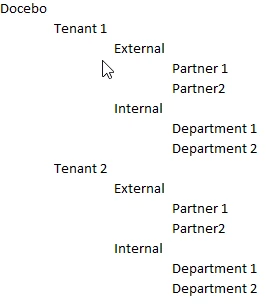
Our org chart looks like this:


This has worked really well for us. Some of our tenants are exclusively internal, and some are mixed. But because we were strategic in our planning (after a lot of listening), I could see that we could build a framework that gave us flexibility.

I have added a couple of new tenants during our 3 years in the platform. One new platform required that we move learners from one tenant > External > Partner 1. I followed Step 1 and 2 above, and then used a batch .csv to move the learners into their new External > Partner 1a branch using branch codes and branch names. We also had to change the username schema as the new tenant didn’t want to use an email address. Did that in the same batch upload; worked perfectly.


Forum|alt.badge.img+1
  • Influencer I
  • August 3, 2022

@KMallette Hi there, you mentioned CNAME in your previous post, may I ask what you’re supposed to put for that? Will host name for CNAME record be the main domain, sub domain, or docebosaas.com? How about “Alias to”?

Thanks in advance!


KMallette
Hero II
Forum|alt.badge.img+9
  • Hero II
  • August 3, 2022

@teresa.mycity.org CNAMEs are DNS records that map web addresses.  For example, we have a CNAME record that maps viasat.docebosaas.com to viasatdiscover.com so that we can have a personalized domain name.

Then, for each tenant (which has its own branch), we use an additional CNAME record to map bbs to viasatdiscover.com so that we end up with a URL that is bbs.viasatdiscover.com.

In the EE app, we created a new client called BBS, and mapped it to the branch BBS, and assigned the bbs.viasatdiscover.com URL to it.

You’ll need to work with someone (like an IT dept.) who can create the DNS/CName records, as that is outside of Docebo.


Forum|alt.badge.img+1
  • Influencer I
  • August 3, 2022

@KMallette Thanks so much for the detailed information! We have generated DKIM keys for one of our sender domain, and we are trying to put TXT record (instead of CNAME record) to our DNS settings. So according to your example, I would assume if we were to insert CNAME record, host name would be domain.docebosaas.com and Alias name would be domain.com, something around that?


KMallette
Hero II
Forum|alt.badge.img+9
  • Hero II
  • August 3, 2022

@teresa.mycity.org I’m so sorry Teresa, but I don’t know anything about TXT and DKIM records. We created 1 DKIM record for viasatdiscover.com, but it looks like the wizard could take create a key for bbs.viasatdiscover.com.  The keys looks like they are generated in something called Bind9 format, so I don’t know how that would related to a TXT format.