Best Answer

Transitioning users out of Extended Enterprise

  • March 19, 2024
  • 4 replies
  • 86 views

We have a group of users currently in an extended enterprise domain that we need to transition to our central domain (and close out the EE domain). Is there a way to do this without losing all of the data/branch/page/menus?

Best answer by KMallette

@annaleeCMF Yes, with some suggestions.

  1. Find some method to note that these accounts were once part of this disbanding EE. Maybe it’s a top-level folder under your main EE, or maybe an additional field with a note in it.
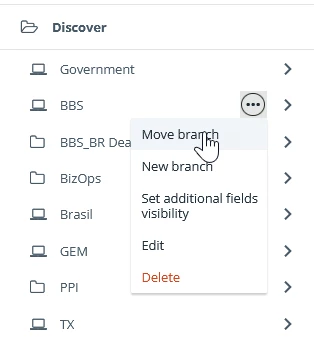
  2. Wit Users … you can simply move the top level branches to whereever you want them to go.
  3. Things like sub-branches, user accounts, data in the accounts will follow along.

  4. EVERYTHING needs to be reviewed. This won’t be an effortless process, but Docebo does do pretty good.

    1. Catalog assignments -- you might need to reassign catalogs if they are tied to a branch

    2. Enrollments rules

    3. Notifications … you may need to recreate some of these because they need to be created in the domain that they apply to. So any that you created in this disbanded EE will stop functioning.

    4. Groups

    5. Pages should be ok because that’s just describing the content, so if you’ve looked at the first four of this list, pages should be ok.  But again .. REVIEW

    6. Menus -- check the visibility. This is often based on branches to review to make certain that everything is still in order.

    7. Custom domain -- check with your IT group to see if they can put a redirector in place to get your learners over to the correct URL without giving them a 40x error

4 replies

steveninfinger
Helper III
Forum|alt.badge.img+8

Do you have automation that puts users in the current branches? What do that look like for your use case?


KMallette
Hero II
Forum|alt.badge.img+9
  • Hero II
  • Answer
  • March 19, 2024

@annaleeCMF Yes, with some suggestions.

  1. Find some method to note that these accounts were once part of this disbanding EE. Maybe it’s a top-level folder under your main EE, or maybe an additional field with a note in it.
  2. Wit Users … you can simply move the top level branches to whereever you want them to go.
  3. Things like sub-branches, user accounts, data in the accounts will follow along.

  4. EVERYTHING needs to be reviewed. This won’t be an effortless process, but Docebo does do pretty good.

    1. Catalog assignments -- you might need to reassign catalogs if they are tied to a branch

    2. Enrollments rules

    3. Notifications … you may need to recreate some of these because they need to be created in the domain that they apply to. So any that you created in this disbanded EE will stop functioning.

    4. Groups

    5. Pages should be ok because that’s just describing the content, so if you’ve looked at the first four of this list, pages should be ok.  But again .. REVIEW

    6. Menus -- check the visibility. This is often based on branches to review to make certain that everything is still in order.

    7. Custom domain -- check with your IT group to see if they can put a redirector in place to get your learners over to the correct URL without giving them a 40x error


  • Author
  • Novice I
  • March 19, 2024

Steven - No, we manually upload users into a branch that is associated with our EE domain. I’m not sure if we delete the EE domain, if users in that branch will just revert to our standard domain or if I will need to move them over to a new branch.


KMallette -- thanks for this thorough answer!


KMallette
Hero II
Forum|alt.badge.img+9
  • Hero II
  • March 19, 2024

You will need to move them. You don’t want to run a risk like that.