

Question

Asset Being Renamed when uploading

  • Nov 19, 2026 8:17 PM UTC
  • 1 reply
  • 3 views

Hello!

Previously when we would upload an asset (PDF, excel sheet, etc.) it would upload with the original title of the document and therefore be downloaded with the original title of the document. But now the title is being replaced by randomized characters and subsequently downloaded as the random characters. Example below:
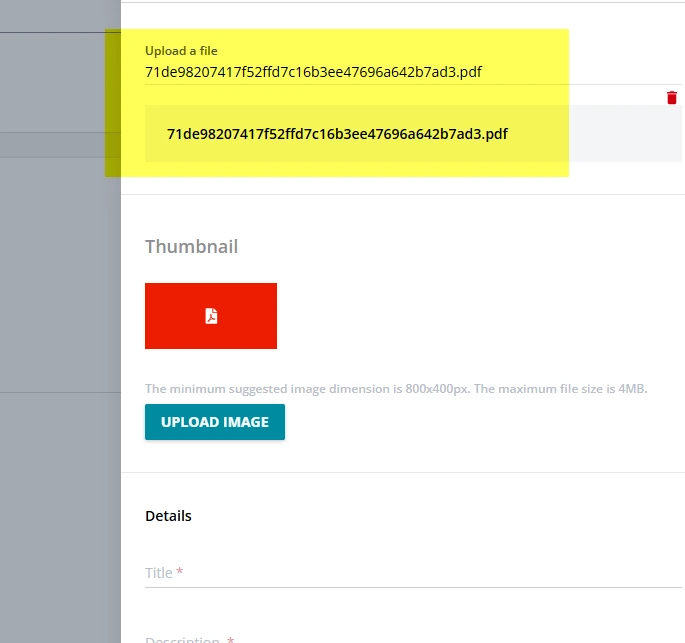


How can I fix this so it goes back to using the tile of the actual document in the download versus the random characters?


1 reply

Moshe.Machlav
Guide I
Forum|alt.badge.img+2

Hi ​@brsargent ,

Before digging into a fix, could you clarify where you are uploading and downloading this file? Specifically, is it:

  • A Social Learning / Discover, Coach & Share asset (uploaded to a channel),

  • A File training material inside a course,

  • Downloaded directly from the Central Repository, or

  • Inside a course's File repository area widget?

The reason I ask is that there is no admin setting in Docebo to toggle filename behavior—Docebo hashes filenames on the backend for storage and maps the original title back on download. However, each of those areas handles file delivery slightly differently, and when randomized strings suddenly start showing up on download, it's usually either a platform-side regression in one specific area or a filename sanitization quirk (like special characters in the title).

Once we know which area you're seeing this in, I can point you to the best workaround—or confirm if it's one to flag directly with Docebo Support.