Best Answer

How to access Learning Assignments

  • September 23, 2026
  • 1 reply
  • 12 views

Hi I’m hoping someone can help. I am currently a super admin within our platform and we have some power users in the system too. 


I have set up an assignment within a course as we want staff to upload a document. This is working and when staff upload the document I can see it but the power users I need to see it can see it is completed but the EVALUATE button is not there for them to view or download the file. 

I feel like its something really simple but I cannot figure out what I am missing. Can someone please help?

Best answer by ntosto

Hello, you may be able to get around the Power User permissions issue by enrolling those people in the course as Instructors instead. One of the permissions that the Intructor Enrollment grants is the ability to evaluate assignments within the course. More info here: https://help.docebo.com/hc/en-us/articles/360020128319-Managing-assignments-as-training-material


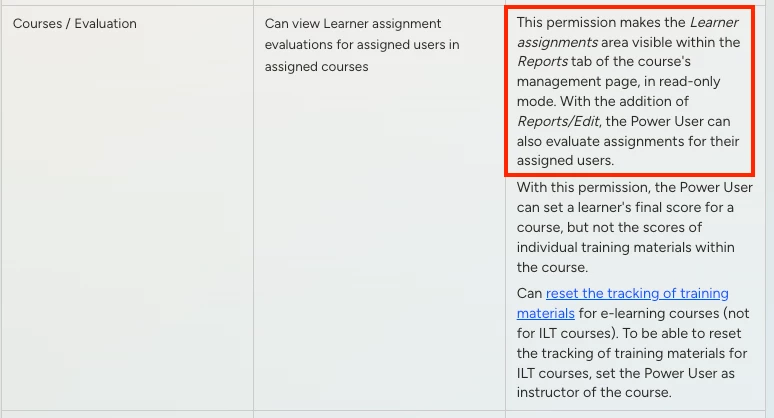
If they need to be Power Users, you may need to have both the Courses > Evaluation permission as well as the Reports > Edit permission in order to let them grade assignments.


https://help.docebo.com/hc/en-us/articles/6463399445394-Power-User-permissions

1 reply

ntosto
  • Newcomer
  • Answer
  • September 23, 2026

Hello, you may be able to get around the Power User permissions issue by enrolling those people in the course as Instructors instead. One of the permissions that the Intructor Enrollment grants is the ability to evaluate assignments within the course. More info here: https://help.docebo.com/hc/en-us/articles/360020128319-Managing-assignments-as-training-material


If they need to be Power Users, you may need to have both the Courses > Evaluation permission as well as the Reports > Edit permission in order to let them grade assignments.
https://help.docebo.com/hc/en-us/articles/6463399445394-Power-User-permissions