Question

Training Material Loads Slowly

  • October 24, 2023
  • 14 replies
  • 212 views

Forum|alt.badge.img

I find that SCORM files take a long time  (1 to 4 seconds) to open in Docebo. This results in an unpleasant user experience. The SCORM files are small microlessons, so I do not think the slow load time is related to file size. 

Does anyone else experience this? If so, have you found anyways to make the load time quicker?

14 replies

jlreonal
Guide II
Forum|alt.badge.img+3
  • Guide II
  • October 25, 2023

Hi @meaganp - I have the same experience but no users have complained about this, so I guess we are still good. There are times when I thought that the course may have an issue because it takes a while to load. I am not sure if there is any way to make the load time quicker, but let’s see if anyone has a solution for this.


Bfarkas
Hero III
Forum|alt.badge.img+6
  • Hero III
  • November 3, 2023

Its funny, I was researching something else and came across this which seems relevent:


jlreonal
Guide II
Forum|alt.badge.img+3
  • Guide II
  • November 3, 2023

Its funny, I was researching something else and came across this which seems relevent:


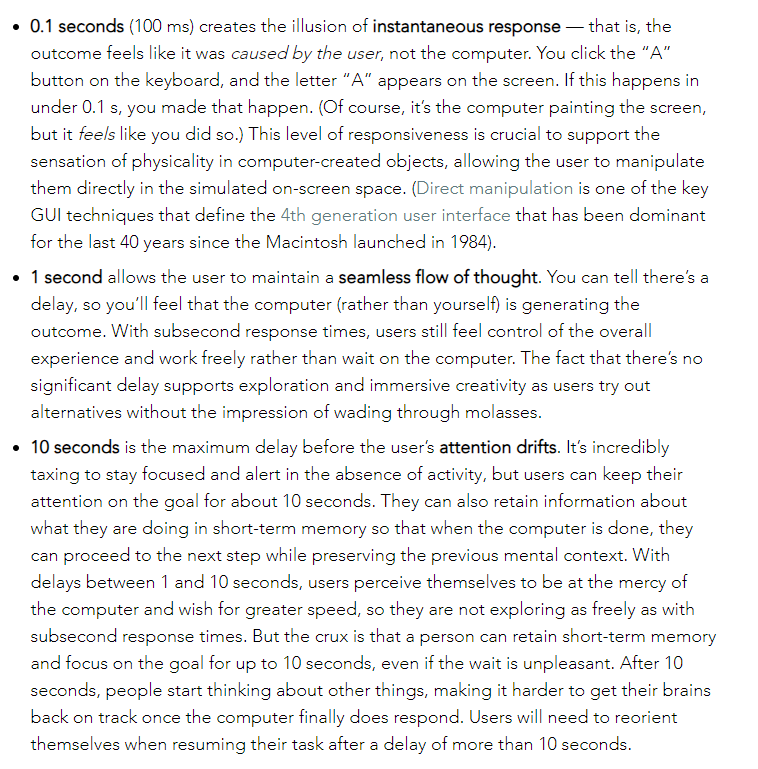
6 to 10 seconds users start submitting a ticket that there is an issue in the course. :/


Bfarkas
Hero III
Forum|alt.badge.img+6
  • Hero III
  • November 3, 2023

Yeah I would think so too, this was a more global writeup of websites in general and we were all discussing the 10 second cutoff thing a bunch this week.


  • Helper I
  • September 24, 2024

Our customers and staff are very frustrated with the slow loading of our SCORM content. They find this confusing and keep trying to reload the page/course.

  • Each content file is around 3MB in size so I can’t imagine it’s a file size issue. We get the same delays on a single page course overview microlearning file as we do on a full course.
  • From when a user clicks on ‘Start learning’ there is anywhere from 5-20 second delay before ‘Your content is loading’ even appears.
  • Then there’s at least another 5s until the content is actually visible.
  • And this happens between every module/course file.

The solution from Docebo support is to instruct users to clear their cache.

“with all the sites people visit and interact with over time as well as many other software interactions can build up issues in the cache and cookies which causes issues with latency and other process issues.”

In my specific test that I sent to support:
* Before clearing took 25s to load the course, and 19s to load each next content module
* After clearing took 12s to load the course, and 4s to load each next content module

Even after clearing, these are not ideal loading speeds.

From support:

“I understand that this may not be ideal as it is expected behavior and have provided all information that I can from the technical perspective. If you are in need of someone to speak to regarding this matter outside of technical support I would recommend a CSM which can be reached through the following email address CS-EMEA-APAC@docebo.com

I cannot believe this is ‘expected behavior’. I emailed the CSM team and our account manager weeks ago. Still no reply.


  • Newcomer
  • March 2, 2026

Has anyone gotten a response from Docebo on this? I’ve brought this to their attention multiple times and they consistently blame file size as the main cause. I have tested an empty Rise course and it takes just as long to load. It’s absolutely ridiculous.

I’ve never experienced this with any other LMS. This is not “expected behavior.”

As a learning designer, it is incredibly frustrating to spend months designing and developing learning content only to have learners frustrated before they even click “start course.”


  • Helper I
  • March 2, 2026

Hi ​@brandonl. This was resolved over a year ago, at least for us. After finally getting this escalated Docebo did acknowledge there was a loading issue on the portal (not specific to our site or configuration). This was acknowledged in October 2024 and resolved in December 2024. We’ve experienced no loading delay issue since then.

I’m a bit surprised you’re experiencing this now, I thought it was a platform-wide issue (but perhaps it could be regional). The two things I would suggest: 1) confirm that your Rise files are published as SCORM 2004 - 3rd Edition. 2) Reach out to your account manager and let them know you have this issue and it’s not being addressed or escalated.

All the best.


  • Newcomer
  • March 2, 2026

I’m glad you were able to get your issues solved. Thank you for the suggestions. I have tested with SCORM 2004 - 3rd Edition and it is still very slow. It’s just a blank screen for 6-8 seconds (at least) before you get the Rise “Your content is loading...” screen. There have been times when it takes 11-12 seconds.

We’ve shown a screen recording with our point of contact at Docebo and nothing changes. We get feedback from our users that our LMS is clunky, slow, difficult to navigate, etc. I’m just frustrated.

I don’t know if I was hoping our issue was unique or this was a widespread issue. Either way, it seems like there’s nothing I can do about it.


  • Helper I
  • March 2, 2026

I completely understand your frustration. I spent almost a year with it. Our customers and staff hated our new portal when we launched.

I tried to reach out to the person who who finally got this escalated for us, but evidently she is no longer around, so I’ve reached out to our account manager in the hope that perhaps she can forward it to the right person to get it escalated for you.


  • Newcomer
  • March 2, 2026

Thanks so much! I really appreciate it.


szomorrodian
Novice II

Hey Gus, did they happen to mention what the root cause was? Maybe we can cite it when we escalate to our CSM again. 


  • Helper I
  • March 4, 2026

No, we never got a reason why. It just got fixed and quite frankly we were just relieved to have it done.

Our original ticket number was #889194 if you want to reference that. I know the issue was replicated within that ticket, but I believe it was then moved from that task and taken over by the global leadership team to be actioned. A couple of months later we were advised there was a solution, “Our team will be implementing a solution individually on each platform, resulting in a noticeable decrease in loading times.” So it does sound like each individual platform needs the fix applied.

I have passed your details on to our account manager who is going to attempt to have this escalated internally for you.


szomorrodian
Novice II

Thanks, appreciate it. I’ll loop in our CSM too. 


Forum|alt.badge.img

@szomorrodian I was looped in by another Docebian - I will review the ticket that Gus shared and see if we can get this resolved for you.