
Best Answer

Assignment Submission - Course Completion

  • June 18, 2026
  • 5 replies
  • 97 views

GVandy
Novice II

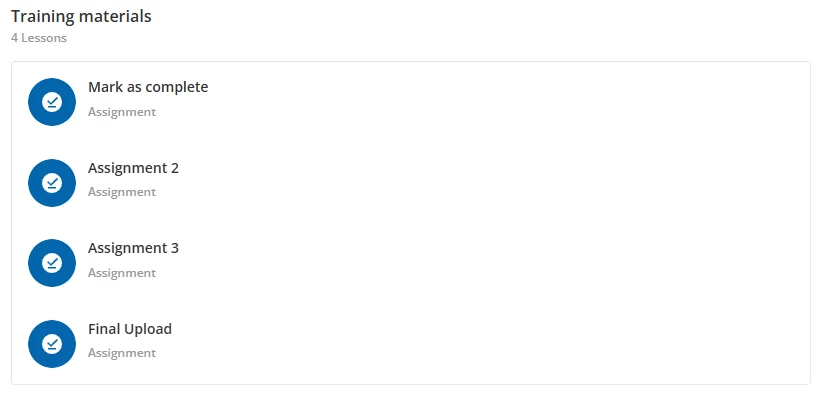
I’ve got a course that has multiple “assignment” submission training materials (in this example, there are 4 assignment submissions). My goal is that the learner is able to submit all 4 assignments without needing to wait for each one to be evaluated before moving on to the next submission. I have successfully figured out how to accomplish this first step, however, my issue pops up in the next step.


Next, I would like my instructor to be able to go in and evaluate all submitted assignments from this learner. Once they have evaluated AND passed all 4 submissions, I want the user to be automatically marked as complete for this ILT Course. Currently, if I set the session completion to “Training Material Based” the learner is not marked as complete once all 4 submissions have been evaluated and passed.


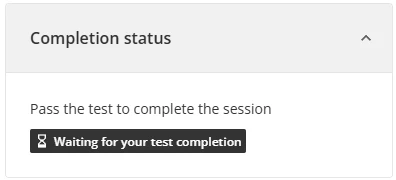
After passing all 4 submissions, learners are still “in progress” and they see a message telling them to “Pass the test to complete the submission”. This course does not have any “test” training materials, only 4 assignment submissions.
 

I am starting to think what I would like to achieve is not a possibility. Has anyone done something like this before or know how to achieve it without needing to manually mark the learner as complete after evaluating and passing their submissions?


Best answer by lrnlab

@GVandy is this for ILT type course? Did you have a test in the training materials at some point? Sometimes if you change settings, materials, etc for an ILT course where users were already enrolled, they might not apply fully. e.g. you had the sessions evaluation settings to “learner passes a test” and changed to “evaluation” (which by the way has nothing to do with the Assignments training material - this is about the instructor evaluating users in the session where they may have group work to do or demonstrate what was learned during the session, etc.). 

You can also try to unenroll and reenrol the user (hopefully with a test account) to see if that resets the message in your pic above.

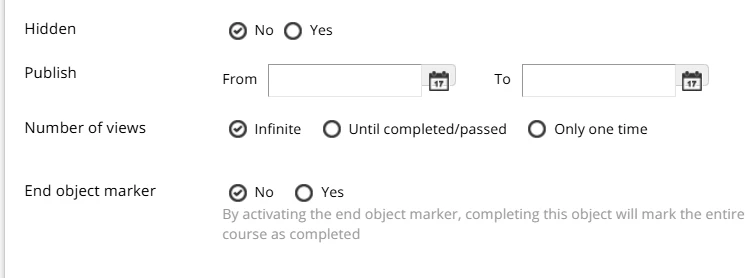
Next option is to set the last assignment as your “end object marker” (see pics from ​@Dnormand0221 ). This should trigger course completion once that assignment is marked as “passed”.

If that is not the case or it does not change that message, I suggest you open a ticket with support.

5 replies

GVandy
Novice II
  • Author
  • Novice II
  • June 18, 2026

I attempted to change the session completion to “Evaluation Based”, however, that also does not mark the learner as complete for some reason. It does show a green thumbs up icon after passing all evaluations and creates an “evaluation date”, but no completion data.


Forum|alt.badge.img

Hello ​@GVandy!

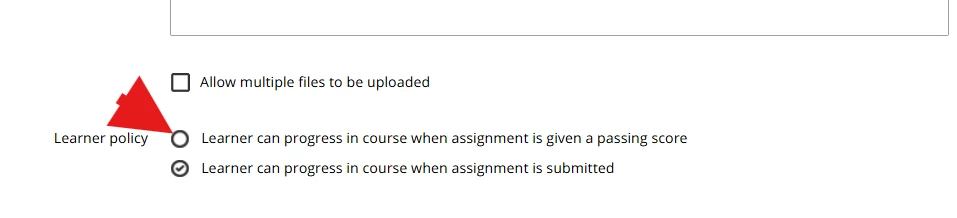
I believe this can be achieved by setting the last training material as “Learner can progress when given a passing score” and as the end object marker. That way, if the last assignment is considered completed when the assignment is evaluated, then once that is completed then the course is also completed 


GVandy
Novice II
  • Author
  • Novice II
  • June 18, 2026

Hello ​@GVandy!

I believe this can be achieved by setting the last training material as “Learner can progress when given a passing score” and as the end object marker. That way, if the last assignment is considered completed when the assignment is evaluated, then once that is completed then the course is also completed 


Thanks for the response! Currently, I have all 4 assignment submissions set as “Learner can progress when given a passing score” and unfortunately it still does not mark the learner as complete after evaluating and passing all 4 assignments.


lrnlab
Hero III
Forum|alt.badge.img+10
  • Hero III
  • Answer
  • June 18, 2026

@GVandy is this for ILT type course? Did you have a test in the training materials at some point? Sometimes if you change settings, materials, etc for an ILT course where users were already enrolled, they might not apply fully. e.g. you had the sessions evaluation settings to “learner passes a test” and changed to “evaluation” (which by the way has nothing to do with the Assignments training material - this is about the instructor evaluating users in the session where they may have group work to do or demonstrate what was learned during the session, etc.). 

You can also try to unenroll and reenrol the user (hopefully with a test account) to see if that resets the message in your pic above.

Next option is to set the last assignment as your “end object marker” (see pics from ​@Dnormand0221 ). This should trigger course completion once that assignment is marked as “passed”.

If that is not the case or it does not change that message, I suggest you open a ticket with support.


GVandy
Novice II
  • Author
  • Novice II
  • June 18, 2026

Amazing, thank you! I unenrolled my test users an made sure to set the session completion requirement to “training material”. I then set my final assignment as the end object marker, which I had completely forgotten to do earlier in my testing!

After enrolling, submitting all assignments, and then being evaluated the course was marked complete automatically as I wanted!

Thank you both very much!


To answer your first questions: This is an ILT type course and at no point have I included an actual “test” training material as I only wanted to use the assignment submission option.