
Best Answer

Count of users for enrollments

  • Nov 14, 2023 11:25 AM UTC
  • 10 replies
  • 302 views

Forum|alt.badge.img+1

Hihi! 


Is there a report or recommended way to find the # of users that have enrolled in our courses? When I run the course report I can see that 12 have enrolled in one course, 20 in another but these might be the same people. 

We want a count of unique users that have enrolled in our courses. Would the best way be that I sort them by username and then count individually so we can say for example: 98 partners have enrolled in our 65 courses or out of our 375 staff members, 195 have enrolled in courses.

Thanks for the help!

Best answer by KaterinaT

Yes, I also do the above manually. And then create tables and graphs.

View original

10 replies

  • Novice III
  • Nov 14, 2023 11:35 AM UTC

I’d also be interested in this, currently I’m doing manual manipulation with data exported to Excel to combine username lists and then removing duplicates. 


AngeWi
Forum|alt.badge.img
  • Nov 14, 2023 11:36 AM UTC

Hihi! 


Is there a report or recommended way to find the # of users that have enrolled in our courses? When I run the course report I can see that 12 have enrolled in one course, 20 in another but these might be the same people. 

We want a count of unique users that have enrolled in our courses. Would the best way be that I sort them by username and then count individually so we can say for example: 98 partners have enrolled in our 65 courses or out of our 375 staff members, 195 have enrolled in courses.

Thanks for the help!

Yes that would work nicely, you could pivot table it to show the count of individuals and the count of courses enrolled. Of course, then you’ll be wanting to see the progress so you can build up a ‘dashboard’ view of your users 😀


  • Novice III
  • Answer
  • Nov 14, 2023 1:25 PM UTC

Yes, I also do the above manually. And then create tables and graphs.


AngeWi
Forum|alt.badge.img
  • Nov 14, 2023 1:33 PM UTC

Just thinking about it, it’s worthwhile talking with your CSM about this as there are Docebo products that may be of use, for example  https://www.docebo.com/products/docebo-learn-data/


Forum|alt.badge.img+1
  • Author
  • Influencer III
  • Nov 14, 2023 2:44 PM UTC

Thank you @AngeWi @KaterinaT !!


KMallette
Hero I
Forum|alt.badge.img+11
  • Hero I
  • Nov 14, 2023 3:12 PM UTC

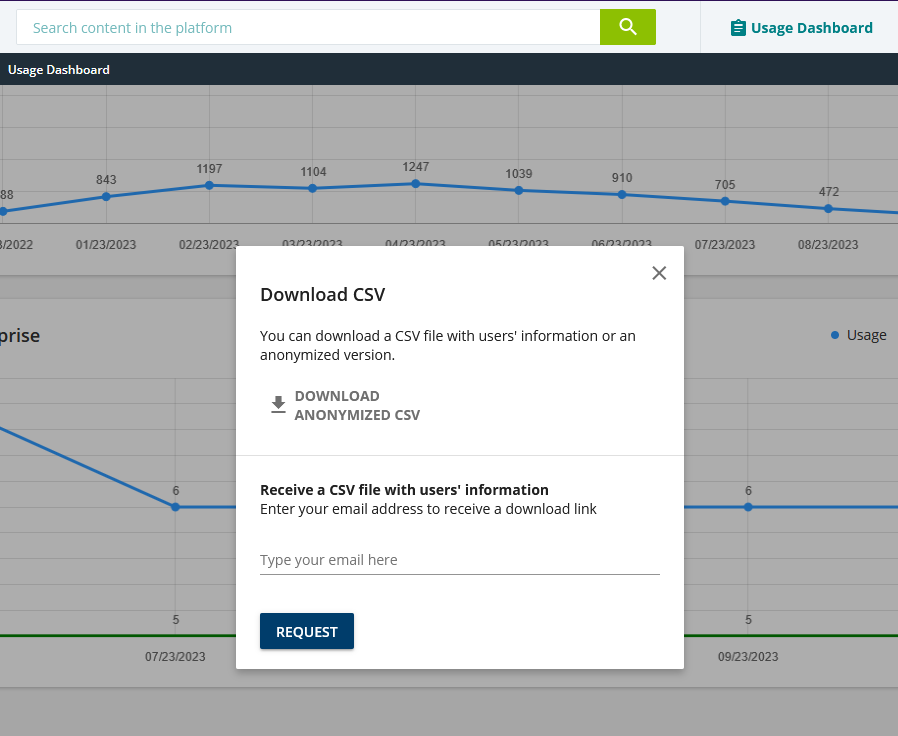
Hi! @isaal Another approach might be to use the Usage Dashboard. It appears at the top of your home page when you log into as an SuperAdmin. If you open the History, you can then request either anonymous data or information with user details.  It may not be all of the data that you need, but it can help with the “uniqueness” part.


maricela.jimenez
Contributor I

I use the "User Enrollment" report, which provides an overview of course enrollments.


Here are the steps:

Navigate to the Reporting area in your Docebo platform.

Select the "User Enrollment" report.

Customize the report parameters to include the specific courses you're interested in.

Run the report, and you'll see a list of unique users who have enrolled in the selected courses. 


angel.maenza
Novice III
Forum|alt.badge.img+1

Maybe not the most efficient way to handle it, but I’d just run a report with all of the courses I’m interested in then, in excel, delete the duplicate usernames.


Lucy Dolphin
Influencer I
Forum|alt.badge.img+1
  • Influencer I
  • Nov 15, 2023 4:17 PM UTC

It would be great to be able to report on unique enrolments into courses in a selected catalogue too :-) 


Bfarkas
Hero III
Forum|alt.badge.img+6
  • Hero III
  • Nov 15, 2023 4:36 PM UTC

Since this thread is getting attention and it wasn’t mentioned. For those using the report route, make sure to use excel tools to find unique values for you, makes it pretty simple: 

https://support.microsoft.com/en-au/office/filter-for-unique-values-or-remove-duplicate-values-ccf664b0-81d6-449b-bbe1-8daaec1e83c2#:~:text=To%20filter%20for%20unique%20values%2C%20click%20Data%20%3E%20Sort%20%26%20Filter,group%20on%20the%20Home%20tab.

Often will filter it that way and then just have a  cell running a count for things like this.