Best Answer

Issues with Calendar View - started yesterday

  • July 10, 2025
  • 32 replies
  • 563 views

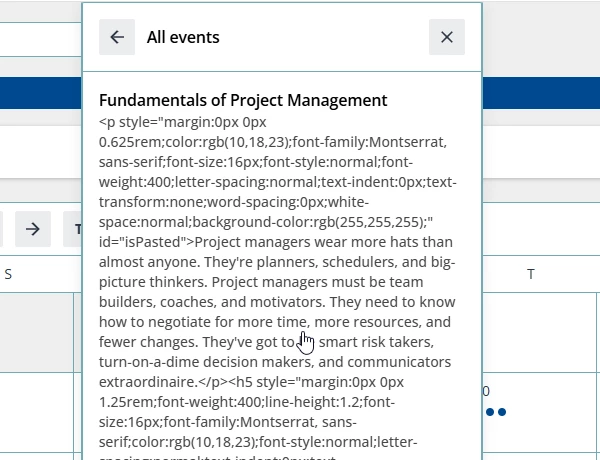
We have a major issued that started yesterday when you change from ‘Card’ view to ‘Calendar’ view.  The whole screen look changed, but more important when you are in calendar view and click the course hyperlink it is give you a pop-up of garbage text showing the course description with various code (Image attached). Previously, when you click on the course hyperlink it would open the course page and that is how a Customer or Employee registers for courses or VILT courses.  Right now, the only way someone can register for class is to open the actual course tile. 

Is anyone else having an issue since Docebo pushed the July update yesterday?  I have a ticket opened, but I got the typical ‘moved to tier 2 and they will get back to you’ email.

Best answer by Scott Peacock - Docebo


Our calendars are also working again.  Disappointed that you only see 1 line of the course description and not option to ‘show more.’

If anyone figures out how to change the ‘Go to Event’ button wording, please share.  We would prefer it has ‘Go to Course.’


Hi Cheryl, 

You can do this natively as a Super Admin!

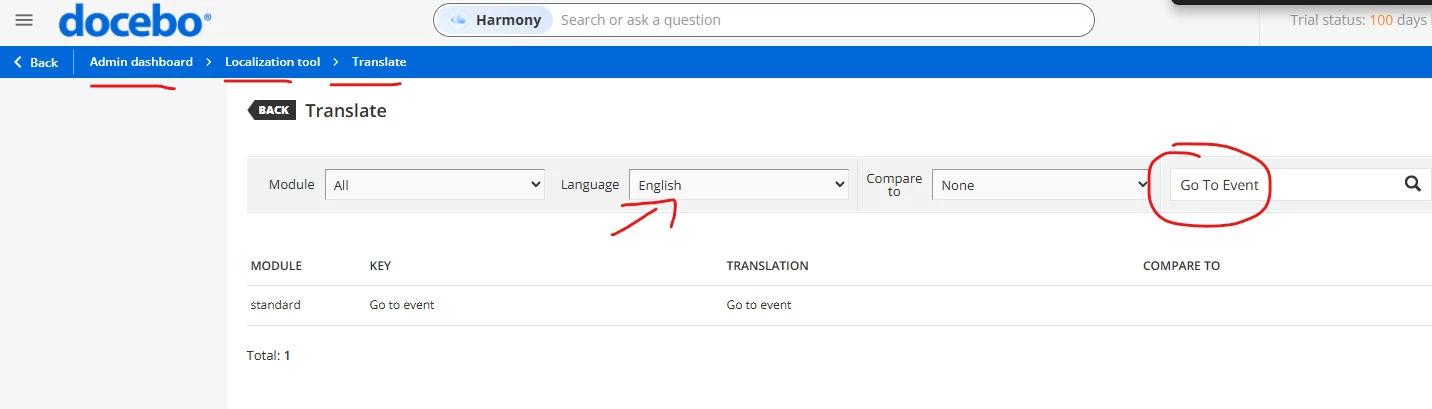
  1. Go to your admin dashboard,
  2. Open “Localization Tool” 
  3. Select the language you want, in this case likely English.
  4. Search on the top right “Go to Event” 
  5. Type in your new translation, in this case “Go to Course”
  6. Confirm and reload your platform (hard refresh). 

These steps should work, let me know if it doesn’t for you, but you can do this with any hard-coded text across the entire platform! :) 


32 replies

lrnlab
Hero III
Forum|alt.badge.img+10
  • Hero III
  • July 10, 2025

Haven't tested but do see the new look and it’s not great. We’re having to go ask and look at our pages as most where this used are now all misaligned. Please update the results of your ticket if you don’t mind. Thank you!


Forum|alt.badge.img

I just checked ours and it's the same thing. It's as if they are pulling the html code rather than the WYSIWYG. That's a pretty huge deal! Keep us posted 


sarahbarber99
Novice II

Thanks for bringing this up! I am seeing the same thing on my university instance. They can no longer access the course to enroll via the calendar and it is including all of the HTML coding in the course description.  This is going to be a big problem for our Power Users hosting local ILT’s. 


Forum|alt.badge.img
  • Contributor III
  • July 10, 2025

We have a major issued that started yesterday when you change from ‘Card’ view to ‘Calendar’ view.  The whole screen look changed, but more important when you are in calendar view and click the course hyperlink it is give you a pop-up of garbage text showing the course description with various code (Image attached). Previously, when you click on the course hyperlink it would open the course page and that is how a Customer or Employee registers for courses or VILT courses.  Right now, the only way someone can register for class is to open the actual course tile. 

Is anyone else having an issue since Docebo pushed the July update yesterday?  I have a ticket opened, but I got the typical ‘moved to tier 2 and they will get back to you’ email.

I submitted a help ticket for this today. 


missyb
Novice III
Forum|alt.badge.img
  • Novice III
  • July 10, 2025

We have this issue as well and my co-worker submitted a ticket for it today as well. 


  • Helper I
  • July 10, 2025

see other issues posted here


jckemv
Helper I
Forum|alt.badge.img+2
  • Helper I
  • July 11, 2025

Any new feature that changes layout with requirements needs to have better communication to the end users who will need time to adjust and consider the changes. It may be that sites are responsive yeah, but we all create pages based on the use of widgets in certain ways, like using the height in pixels etc.., and for me the calendar has mucked up my layout needing change. Even some info on what to expect as changes would be helpful [edit: it seems in the link above a lot of this is explained that gus shared]


jckemv
Helper I
Forum|alt.badge.img+2
  • Helper I
  • July 11, 2025

Thanks for bringing this up! I am seeing the same thing on my university instance. They can no longer access the course to enroll via the calendar and it is including all of the HTML coding in the course description.  This is going to be a big problem for our Power Users hosting local ILT’s. 


Yes same with my platform. Can I just say, how did this get through QA testing? This is terrible now in our production systems. I’ve already had end users reporting it wasting my time on something that should never occur and is such a simple QA test for programming teams. Stop focusing on AI everything and get the basics right please.


sjennings78
Guide III
Forum|alt.badge.img+7
  • Guide III
  • July 11, 2025

Same here - I submitted a ticket for this yesterday as well.


Forum|alt.badge.img+2
  • Helper II
  • July 11, 2025

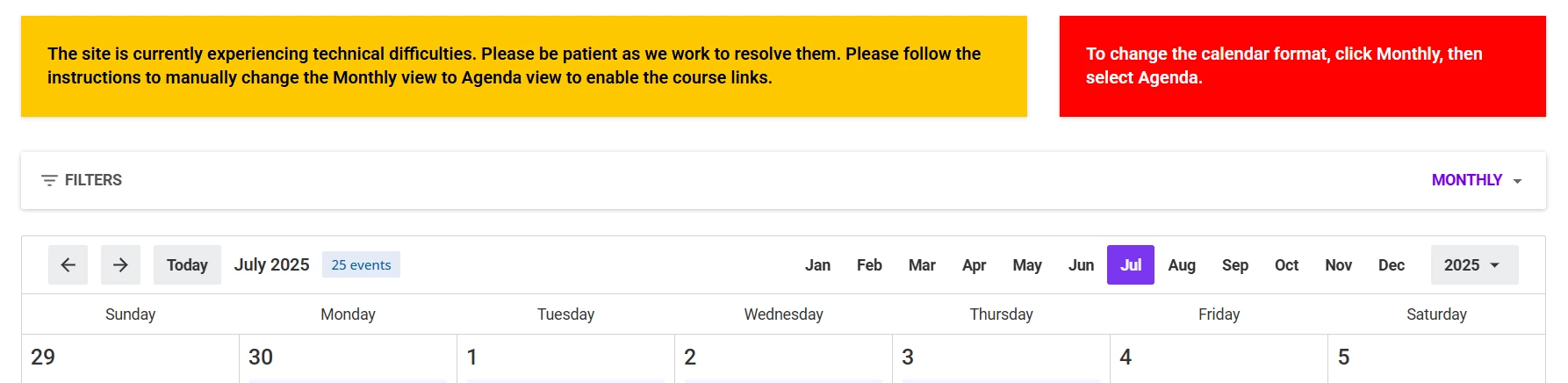
@lrnlab ​@cheryl.theis Thank you for bringing this up - I noticed the same thing in my site and even found part of the issue - our course descriptions are too robust for the new feature.  Below is a screenshot of the temporary instructions that I added to the page so that customers know to change the default Calendar view from Monthly to Agenda so they can access the link.   

Temporary instructions on changing view to enable calendar links


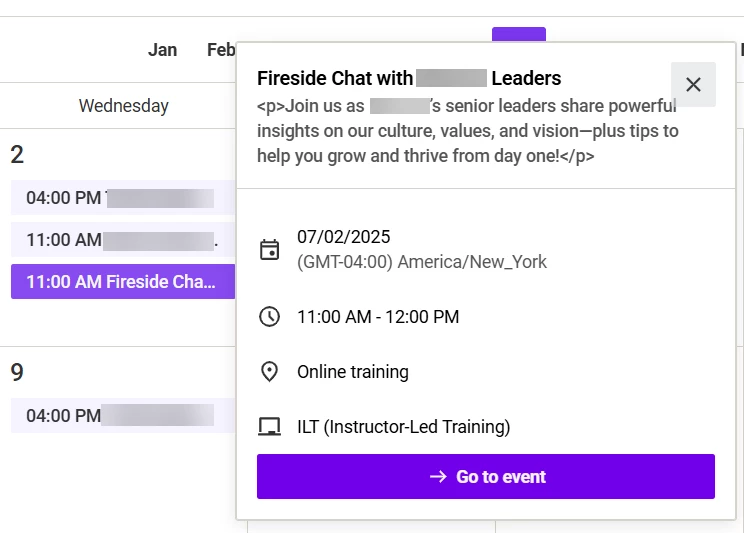
Here also is a screenshot of how the enhancement is SUPPOSED to work -- and works well with very short descriptions. I will be opening a case with Docebo this morning as well and suggesting to them if they get rid of the HTML and add a show more/show less feature like they have on the course information page, then this would actually work well and be an enhancement. I wish I could change the default Calendar view from Monthly to Agenda but that only works for the My Calendar widget (after enrollment) 


How it works with a short description


  • Author
  • Contributor III
  • July 11, 2025

@Sdinnoce Thanks for the idea on adding the ‘we got an issue’ banner.  This is a major problem as most of our customers go to the calendar to access the course for registrations.  I have gotten no response to my ticket even when I followed up except it is being looked at. I hate having to hold my breath every update and ‘drive’ through all our pages to see if anything has broken.  Docebo testing has not gotten any better and almost keeps getting worse than what we have seen over the past 5 years.


Davefox
Helper III
Forum|alt.badge.img+3
  • Helper III
  • July 11, 2025

FWIW We do not use card view and are not seeing the issue in either calendar or agenda views. 


Vmueller
Contributor II
Forum|alt.badge.img+2
  • Contributor II
  • July 11, 2025

I was told by my CSM that Accessibility upgrades were done to calendar and task widgets which caused the issue. Our task widget has changed and gone back to Docebo default image.  We were told to fix this, add CSS back.


  • Author
  • Contributor III
  • July 11, 2025

I just received this update from Docebo Support, so hopefully this is resolved today:

Our development team has just informed me of a task that was created on fixing this issue! I will continue being your point of contact and will keep you updated.


lrnlab
Hero III
Forum|alt.badge.img+10
  • Hero III
  • July 11, 2025

@lrnlab ​@cheryl.theis Thank you for bringing this up - I noticed the same thing in my site and even found part of the issue - our course descriptions are too robust for the new feature.  Below is a screenshot of the temporary instructions that I added to the page so that customers know to change the default Calendar view from Monthly to Agenda so they can access the link.   

Temporary instructions on changing view to enable calendar links


Here also is a screenshot of how the enhancement is SUPPOSED to work -- and works well with very short descriptions. I will be opening a case with Docebo this morning as well and suggesting to them if they get rid of the HTML and add a show more/show less feature like they have on the course information page, then this would actually work well and be an enhancement. I wish I could change the default Calendar view from Monthly to Agenda but that only works for the My Calendar widget (after enrollment) 


How it works with a short description


Do you know why the <p> tags are showing in the description? Is this a bug?


  • Author
  • Contributor III
  • July 11, 2025

Our course descriptions are very detailed and over 200 that would require re-writing.  This is a major change that I can find no prior head ups from Docebo this was happening.  I have yet to figure out why the  <p> showing when testing.

For now, we are waiting for Docebo’s answer to the issue.


lrnlab
Hero III
Forum|alt.badge.img+10
  • Hero III
  • July 11, 2025

Thank you ​@cheryl.theis 

These tags sometimes appear in reports as well. I have seen this in outputs even when you did not use HTML to write your descriptions. they should not be appearing on the screen at all.


Forum|alt.badge.img+2
  • Helper II
  • July 12, 2025

Thank you ​@cheryl.theis and ​@lrnlab -- I have seen the HTML appear in other places as well and when I opened a ticket to have it fixed when a power user enrolls a user from a subscription view - Docebo was able to fix it. Nothing we as customers can do about the HTML except let Docebo know when we see it. 

Like Cheryl, we have 37 ILT courses for our customers and have lengthy descriptions that we do not want to re-write. My suggestion in the case I opened with Docebo was to add a “Show more/Show less” feature to the description in Calendar view like it is when you open to view the course description so that we get what would otherwise be a cool enhancement if it worked. No telling if they will take my advice or not but placing it here to see if others think this would be a good solution. 

Here is the response I received from Docebo Help Desk on the Calendar View Issue:

“The team is currently aware of this issue and is working on resolving this. The current release set for this is July 23rd 2025, I will keep you updated within this ticket regarding this investigation and if there any changes to this date!”


lrnlab
Hero III
Forum|alt.badge.img+10
  • Hero III
  • July 12, 2025

Opened a ticket as well for the description.

Agree with ​@Sdinnoce about adding the “show more” vs how it displays now.

Also opened a 2nd ticket for the My Calendar view that now only shows the Event descriptions; no more course titles displayed. This can be very confusing for users. Asked that they add the course title to the events displayed.


trose23
Helper III
Forum|alt.badge.img+3
  • Helper III
  • July 14, 2025

I just checked and we’re experiencing this, too.  I did notice that if the description is too large for the Event button to show at the bottom, if you decrease the Zoom enough, the button will show.  So on 100%, I couldn’t see the event button to select, but decreasing the Zoom to 80%, I could see the event button for people to register without having to exit the calendar.  Still not a resolution, by any means, but it could be something to suggest to users in the meantime while they’re investigating a fix.


  • Newcomer
  • July 14, 2025

@lrnlab ​@cheryl.theis Thank you for bringing this up - I noticed the same thing in my site and even found part of the issue - our course descriptions are too robust for the new feature.  Below is a screenshot of the temporary instructions that I added to the page so that customers know to change the default Calendar view from Monthly to Agenda so they can access the link.   

Temporary instructions on changing view to enable calendar links


Hi ​@Sdinnoce  - Would you mind sharing the code that you used to add these temporary instructions? We don’t typically use the site CSS to configure pages so I’m not sure I could figure out how to add a similar note on my own.


Thanks in advance,

Traci B.


trose23
Helper III
Forum|alt.badge.img+3
  • Helper III
  • July 14, 2025

@lrnlab ​@cheryl.theis Thank you for bringing this up - I noticed the same thing in my site and even found part of the issue - our course descriptions are too robust for the new feature.  Below is a screenshot of the temporary instructions that I added to the page so that customers know to change the default Calendar view from Monthly to Agenda so they can access the link.   

Temporary instructions on changing view to enable calendar links


Hi ​@Sdinnoce  - Would you mind sharing the code that you used to add these temporary instructions? We don’t typically use the site CSS to configure pages so I’m not sure I could figure out how to add a similar note on my own.


Thanks in advance,

Traci B.

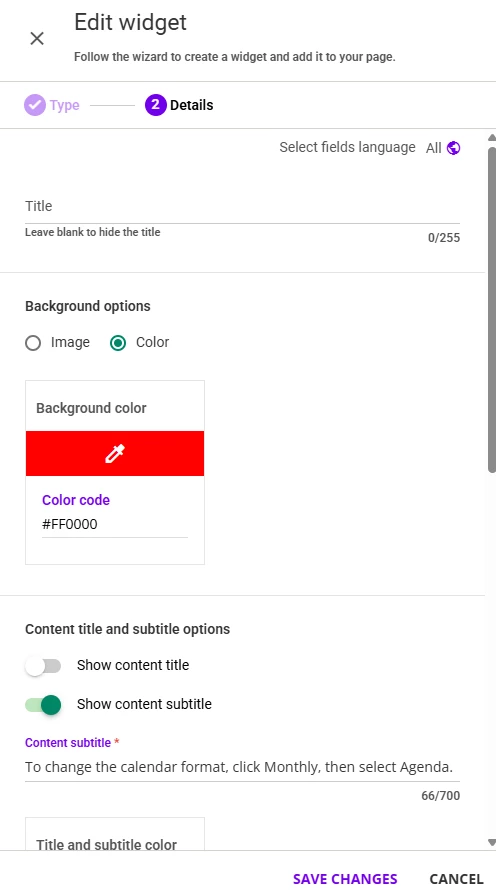
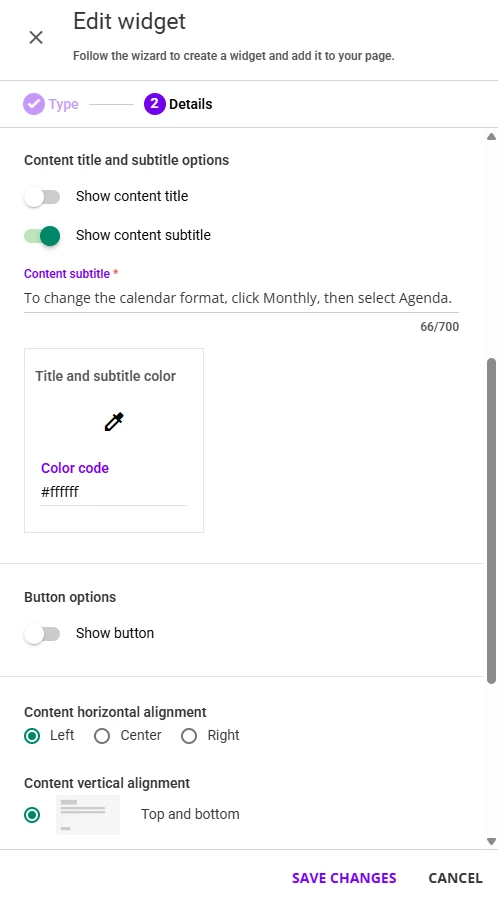
@tbrandon - You do not need to do CSS to accomplish this kind of message.  You can insert a row of widgets above your calendar and use the widget Custom Content Box. Choose a solid color background, pick your color for text, enter the directions into either the Content Title or Content Subtitle area, and do not include a link.


Forum|alt.badge.img+2
  • Helper II
  • July 14, 2025

Thanks ​@trose23 ​@tbrandon That is exactly what I did. I inserted a row in 2/3 and 1/3 format and put two custom content widgets on the page. One with a yellow back ground, the other with a red background. 


lrnlab
Hero III
Forum|alt.badge.img+10
  • Hero III
  • July 14, 2025

Support merged my 3 tickets onto oner saying this issue is know and the dev team are looking into it. Think we got their attention.


  • Author
  • Contributor III
  • July 16, 2025

Last update from Support is they are working on a fix which are client manager confirmed.  “The task shows that the Due date is the 23rd of July but the release might come sooner.”

I pushed back as this is costing us money and already been 1 week with no progress or real information from Support.