Question

Learning plan: How to monitor and close enrollment?

  • July 2, 2026
  • 2 replies
  • 50 views

Hi everyone, 

I have a learning plan (for sale as a whole). There is an enrollment limit, but since it can’t be set at the learning plan level, it is set at the course level (ILT included in the learning plan).

  • Q1: Does anyone have any suggestions on how to monitor enrollment #s for a learning plan? Note: I can’t rely on the enrollment limit set for the ILT as users aren’t forced (forget/don’t read instructions) to enroll in a session when they enroll in the learning plan.
    • ​​​​Options: Manually check enrollment in the learning plan. Custom report: Learning plan - user statistics, or Ecommerce - transactions

Ideally, if we reach the enrollment limit, I would like to prevent users from enrolling/paying and put up a notice saying enrollment is full and reach out if you want to be on the waitlist.

  • Q2: How would you close enrollment in a learning plan (prevent users from enrolling/paying)?
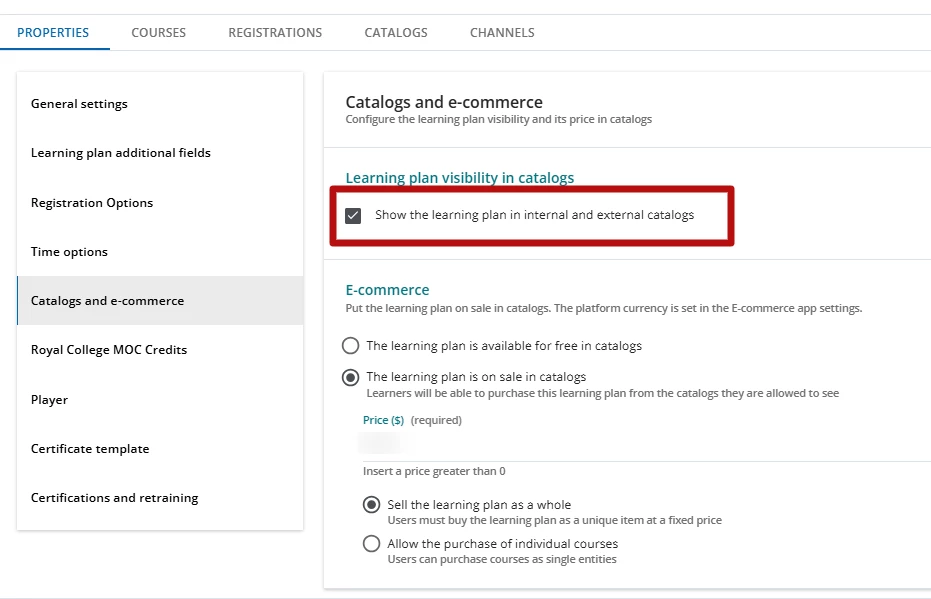
    • Is the only option to uncheck the “show the learning plan in internal and external catalogs” (see screenshot below)? I am hoping for a better option...
    • Learning plan properties > Catalogs and ecommerce (tab)


  • Q3: Is there a way to keep the learning plan visible in the catalogs with an “enrollment is full” notice, AND stop users from enrolling/paying?
    • I think the answer is no, but hopefully I’m wrong.

Thank you in advance for any suggestions you may have. 

2 replies

Moshe.Machlav
Helper III
Forum|alt.badge.img+2

Hi jting,

Before diving into manual monitoring and workarounds, I have to ask: do you have to sell this as a Learning Plan?

If the strict enrollment limit is driven by the ILT course, selling the ILT course directly instead of bundling it into a Learning Plan solves all of your requirements natively. ILT courses have built-in maximum enrollment quotas and automated waiting lists. When the limit is reached, Docebo automatically stops standard enrollment and manages the waitlist for you, showing a clear indicator to the user.

Addressing your specific concerns with this approach:

  • E-learning components: If your Learning Plan included e-learning modules alongside the ILT, you don't need a Learning Plan to bundle them. You can upload those e-learning modules directly as Training Materials inside the ILT course itself.

  • Users forgetting to enroll in a session: If you use Docebo Connect (Workato), you can set up a simple automation recipe that automatically enrolls the user into the correct session the moment they purchase or enroll in the course. This completely removes the manual step for the learner.

If you absolutely must use a Learning Plan for other administrative reasons, here are the answers to your specific questions based on current platform constraints:

  • Q1 (Monitoring): Don't check manually. Create a Custom Report (Learning plan - user statistics) filtered by this specific LP, and schedule it to be emailed to you daily or weekly so you can keep a pulse on the numbers.

  • Q2 & Q3 (Closing Enrollment & "Full" visibility): There is currently no native "Enrollment Full" state for Learning Plans. Unchecking "Show the learning plan in internal and external catalogs" is the only native method to stop purchases. To keep it visible for marketing, a common workaround is to remove it from the standard catalog, but display it on a Custom Widget Page using an HTML widget with a "SOLD OUT - Click here to join the waitlist" graphic that links to an external form.

In organizations I've worked with, the pattern that holds up best is avoiding bundling strictly-capped ILTs into e-commerce Learning Plans. Instead, we typically sell the ILT course directly, consolidate the e-learning assets as training materials inside that same ILT course, and let Docebo's native waitlist engine do the heavy lifting.

You can read more about how course-level limitations and policies behave with e-commerce here: Managing properties for courses

Hope this helps give you a cleaner path forward!


Forum|alt.badge.img

Hello Jting. 

We don´t use e-commerce in our platform, and I may be sharing information you already know however there is no learning-plan–level setting available to achieve this, not sure if any other have found a way to do this. 

What the docs show:

  • Learning plans have more limited enrollment controls than courses:

    • They cannot have a moderated enrollment policy.
    • They do not have their own waiting list.
    • When learners enroll in a learning plan, they are auto-enrolled into all included courses; learning-plan enrollment ignores course-level restrictions like “only admins can enroll learners” and maximum enrollment quota.
  • For courses (not learning plans), “course not available for enrollment or purchase” can be driven by:

    • Enrollment period being over.
    • Course being fully booked / maximum enrollment quota reached.
    • Self-enrollment being disabled (“self-enrollments are not available”).
    • Only administrators being allowed to enroll learners.
    • Course expiry or similar conditions.
  • For learning plans specifically:

    • The docs explicitly state that learning plans cannot have moderated enrollment and do not have a waiting list.
    • Maximum enrollment quotas at course level are not considered when enrollment happens via a learning plan, so you cannot rely on “course full” to block new enrollments into a plan.
  • Catalog visibility:

    • To be visible in catalogs, a learning plan must be configured with “Show the learning plan in internal and external catalogs”.
    • Turning that off would indeed hide the plan entirely, which stops new enrollments but does not meet your requirement of “still visible but closed.”

Given this, within the documented behavior, your options are essentially:

  • Hide the learning plan from catalogs (as you suggested) to stop new enrollments/purchases, or
  • Control enrollment and purchase behavior at the course/e-commerce level, knowing that learning-plan enrollment bypasses some course-level self-enrollment restrictions and max quotas.

There is no documented way to keep the learning plan visible with a dedicated “enrollment is full” message while actually blocking new enrollments/payments at the plan level. So, from the documentation available here, your conclusion (“I think the answer is no”) is, unfortunately, correct.

I got the above using Harmony Copilot, but I really think this could be a great idea for Docebo to look at, I think we need to extend the catalog options from courses into Learning plans, so we can better manage catalog options in Learning plans. 

Regards.