
Question

New hire VILT automation

  • April 28, 2026
  • 8 replies
  • 122 views

kprim
Novice I

We have new hires start almost every week on Tuesdays. They need to be enrolled into a VILT session that corresponds with that week.  I am looking for best practices on how to set up an automation to get new hires into the course and session/event for that week. For example We will have one group start on Tuesday June 9 and another on Tuesday June 16. 


I have a new hire overall group built to show the onboarding page until they finish the last general course to then be shown the regular home page. This is based off an additional field of new hire yes or no. I will have access to their hire date as well. 

8 replies

sfrost
Helper II
Forum|alt.badge.img+3
  • Helper II
  • April 28, 2026

Following because I have a similar question, but need some folks to be enrolled in a previously recorded VILT. Also hoping my comment will help bump your post! 


Forum|alt.badge.img
  • Novice I
  • April 28, 2026

Following, as well, as we have many use cases for this!


  • Novice III
  • April 28, 2026

Following as well, this would save us a lot of administration time!


dklinger
Hero III
Forum|alt.badge.img+11
  • Hero III
  • April 28, 2026

Good afternoon, I am a little outside of my league as we do not use ILTs - but I am going to try.

You can currently use enrollment rules to put a person into a learning plan, a course (elearning), and I believe an ILT course. But then I believe you need a person to then enroll themselves into the ILT session in that course.

Folks may have gotten clever with reporting and an integration - but it is listed as a clear limitation with in the box tools.


  • Helper I
  • April 28, 2026


We have new hires start almost every week on Tuesdays. They need to be enrolled into a VILT session that corresponds with that week.  I am looking for best practices on how to set up an automation to get new hires into the course and session/event for that week. For example We will have one group start on Tuesday June 9 and another on Tuesday June 16. 


I have a new hire overall group built to show the onboarding page until they finish the last general course to then be shown the regular home page. This is based off an additional field of new hire yes or no. I will have access to their hire date as well. 

 

Great question — weekly Tuesday VILT onboarding is a common use case, and there are a few Docebo quirks to plan around.

  • Enrollment rules are solid for auto‑enrolling into courses
  • They can’t auto‑pick the “right” VILT session based on date logic (like “this week’s Tuesday”)
  • Rules can react to things like user creation, additional fields, group/branch membership, and course completion
  1. Keep using your New Hire flag
  • New Hire = Yes works perfectly to:
    • Show the onboarding page
    • Trigger enrollment rules into general onboarding courses

Other helpful rule triggers you can use

  • User creation
  • Additional field = value (New Hire, Job Role, Region, etc.)
  • Added to a branch or group
  • Course completion (good for progression, not sessions)2
  1. Create weekly cohort groups 

Each group = one Tuesday start.

  1. Tie VILT sessions to groups
  • Each VILT session auto‑enrolls one weekly cohort group
  • When someone hits the group → they’re in the right session


Best‑practice (most teams do this):

  • Enrollment rule:
    • If New Hire = Yes → enroll in onboarding courses
  • HR/L&D assigns new hires to the correct weekly cohort group
    • Fast, visible, and easy to QA

More automated (but higher maintenance):

  • Weekly enrollment rules like:
    • If Hire Date between X–Y → add to NH – Week of June 9
  • Works, but needs clean HRIS data and weekly rule upkeep

Common pitfalls to avoid

  • Trying to auto‑assign VILT sessions directly via rules
  • Reusing one VILT session across multiple weeks
  • Depending on Hire Date alone for logic
  • Forgetting to remove users from cohort groups post‑onboarding

Given this use case, I’d encourage you to sign up for the Docebo Product Design Group (PDG) focused on Enrollment & Unenrollment Automation.

This PDG is specifically rethinking how enrollments are managed at scale — and the weekly VILT / “auto‑route me to the right session” & time-based or scheduled triggers “every tuesday” “weekly on  x day and “run this rule on a recurring cadence” need is a big gap in current functionality. Your scenario is exactly the kind of real‑world enterprise use case they’re looking for (so are we).


Forum|alt.badge.img
  • Novice III
  • April 28, 2026

Do you have Docebo connect? If so, you can build a recipe to address this. We do something similar with our sales roles but they want them in a session 4 weeks after hire. I solved this using a webhook and a recipe. 

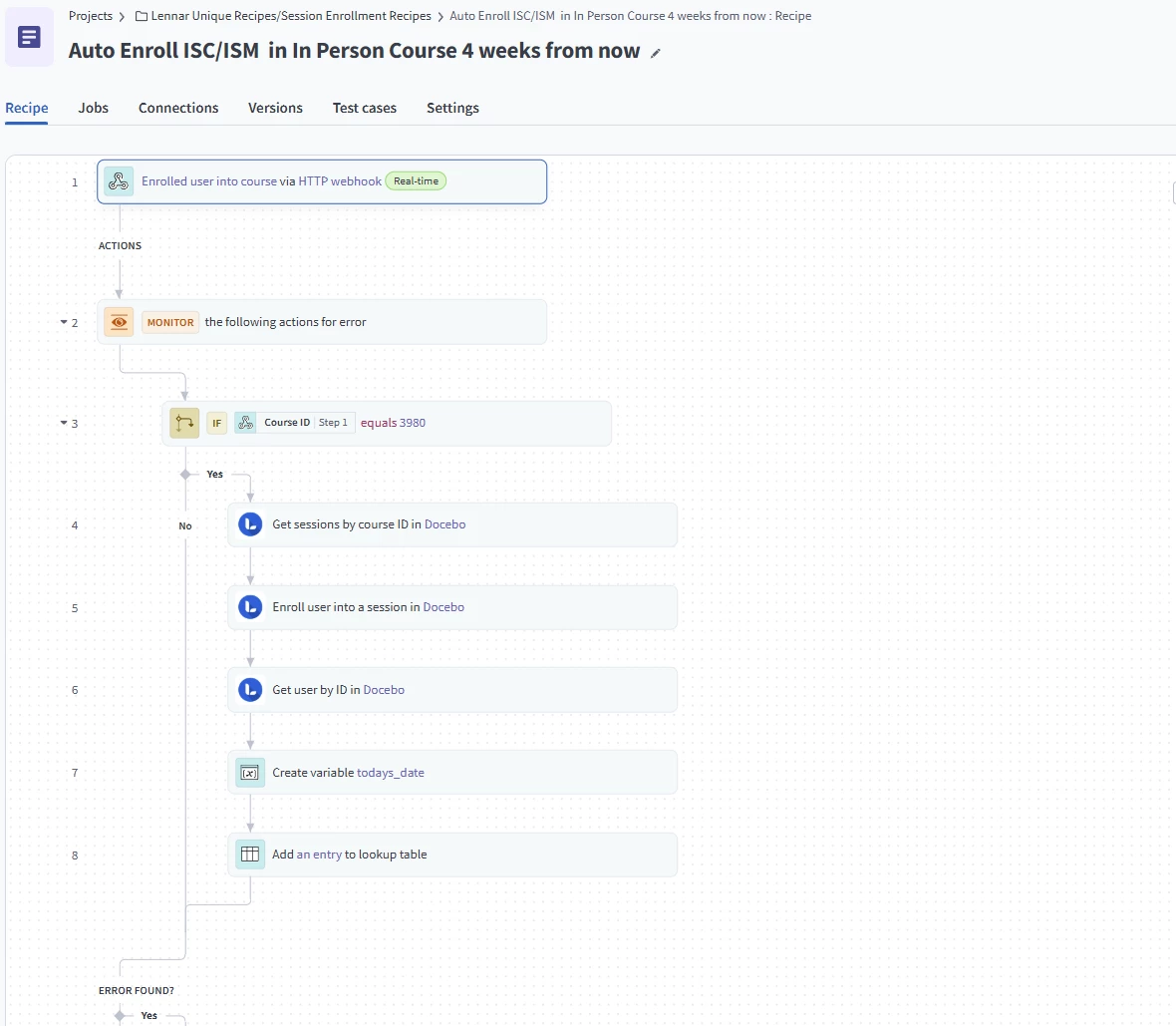
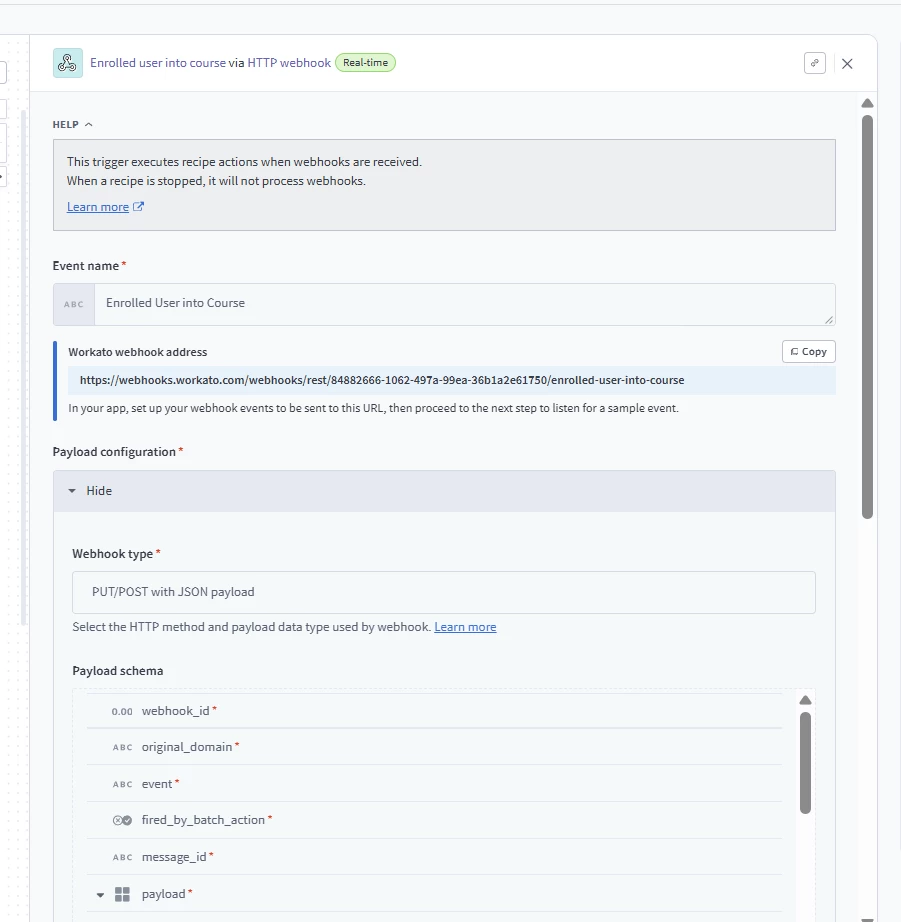
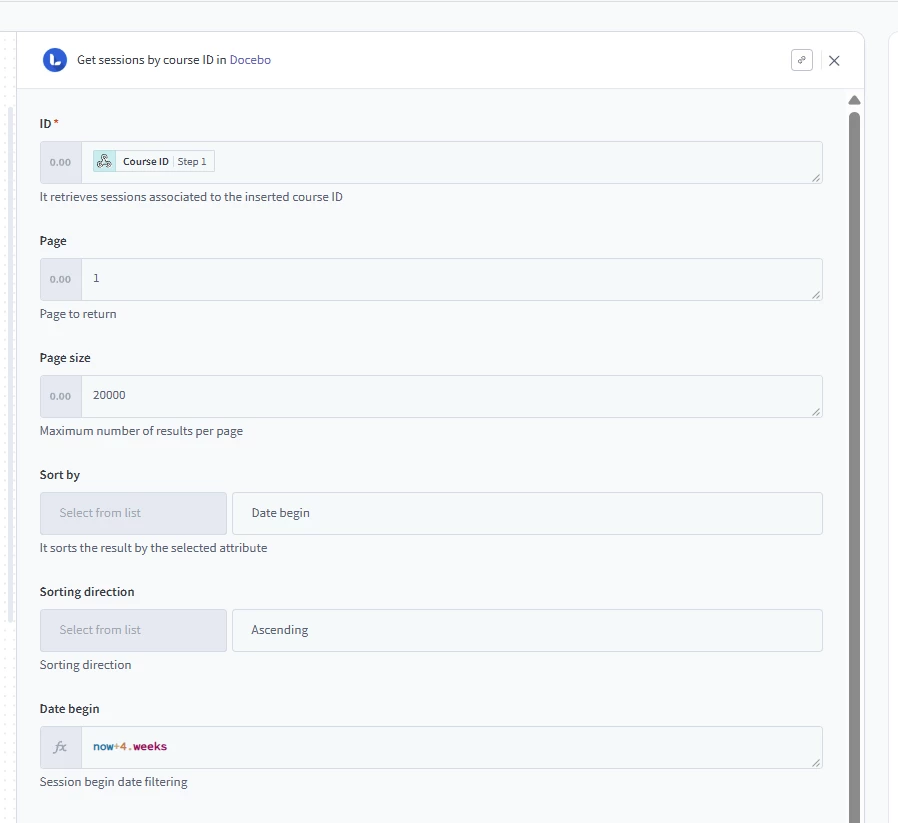
I've included some screenshots from our recipe below so you can see how it's structured. Here's how I'd think about building it:

The overall flow:

An enrollment rule drops the new hire into the course shell → Docebo fires a webhook → Workato picks it up, figures out which session matches their start week, and enrolls them into it automatically.


Setting up the enrollment rule:

Since you already have the new hire group built off the additional field (new hire = yes) and you have access to hire date, you can use an enrollment rule tied to that group to auto-enroll users into the VILT course shell when they're added. That enrollment is just the course-level container — it doesn't put them into a specific session yet. That's where the automation takes over.

The Workato recipe:

Your trigger is the same as ours an HTTP webhook listening for "user enrolled into course" events from Docebo. The payload gives you the user_id and course_id. Add an IF condition early in the recipe to filter on your specific VILT course ID so it only fires for the right course.

The session-matching logic — this is the key part for your use case:

In our recipe, we pull all sessions for the course starting 4+ weeks out and just grab the first one. You need to be more precise because you're matching to a specific Tuesday. Here's how I'd approach it:

  1. Pull the user's profile from Docebo using the User ID from the webhook. Grab their hire date from the additional field.
  2. Get all sessions for the VILT course, sorted ascending by start date, with a date filter so you're only looking at upcoming sessions.
  3. Match the session whose start date falls on the same week as the hire date. Since your sessions and start dates are both Tuesdays, you should be able to do a direct date match compare the session's start date to the hire date. If they're the same day, that's the session. In Workato you can use a formula to normalize both dates and compare them.

Logging:

I'd recommend adding a lookup table entry at the end, log the user, the session they were enrolled into, and a timestamp. It's a lightweight audit trail that saves you from having to dig through Docebo reports to confirm enrollments went through.

Error handling:

Wrap everything in a Monitor block. If a session doesn't exist for a given week, or the hire date field is blank, or the enrollment call fails, you want to know about it rather than have it silently drop.

A few things to think about:

  • Make sure your sessions are created in Docebo far enough in advance. The recipe can only match to sessions that already exist, so if someone creates sessions week-by-week you'll want a buffer.
  • Test with a user whose hire date matches an upcoming Tuesday session and confirm the match logic picks the right one.
  • If you ever have multiple sessions on the same Tuesday (different cohorts, different times), you'll need an additional differentiator in the matching logic, maybe session name or a secondary field.

I'm also happy to hop on a call and walk you through our setup live if that would be helpful, sometimes it's easier to see it in action. Just let me know!


  • Novice III
  • April 30, 2026

@jbrandow This is amazing! Thank you so so much for sharing this connect workaround! We are going to test this out and I would love to connect with you for more insights if possible :)


Forum|alt.badge.img
  • Novice III
  • April 30, 2026

@dbhaskar  Feel free to reach out to me directly. jamie.brandow@lennar.com 


Jamie