Hi everyone,
I opted into the new navigation interface thinking it would make usability easier, but it has been quite the opposite. I am trying to revert back to the legacy navigation (knowing Docebo is going to force users to the new interface July 2026), but I am currently in the middle of implementing a course and do not have capacity for the learning curve right now. The legacy interface was much easier for me to navigate, especially because the admin items were all in one place. I am a super-admin.
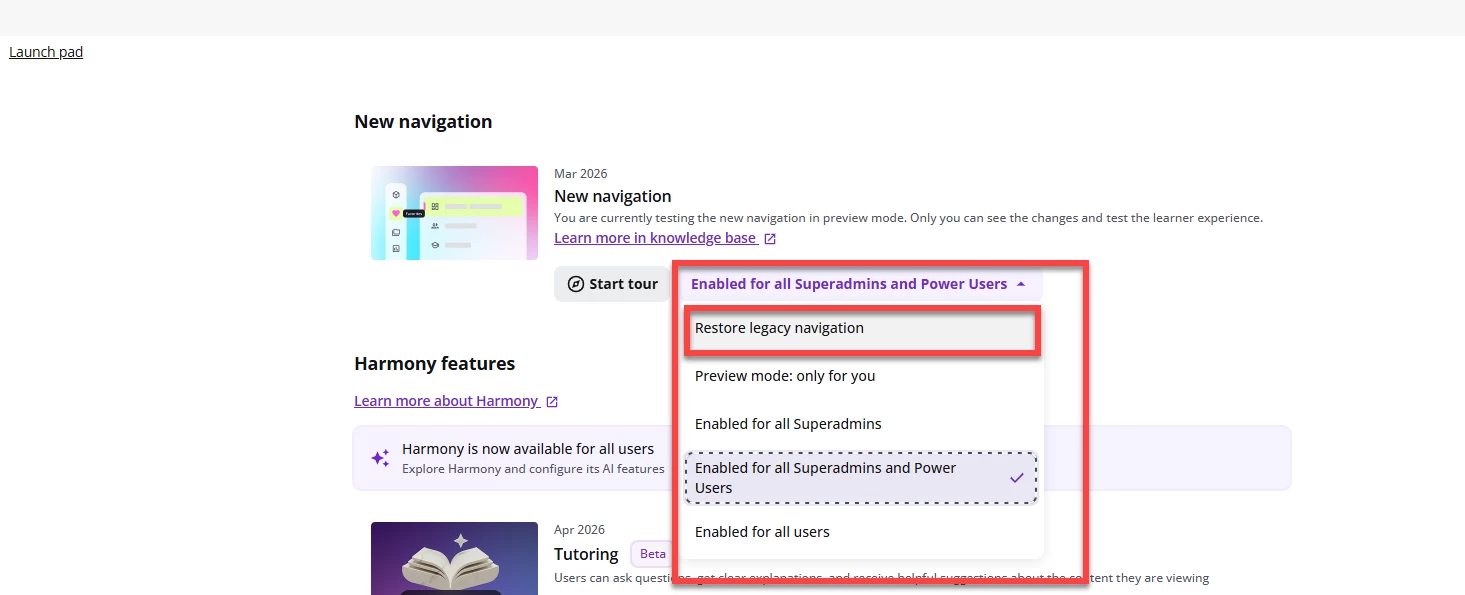
I found the Docebo instructions for restoring legacy navigation, but I am not seeing the options referenced. The instructions say to:
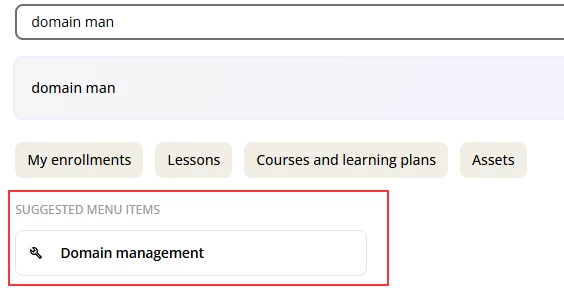
1. Click the rocket icon in the left sidebar to open the Launch Pad page. I don’t see a rocket anywhere, so I searched and went on the Launch Pad page.
2. Then it says to locate the New Navigation card, but I didn’t see it.
3. From the enablement dropdown menu, select Restore legacy navigation.
4. Confirm.
The issue is that I do not see a rocket icon in the left sidebar. I tried searching for “Launch Pad” and was able to get to what appears to be the Launch Pad page, but I still do not see the New Navigation card or any option to restore legacy navigation.
I also tried asking Harmony, but it was unable to process the request.
Has anyone successfully reverted back to the legacy/classic navigation recently? If so, can you please share the exact steps or where the restore option is located?
Thank you!