Question

Setting Up Course Completion Reminders

  • August 6, 2026
  • 5 replies
  • 60 views

Hi all, trying to set up 3 deadline reminder emails (1 day before a fixed due date) for a mandatory course. I've set up a "Course has expired" notification (Before the event, 1 day) linked to a course with an end date.

Notification is Active, Recipients and Trigger Filters are correctly scoped to the course/user, but no email has triggered and there's no entry in the Logs tab at all.

Has anyone gotten this Before-trigger notification to actually fire reliably for this kind of use case? Any known delay or gotcha I'm missing?

Setup:
- Course validity period: End date set - Aug 7 2026
- Enrollment validity period is disabled
- Soft deadline: enabled
- Notification event: "Course has expired"
- Scheduler: Before the event, Time frame = Days, Days before the event = 1, Time = 05:00 PM, Time zone = Asia/Kolkata (GMT+5:30)
- Notification status: Active/Published
- Recipients: Users checked
- Trigger Filters: scoped to the correct test course
- A few test users Enrolled

Appreciate any insight... trying to nail this down before I put it in front of real learners with a hard compliance deadline.

Thanks!

5 replies

NateC
Helper I
Forum|alt.badge.img+2
  • Helper I
  • August 6, 2026

Hi ​@sameeksha 

i’m not sure if this helps, but this is how I usually set up course completion reminders:


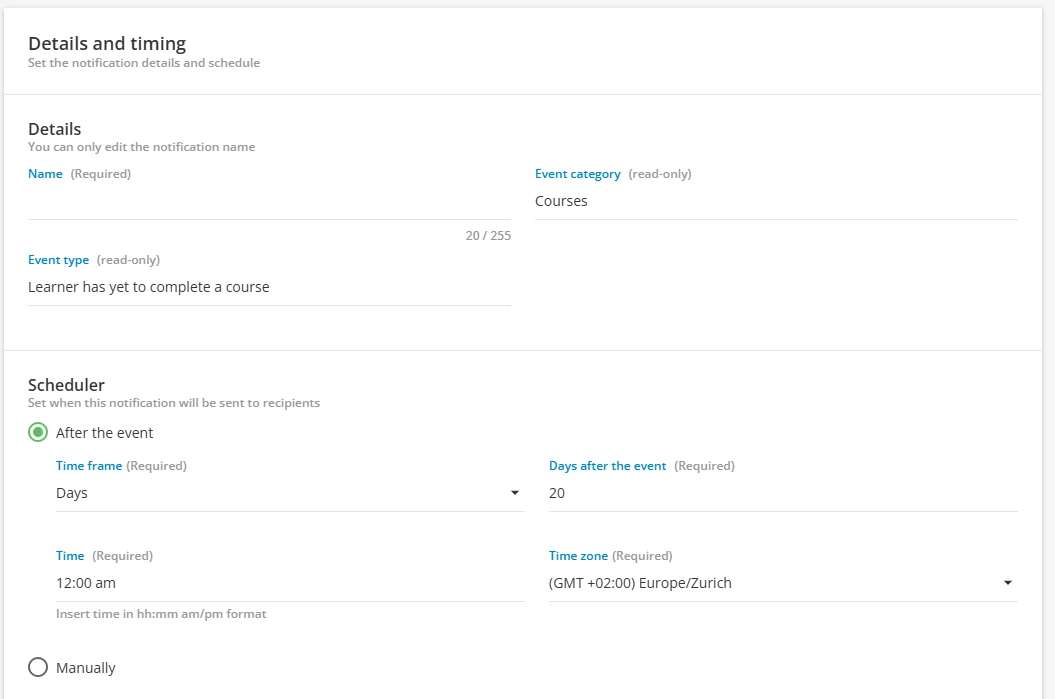
We don’t usually expire courses, so we use the ‘Learner has yet to complete a course’ option. Depending on the admin’s needs, we can add several to a course - e.g., 30, 15 then 5 days in advance.

Hope this helps.
Nate


John Sager
Novice III
  • Novice III
  • August 6, 2026

@sameeksha  

Looking at your message it sure looks like it should have worked. Is this the only course this is happening on?

Are you sure it was an active notification and someone else didn't have it turned off for some reason? 

And can you verify if these conditions were met?

  • This notification is only triggered by e-learning courses
  • This notification is sent both when the course has expired and when the enrollments have expired
  • This notification is triggered also if the Soft deadline for the course validity period is enabled: although the course remains accessible to learners, it is still considered expired

Also what's the status of the course its supposed to send on? It isn’t inactive for some silly reason, is it?


dklinger
Hero III
Forum|alt.badge.img+13
  • Hero III
  • August 6, 2026

Hi my colleagues. Some insight from someone that has travelled this long road with notifications:

  • the idea of using expiring notifications works best with learning plans not standalone courses
  •  instead i would strongly suggest leveraging digest notifications for a weekly nudge/reminder
  • @sameeksha - that gets you what you want when it comes to before the deadline
    • The downside ​@sameeksha - is you then would have to bake a post-due message as well
      • which is deliverable to folks that have not completed
  • if you play a deep groups game? You can potentially do more setting and forgetting surrounding your course notifications, but you would need to understand the “relative age” of the person in the campaign - this person is X days into this campaign….but we found the value diminishes of specific emails for people at different ages in a campaign vs configuring the one digest to just keep on nudging folks

Forum|alt.badge.img
  • Influencer II
  • August 6, 2026

This may sound simple, did you activate the Notification?


  • Contributor II
  • August 6, 2026


When did you set up the notification?

Did you make adjustments to the course expiration in the last 48 hours?

If the course expires on August 7 at 23:59:59 UTC, with a configured email send time of 5:00 PM Asia/Kolkata = (11:30 UTC), I think the email should have fired today at August 6 at 11:30 UTC.

I think that is right...

However, if the email was set up, alterned, or the course expiration date was altered after the scheduler evaluated if an email should be sent - maybe that is why it didn’t send?


“The number of days before the event does not always correspond to calendar days. Docebo calculates this as a time range: for 1 day before, the system looks for events between 24 and 48 hours away.”

https://help.docebo.com/hc/en-us/articles/35916862646674-Troubleshooting-notifications


If I’m understanding why you are using a course expiration date and email, is it to get the email to send releative to the expiration, as opposed to the ‘learner has yet to complete a course’ trigger which is off of enrollment date? Is that correct?  I wish Docebo would trigger emails off the ‘end validitiy date’ of the enrollment - would make life so much easier as an admin.


Let us know how this turns out for you!