


Best Answer

vILT Session Reminder

  • Feb 29, 2024 8:00 AM UTC
  • 7 replies
  • 255 views

ponnammal.sundaram
Influencer I
Forum|alt.badge.img+1

Hi,

Is there any notification rule available to send reminders ‘n’ number of days before the session start date or count down reminders to a vILT session setup in Docebo?

The user gets an enrollment notification as soon as he enrolls in a webinar/vILT Session. 

I want to send a reminder for the session a few days before. Understand that Outlook calendar reminder can be used only if the user has added the calendar attachment and it is just 15 minutes before the session starts.


Regards,

Ponnammal
 

Best answer by joanne.gerard

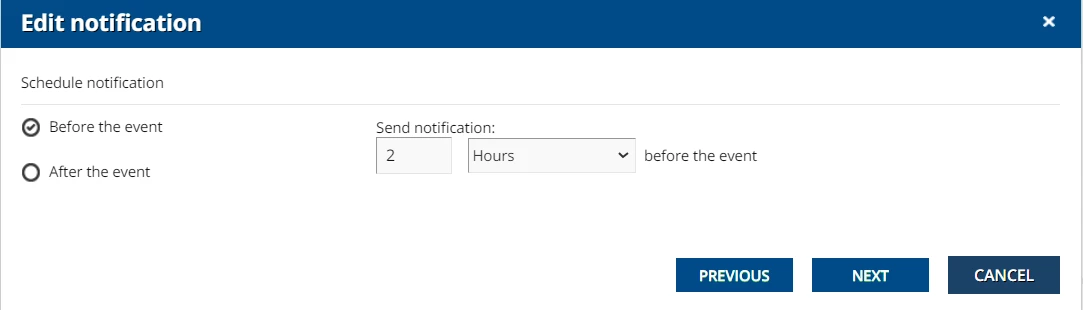
The notification event ‘ILT session starting’ can be set for hours, days or weeks before the event.


View original

7 replies

  • Novice III
  • Feb 29, 2024 8:04 AM UTC

I think the events 'ILT session starting’ and 'ILT event starting' can provide this.


  • Novice III
  • Answer
  • Feb 29, 2024 8:12 AM UTC

The notification event ‘ILT session starting’ can be set for hours, days or weeks before the event.


Hi

You can do that with “ILT Session Starting”.  Follow the steps:


  1. Select Notification Manage Option from the Admin menu.
  2. Select the New Notification
  3.  In general setting choose of the event Select “Course” “ILT starting”
  4. Set you reminder type (Email or Notification) and write your message.
  5. Set the “Before the event” Enter the Hours, Day, Week and set the time “HH:MM” to sent the reminder.
  6. Select the Branch/ Group as per requirement.
  7. Select target role for your notification: (User, Power user, Instructor, and Admin). For your request it should be “User”.
  8. Select the course require, or else select all course if you want to set it for all the “VILT/ ILT session”.
  9. Lastly, select save and activate to activate the notification setting.

ponnammal.sundaram
Influencer I
Forum|alt.badge.img+1

Thank you all 😊

ILT Session Starting notification serves the purpose.


  • Novice III
  • Feb 29, 2024 2:03 PM UTC

Currently, you can only set one notification to go out n hours/days/weeks, but not as a recurring notification, such as every n hours/days/weeks. The work around is to create multiple notifications, which is frustrating, because you’d have to have 52 separate notifications to send out a weekly reminder for users to complete courses (for example). There are some ideas posted, so please vote for these and hopefully it will get added to the development queue. Notifications and Newsletter Ideas


Davefox
Helper III
Forum|alt.badge.img+4
  • Helper III
  • Feb 29, 2024 3:11 PM UTC

Came here to say what everyone else said. One thing to remember for notifications is that they are either everything or specific things, so if you have stock notifications to use make sure you select courses or events you want to tie them to. 


hwolfehall
Helper I
Forum|alt.badge.img+4
  • Helper I
  • Feb 29, 2024 5:40 PM UTC

These notifications are good. But, they don’t contain critical session information - like the LOCATION and CLASSROOM!   I would like to see the shortcodes updated to include this vital reminder information.