


Anyone know of CSS I can input to customize the Observation Checklists?

  • September 24, 2025
  • 6 replies
  • 85 views

Forum|alt.badge.img

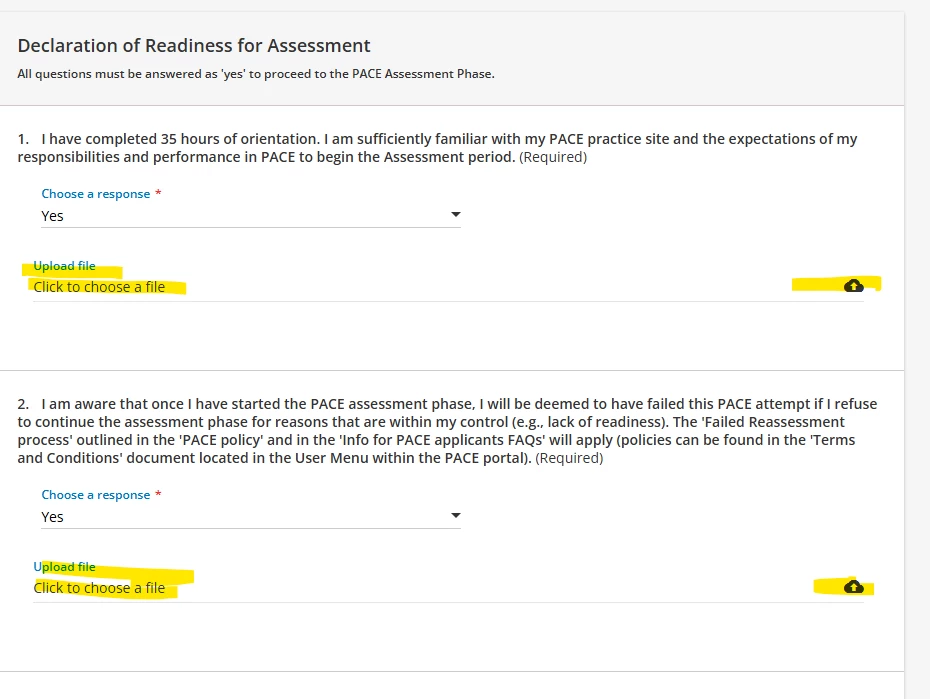
The new update to the Observation Checklists made it so that there is a new option for the manager to upload a file on every question of every Observation Checklist (see image). This is confusing to our managers because we don’t require this, and it’s making the checklists very long. I asked Docebo support and they have no way of turning it off. Is anyone aware of something we can input via CSS to remove this? Thank you in advance. 
 

6 replies

lrnlab
Hero III
Forum|alt.badge.img+10
  • Hero III
  • September 24, 2025

Wow that is a pretty big issue. hopefully they can offer an option to turn this OFF. Hadn't noticed this change. Was it noted on the product updates at all? Please keep this thread update with any news from support. Thank you.


Forum|alt.badge.img
  • Author
  • Contributor I
  • September 25, 2025

Wow that is a pretty big issue. hopefully they can offer an option to turn this OFF. Hadn't noticed this change. Was it noted on the product updates at all? Please keep this thread update with any news from support. Thank you.

I also didn’t see it in the update but yesterday all our checklists looked like this all of a sudden and some users were confused. 


lrnlab
Hero III
Forum|alt.badge.img+10
  • Hero III
  • September 25, 2025

Seems it may have been updated a while ago since we can see this in production sites as well.


Forum|alt.badge.img+1
  • Influencer I
  • September 30, 2025

Hey ​@jpolson ​@lrnlab 

I have this issue as well (since last week), and here is what Docebo Support says about it: 

[...] “feature" was released ahead of schedule, as it should be available in your Production instance starting on October 8th. 

[...] it will not be possible at this time to remove the option "upload file" from the Observation Checklists, but that they will take this into consideration for future enhancements.


If needed, I found a way to hide it with CSS: 

.docebo-upload-field.drop-file-area.form {
  display: none !important;
}


Forum|alt.badge.img
  • Author
  • Contributor I
  • September 30, 2025

Hey ​@jpolson ​@lrnlab 

I have this issue as well (since last week), and here is what Docebo Support says about it: 

[...] “feature" was released ahead of schedule, as it should be available in your Production instance starting on October 8th. 

[...] it will not be possible at this time to remove the option "upload file" from the Observation Checklists, but that they will take this into consideration for future enhancements.


If needed, I found a way to hide it with CSS: 

.docebo-upload-field.drop-file-area.form {
  display: none !important;
}


This worked for us. Thank you SO MUCH!


lrnlab
Hero III
Forum|alt.badge.img+10
  • Hero III
  • September 30, 2025

thanks ​@pclaveirole I will give it a try. Much appreciated.




