Hi! Tell me please if I can change the name of the button “SAML SSO” in this login window, I didn't find such an option in the settings
I need the button to be called differently for internal and external customers but have redirect on the same link.
Also, I need to change the link under the Register button. Please tell me how I can do this?
Thanks!

Best Answer
Custom HTML for Register Page
Best answer by pmo
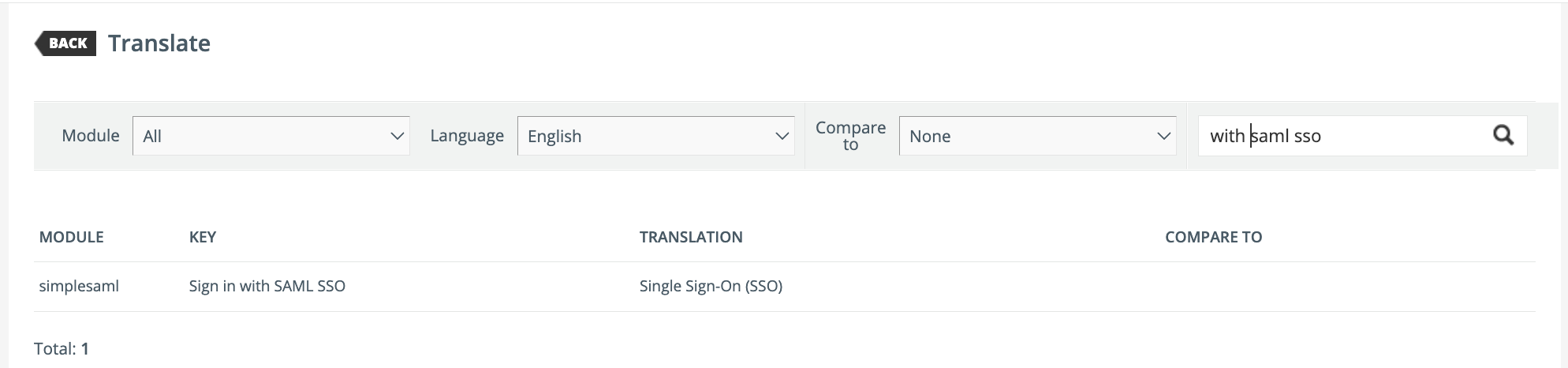
You should be able to change it within the Localization Tool by searching for SAML SSO and then updating the text to whatever you need to.
If you need it to change based on the audience that won’t be possible since the system won’t be able to detect whether they’re internal or external until AFTER they’ve logged in.
You could talk to your IT team about implementing a second SSO connection utilizing Oauth (you can’t have two saml connections unless you’re an extended enterprise custoomer) and this would allow you to Localize the text on each button for the different audiences.






Log in to Docebo Community
Enter your email address or username and password below to log in to Docebo Community. No account yet? Create an account
Docebo Employee Login
or
Enter your E-mail address. We'll send you an e-mail with instructions to reset your password.