



Question

How to hide training labels with CSS?

  • September 15, 2025
  • 3 replies
  • 95 views

jennadionn
Helper I
Forum|alt.badge.img

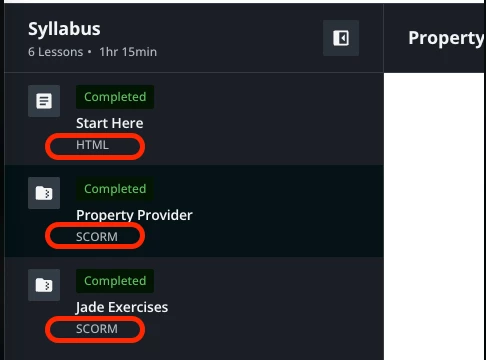
We desperately need to hide the training labels that are in the syllabus of the new course player. They have no meaning to our learners and the visual clutter is overwhelming. It also dissuades us from being able to use the short description for training materials that would add value to our learners. 

I have combed through every mildly related community post and tried every CSS suggestion from the past few years in our sandbox. None have worked to hide training label. I reached out to Docebo Support and they said they do not advise on CSS.

Is there a CSS genius out there who can assist with this dilemma?   


P.S. I know they can be changed via localization but our goal is to hide them entirely. That being said, if you changed yours, what did you change them to? Open to suggestions.
 

3 replies

gstager
Hero III
Forum|alt.badge.img+8
  • Hero III
  • September 15, 2025

Give this a try and be sure to test thoroughly to be sure there is not a negative impact on other areas of your platform.


/** Begin Remove Content Type **/

lmn-list-navigation dcb-sh-content-additional-details {
display: none;
}

/** End Remove Content Type **/


jennadionn
Helper I
Forum|alt.badge.img
  • Author
  • Helper I
  • September 15, 2025

@gstager, start the Bette Midler music… 🎵 ”Did I ever tell you you’re my heerrrooo?” 🎶

Thank you! It is hiding the labels now and I will be sure to check other areas of the sandbox for impacts before pushing to production.


dklinger
Hero III
Forum|alt.badge.img+11
  • Hero III
  • September 15, 2025

works for me. Thanks Greg for the share.



