


Best Answer

My Team - Looks Good & Take a Look Status Banners

  • April 15, 2025
  • 5 replies
  • 138 views

Forum|alt.badge.img

We are looking for a way to hide the Looks Good and Take a Look status banners from the My Team page. The majority of our courses do not have due dates and these banners have led to confusion by managers. Example: they see the Looks Good status for an employee and assume that employee has completed all courses so they don’t look at the Personal Summary page for the employee.
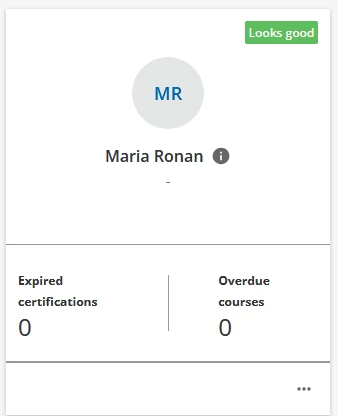
We tested the CSS provided in this post but found it removed status labels from other areas of the platform where we need the labels. We tried using the Localization Tool to adjust the wording. This wasn’t a good fit because we would need to use too many words to describe things to our managers. We tried simply entering a space for both Looks Good and Take a Look. This adds a small colored square in the upper right corner which would create a whole new level of confusion for managers.

Is there CSS that would specifically target these two labels and not others (or exclude other labels)? We are brand new to CSS and this is our first attempt to dip our toes in the water.

Best answer by DonaldPSimpson

Sorry...Busy day yesterday.

See how this works for you as it works on my end.

/** Hides My Team's upper right indicator for everyone on their training to no longer show New, Looks Good, or Take a Look**/

.team-member-card__badge.dcb-ui-badge-status.ui-badge-status.ng-star-inserted { display: none; }


5 replies

DonaldPSimpson
Contributor II

I just tried this and it might work for you as it will remove “Looks Good” and widget, but will show “Take a Look” in the widget for any training you do have a validity date and the content is overdue.

/** Hides My Team's upper right indicator for anyone who is up-to-date on their training and only shows those employees who have overdue training - Take a Look **/

.ui-badge-status-wrapper.ui-badge-status-success.ui-badge-status-size-large.ui-typography-subtitle {

display: none;

}


Forum|alt.badge.img
  • Author
  • Influencer I
  • April 15, 2025

Thank you, ​@DonaldPSimpson. Is there anything that can get more granular than success? I’m guessing there probably isn’t. We need the successful status banner to display somewhere else in our platform.


DonaldPSimpson
Contributor II

Can you provide what the other banner is that you need to have it displayed on? 

You can try this to see if it works only on the My Team page.

/** Hides My Team's upper right indicator for anyone who is up-to-date on their training and only shows those employees who have overdue training - Take a Look **/

.team-member-card__badge .ui-badge-status-wrapper.ui-badge-status-success.ui-badge-status-size-large.ui-typography-subtitle {

display: none;

}


Forum|alt.badge.img
  • Author
  • Influencer I
  • April 15, 2025

@DonaldPSimpson, thank you! That removes only the Looks good status from the My Teams page. One of the successful status labels we still need is the Completed status on the Background Jobs page. This isn’t impacted by the second CSS you sent.

Do you know what we could use if we didn’t want the Take a Look status to show on the My Teams page? I know it will be similar to what you sent most recently, but I’m not sure what we would enter in place of “success”. I’m treading very carefully since we haven’t ventured into CSS before. We appreciate all the help!


DonaldPSimpson
Contributor II
  • Contributor II
  • Answer
  • April 17, 2025

Sorry...Busy day yesterday.

See how this works for you as it works on my end.

/** Hides My Team's upper right indicator for everyone on their training to no longer show New, Looks Good, or Take a Look**/

.team-member-card__badge.dcb-ui-badge-status.ui-badge-status.ng-star-inserted { display: none; }